frase
Well-Known Member
- Reaction score
- 4,685
- Location
- Melbourne, Australia
A confusing question, using MYOB RM
Staff enter on a new sale the Staff number is 1 by default
Customer - add the customer
Then add the code for item say 5 Bricks
Then they might want to be delivered, so select the delivery button
Enter the address & commit
The issue is the icon then defaults to the Customer Field, this is not what is wanted.
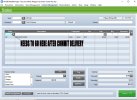
I want the cursor to default back to the Code Table as shown below.
I
Staff enter on a new sale the Staff number is 1 by default
Customer - add the customer
Then add the code for item say 5 Bricks
Then they might want to be delivered, so select the delivery button
Enter the address & commit
The issue is the icon then defaults to the Customer Field, this is not what is wanted.
I want the cursor to default back to the Code Table as shown below.
I