thecomputerguy
Well-Known Member
- Reaction score
- 1,453
I'll try to make this as simple as an explanation as possible but it's pretty tricky problem.
I have a Law client who has document templates. Most of these templates are 20+ pages long filled with legal jargon. They use these templates and fill in the necessary information relating to the client/parties.
This template begins with a table of contents at the beginning and follows a numbering scheme as shown below. If you CTRL+Click the table of contents it will take you to that section. This template was created in who knows what version of Word years ago.
1. Hello this is a major line containing the title of the section.......................................pg1
--------------------------------------------------------------------------------------------------------------------------------------
------------------------------------------------------------------------------------------------------------------------------------------------
The issue is, intermittently, when she modifies something in the document that will then modify the Table of Contents she will retain the numbering of the Major lines, but lose the numbering/lettering for the Minor line in both the Table of the contents. She updates the table of contents by going to References > Update Table > Update Entire Table. After updating the table she will safe the document and it will be fine. She will print the document and it will be fine. ONLY after she closes and re-opens the document is it then broken and she has to manually re-create the numbering format.
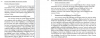
An actual example of how this looks is below. This is after modifying the document in a way that modifies the table the contents. She updated the entire table, saved it, printed it, and this is what happened when she re-opened it.
This is happening across multiple template files and I have no idea how to help her. Right is what it is supposed to look like, Left is how it looked after updating, saving, printing, and re-opening. I was given permission to post this on the internet from her. This also removes the associated numbering in the Table of Contents. There is nothing important in this document.
I told her she might have to re-create the Templates and she wanted me to try and explore another solution.
I have a Law client who has document templates. Most of these templates are 20+ pages long filled with legal jargon. They use these templates and fill in the necessary information relating to the client/parties.
This template begins with a table of contents at the beginning and follows a numbering scheme as shown below. If you CTRL+Click the table of contents it will take you to that section. This template was created in who knows what version of Word years ago.
TABLE OF CONTENTS:
a. This is a minor line which contains a description of the paragraph below.........pg1
- Hello this is a major line containing the title of section.
a. This is a minor line which contains a description of the paragraph below
This is the paragraph which contains all of the legal jargon included in the template.
This is the paragraph which contains all of the legal jargon included in the template.
This is the paragraph which contains all of the legal jargon included in the template.
This is the paragraph which contains all of the legal jargon included in the template.
This is the paragraph which contains all of the legal jargon included in the template.
This is the paragraph which contains all of the legal jargon included in the template.
This is the paragraph which contains all of the legal jargon included in the template.
This is the paragraph which contains all of the legal jargon included in the template.
This is the paragraph which contains all of the legal jargon included in the template.
------------------------------------------------------------------------------------------------------------------------------------------------
The issue is, intermittently, when she modifies something in the document that will then modify the Table of Contents she will retain the numbering of the Major lines, but lose the numbering/lettering for the Minor line in both the Table of the contents. She updates the table of contents by going to References > Update Table > Update Entire Table. After updating the table she will safe the document and it will be fine. She will print the document and it will be fine. ONLY after she closes and re-opens the document is it then broken and she has to manually re-create the numbering format.
An actual example of how this looks is below. This is after modifying the document in a way that modifies the table the contents. She updated the entire table, saved it, printed it, and this is what happened when she re-opened it.
This is happening across multiple template files and I have no idea how to help her. Right is what it is supposed to look like, Left is how it looked after updating, saving, printing, and re-opening. I was given permission to post this on the internet from her. This also removes the associated numbering in the Table of Contents. There is nothing important in this document.
I told her she might have to re-create the Templates and she wanted me to try and explore another solution.