
[SOLVED] Automatic Repair Loop

Pork Chop

Well-Known Member
Reaction score
400
Location
USA
Solution: replaced HDD with SSD and installed Windows fresh.


--------------------
Laptop has the never-ending automatic repair loop. Started out testing the RAM and the HDD because if they are bad they can cause data corruption/issues. RAM is fine. HDD has 4,986 (decimal, not hex) bad sectors.
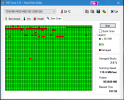
HDTune_Error_Scan_TOSHIBA_MQ01ABD100.png

What would you do next? Try to repair Windows? Put in a nice solid state drive and a fresh installation of Windows 10?
 
Last edited:
Went to Walmart and picked up a 500GB WD Blue SSD and have Windows installing right now :)
 
I use CrystalDiskInfo which I have on my Portable drive running WRT Windows Repair Toolbox in front of client. If it says Warning as in sectors are being re-allocated. I stop there and inform client of issue that they need to replace HDD and is imperative. Also do they want Data backed up. Install an SSD and they will think you are a God!
I do the same. Any yellow warnings gets a new SSD.
 
My fav is the portable version of Hard Disk Sentinel. Super fast. And it is the first thing I do on ANY computer. If you have a drive that is bad, it can go at any time, including backing up, so when I start and a drive is bad, I shut it down asap and inform the client that they will need a new drive and if they are worried about their data, that I will pull the drive and back it up immediately. RAM is easy to replace and so I would test that next if the HDD was in good shape. Reinstall of Windows in this instance is, as others have said, the only option. I have seen drives that someone wanted cloning, go down in the middle of it a few times. Fab's backup is the first thing I do before I even contemplate working on a system.
 
I usually return the old drive in a tinted anti-stat bag with the date written on it and ask the customer to put it in a safe place. Makes a nice backup even if it does have issues. Their stuff is still easily readable in 5-10 years.
 
Unless it is "mission critical data", and they won't pay for professional recovery. Explain the details and CYA.
I would get an image from dd_rescue.
Make a copy of the image.
Then mount the copy of the image in a PE, or other machine, then run Fab's on it.
Fresh install on a new SSD.
Restore what's needed from Fab's.
I wouldn't try getting anything on the original drive, except an initial image.
Then work from a copy of the image.
Always nice to have multiple points to fall back to if things go bad.
 
I would get an image from dd_rescue.
Make a copy of the image.
Then mount the copy of the image in a PE, or other machine, then run Fab's on it.

After pulling the drive and mounting in my bench machine, I always debate with myself on whether to run Fab's first, or ddrescue. I tend to run Fab's first just so I can tell the customer that I've saved his data which only takes a short time, as opposed to running ddrescue for many, many hours. Just my $.02.

Also, have a machine coming in tomorrow with over 10k bad sectors (found it doing a remote session) and Windows 8.1. The amazing thing is that it still runs! It's getting an SSD and fresh install of Win 10.

Harry Z
 
Yea I tend to do both - as I have a full image using Macrium - just cautious. As some users put files in weird locations
I also do both and like @Haole Boy run FABs first as that will almost always complete even on a damaged drive where many times imaging fails on that same drive (and from there it's on to ddrescue).
 
Back
Top