12 Monitor setup

TCG

Active Member
Reaction score
178
Location
Los Angeles, CA
image.jpeg image.jpeg
I know there was just a thread on 3 monitors, and now I have a question about 12.

A little background
I have a client who wanted to use 8 monitors and he wanted to drive them from his laptop, bought those USB adapters and had lots of trouble, I urged him to get a proper desktop, which he did. A Dell Precision with 64GB RAM, and 2 NVIDIA Quadro video cards with 4 mini display ports each, we hooked up his 8 monitors and everything was great, till he decided he wanted 11 monitors because of good cyber Monday deals. I'm not a fan of splitting video signals, so I found him AMD Radeon 7700 series video cards with 6 mini display port each. I couldn't get it to work correctly with Mini DisplayPort to display port cables and ended up using Mini DisplayPort to HDMI active adapters, this worked and everything worked great till he decided he wanted a 12th monitor. He hooked it up himself and it work for a day or so until he decided to try to adjust the resolution, then only 3 monitors would work.

What I've done
Each monitor works individually, in each port, and with each active adapter. When I plug monitors in, they will start working until about 8 of them are plugged in, then some go off. I got to the point where I could have 9 plugged in and 7 working. When all 12 are plugged in, only 3 work and it's the same 3 every time. I've reset the video card settings to default, I've updated to the latest drivers and tried the original drivers. I noticed that when all 12 were plugged in, 9 of them were disabled through the software, so I started enabling them 1 at a time, at about the 10th one, it would reset to only 3 working. I currently have 9 working. At one point I got all 12 for about 5 minutes and then it went back to 3.

These are the current video cards http://www.amazon.com/VisionTek-Rad...F8&qid=1455066130&sr=8-5&keywords=Radeon+7750

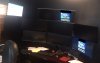
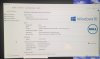
I've attached some pictures, only 11 monitors are visible in the picture, the 12th one is a 65" TV off to the side. The picture with the 3 that are on, seems to be the default configuration when all 12 are plugged in.
 
o_O Huh.

When you say "the same 3 every time" I assume you mean the same 3 ports on the cards. If you pull one of the cards out, will the remaining card work with 6 monitors hooked up, or does it die lower? Also, check with different sets of 6 - in particular, with all 6 being the ultra-wide ones, and with all 6 being non-ultrawide (are the smaller ones 1920x1200, or are the widescreens just throwing off my visualization?).

Also, are all of the active adapters identical? It sounds like you've tested each, but I noticed that at least one review said "keep extras to replace the ones you blow out."

Edit: Also, how's the power draw? I don't see a supplemental power connector on that card, have you tried with 2 passive and 4 active adapters instead of 6 active? I'm assuming that the active ones have extra power draw associated with the circuitry, but the reviews seemed to indicate that 2+4 should work. You may be overstressing the card or bus for power draw.
 
It actually doesn't matter what ports they are plugged into, those same 3 come up every time all 12 are plugged in.

My thoughts have been something to do with power, like getting a bigger power supply for the computer. I tried with 2 passive and that didn't work, same results as usual, however I haven't tried pulling a card and trying 6 ports on one card. I have tried plugging 6 into one card and that didn't work, but I will try pulling one.

The active adapters are all the same, visiontek ones recommended in the reviews. The smaller monitors are 1920x1080.
 
You said you had it working with 11 monitors and worked fine until he started playing with it. Have you gone back to the config you had when you hooked up just 11 monitors?
 
It actually doesn't matter what ports they are plugged into, those same 3 come up every time all 12 are plugged in.

My thoughts have been something to do with power, like getting a bigger power supply for the computer. I tried with 2 passive and that didn't work, same results as usual, however I haven't tried pulling a card and trying 6 ports on one card. I have tried plugging 6 into one card and that didn't work, but I will try pulling one.

The active adapters are all the same, visiontek ones recommended in the reviews. The smaller monitors are 1920x1080.

When you say it's the same 3 every time, can you confirm that you're referring to the same 3 ports on the cards coming up, not the same 3 monitors? If it's the same 3 monitors, then those 3 monitors may have a slight manufacturing difference that lets them handle bad inputs better - if the card(s) output something out-of-range at full load and something about the monitor response is causing the card/drivers to disable that port.

Basically it comes down to a few possibilities:
  • Hardware at the monitor level, or an output that most monitors can't handle. If it's always the same 3 monitors that work, suspect this or an interaction linked to this.
  • Hardware at the card level, possibly a poorly-documented maximum resolution that's being triggered by the extra-wide monitors.
  • Interaction between two cards? Seems unlikely, but what do I know?
  • Hardware at the system level, possibly with 2 fully-loaded cards drawing more power than the PCIe bus can push since the cards don't appear to have supplemental power inputs.
  • Driver issues

I'll also note that one of the other multi-port VisionTek (4xDVI) cards talks about only requiring 65w, but that's suspiciously close to the maximum power available at 75W unless there's a supplemental 6-pin connection to add up to another 75. With 2 of those cards if they're drawing close to the maximum you may be pulling 100-130W through the wiring on the motherboard. Are all PCIe slots wired separately for power or is there a single set of connections? That's not something I've ever needed to look into, but in this case it may be relevant. VisionTek also lists a requirement for a 400W power supply for CrossFire in dual mode, so even if you aren't using that you still have the power consumption of dual cards. With a Xeon hopefully they didn't cheap out on the power supply, but confirm that.
 
  • Like
Reactions: TCG
it's the same 3 monitors regardless of the ports that they are plugged into.

I'm going to this client, this weekend, I'm going to look into these power issues. thank you.
 
You might also see about stability if you have no more than 4 of the extra-wide monitors on either card, not sure if that'd make a difference.

For power consumption, you might be able to get a feel for it if you have a kill-a-watt or if he's on a good UPS with management software on the PC. Plug in additional monitors and see how overall power consumption of the system goes up.
 
Back
Top