
- You are here:
- Home »
- Blog »
- Computer Technician Tools »
- System Restore Explorer – View, Delete and Browse Inside System Restore Points

System Restore Explorer – View, Delete and Browse Inside System Restore Points
System Restore Explorer is small, freeware tool that allows you to view and delete specific Windows system restore points. This is a handy way to clear up some disk space without wiping out all of the restore points since previously the only built in option we had was either all or none.
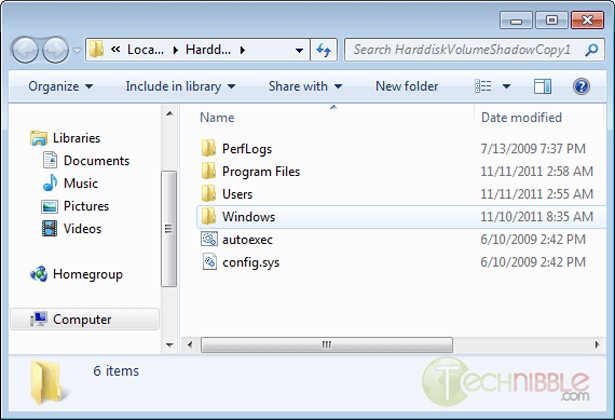
However, the best feature is that it allows browse and copy individual files inside the system restore points, without performing a full system restore.
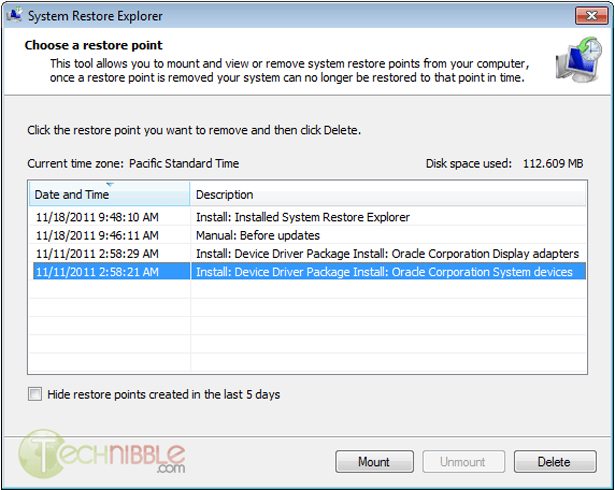
When you install System Restore Explorer, you see a list of all the available system restore points including the time and date of when they were taken. You can right click on any of these and you
have the option to Mount, Unmount or Delete that specific restore point. If you Mount that restore point, it will show you the files inside that restore point in your standard Windows Explorer interface allowing you to manage the files inside it like you would any other file on your system.
This application only works in Windows Vista and Windows 7.
Screenshots
Viewing the list of available restore points to Mount or Delete.
Download
Download from Official Site (search for “download it here”) – 840kb
Special thanks to the forum member Galdorf for recommending this one.
Session expired
Please log in again. The login page will open in a new tab. After logging in you can close it and return to this page.
We use cookies to help you navigate efficiently and perform certain functions. You will find detailed information about all cookies under each consent category below.
The cookies that are categorised as "Necessary" are stored on your browser as they are essential for enabling the basic functionalities of the site.
We also use third-party cookies that help us analyse how you use this website, store your preferences, and provide the content and marketing materials that are relevant to you. These cookies will only be stored in your browser with your prior consent.
You can choose to enable or disable some or all of these cookies but disabling some of them may affect your browsing experience.
We use third-party cookies that help us analyse how you use this website, store your preferences, and provide the content and marketing materials that are relevant to you. However, you can opt out of these cookies by checking "Do Not Sell or Share My Personal Information" and clicking the "Save My Preferences" button. Once you opt out, you can opt in again at any time by unchecking "Do Not Sell or Share My Personal Information" and clicking the "Save My Preferences" button.
Your opt-out settings for this website have been respected since we detected a Global Privacy Control signal from your browser and, therefore, you cannot change this setting.

Nice find bryce!
very nice tool and thanx galdorf !
Thanks Founder… I learned a lot from this site.
Are you saying you can pluck out individual files from a past System Restore Point? Like a forgetful man’s backup?
Good find.
Yep. Mount the system restore point and surf it through Windows explorer. Just like any other file.