
- You are here:
- Home »
- Blog »
- Computer Technician Tools »
- ProcDump – Analyze CPU Spikes
ProcDump – Analyze CPU Spikes
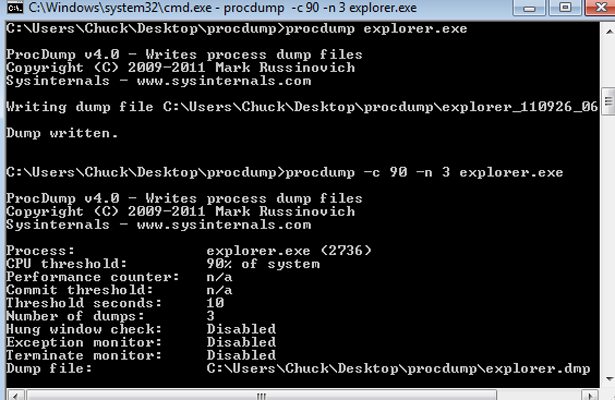
ProcDump is a command-line utility that allows the technician to analyze and diagnose CPU spikes and hanging services. ProcDump also includes hung window and unhandled exception monitoring. The program will write a customized crash dump (.dmp file) based on the technician’s entered parameters. A great feature about ProcDump is that you can automatically set a specific CPU threshold for a process to hit before the program writes a dump file. This means that the program can run unattended and create a dump file at the exact time it causes problems or an abnormal spike.
Here’s an example: you notice on a client’s computer that the explorer.exe process spikes the CPU to 90 percent at random times throughout the day, and you’d like to create a few dumps to analyze the problem. Instead of sitting at the computer with task manager open waiting to see a CPU spike, you can enter the following command to create a dump file at three separate times when the CPU for explorer.exe is at or exceeds 90 percent, and then write the dump files to the c:\procdumps directory:
c:\procdump.exe -c 90 -n 3 explorer.exe c:\procdumps
The -c switch is the CPU threshold parameter. The -n switch tells ProcDump how many dump files to create.
You can get more granular in your parameter settings by adding how long a process spikes the CPU before creating a dump file. Example:
c:\procdump.exe -c 90 -s 5 -n 3 explorer.exe c:\procdumps
The -s switch tells ProcDump the length of time the service needs to spike the CPU at the threshold you configured before a dump is created.
Other interesting parameters include “-u” that treats CPU usage relative to a single core, and “-w” which will wait for a specific process to launch if it’s not running.
Download Links
Download from Official Site – 178kb
Download from Brothersoft.com [Mirror] – 178kb
We use cookies to help you navigate efficiently and perform certain functions. You will find detailed information about all cookies under each consent category below.
The cookies that are categorised as "Necessary" are stored on your browser as they are essential for enabling the basic functionalities of the site.
We also use third-party cookies that help us analyse how you use this website, store your preferences, and provide the content and marketing materials that are relevant to you. These cookies will only be stored in your browser with your prior consent.
You can choose to enable or disable some or all of these cookies but disabling some of them may affect your browsing experience.
We use third-party cookies that help us analyse how you use this website, store your preferences, and provide the content and marketing materials that are relevant to you. However, you can opt out of these cookies by checking "Do Not Sell or Share My Personal Information" and clicking the "Save My Preferences" button. Once you opt out, you can opt in again at any time by unchecking "Do Not Sell or Share My Personal Information" and clicking the "Save My Preferences" button.
Your opt-out settings for this website have been respected since we detected a Global Privacy Control signal from your browser and, therefore, you cannot change this setting.
