
How to Remove Winstall.exe / SpySheriff
Winstall.exe is part of a program called SpySheriff which is a fake anti-spyware program that is designed to fool users into paying for a full version of the program in order to remove a supposed infection which the ‘free version’ put there in the first place. Here are the removal instructions for SpySherrif / Winstall.exe.
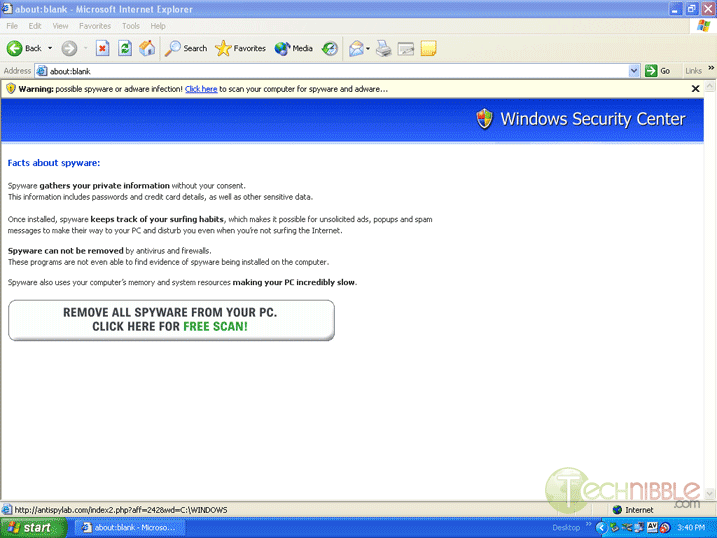
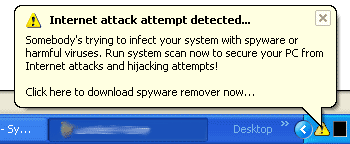
This infection displays a message that is designed to look like it is part of the inbuilt Windows XP Security Center. Up the top it has the Internet Explorer security warning bar which says “Warning: possible Spyware or Adware infection! Click here to scan your computer for Spyware and Adware…â€Â
View Full Size
- First you will need to print out these instructions as you will be required to close all windows in order to do the fix.
- Now, download SmitFraudFix.zip and save it to your desktop. Once it has downloaded, double click on it which will extract it. Do not run the actual program yet as it must be done in safe mode.
- Load into Windows Safe mode by restarting the computer and just before the Windows XP screen comes up, press F8 and choose safemode.
Once in Safemode:
- Close all open windows and open the SmitFraudFix folder which is on your desktop and double click the SmitFraudFix.cmd file which will start the removal process. This whole cleanup process can take a few hours depending on your computer so please be patient.
- You will see a blue screen with white text with a series of options, Press number 2 on your keyboard and press Enter key which will choose the “Clean (Safe mode recommended)” Option.
- The program will go though a series of processes to clean your computer including the disappearance of your desktop icons for a split second. One it is finished it will open up the Disk Cleanup program. This will clean up all Temporary Internet Files, Temp folders and other files which may have been left over by the infection. When it is finished it should close automatically.
- When Disk Cleanup is complete you will be given the option “Do you want to clean the registry? Y or N”. Press the Y button on your keyboard and press the Enter Key
- When the registry cleanup is finished you will get a red screen which will say “Computer will reboot now, Close all Applications”. Press Spacebar and let it restart the computer. Once rebooted you will be shown a log file with a list of all the files that were removed. Close this.
- You should now have succesfully removed the Winstall.exe / SpySheriff Infection
- Be sure to visit the Windows Update site at http://windowsupdate.microsoft.com and get all critical updates to minimise your chances of getting this again.
Session expired
Please log in again. The login page will open in a new tab. After logging in you can close it and return to this page.
We use cookies to help you navigate efficiently and perform certain functions. You will find detailed information about all cookies under each consent category below.
The cookies that are categorised as "Necessary" are stored on your browser as they are essential for enabling the basic functionalities of the site.
We also use third-party cookies that help us analyse how you use this website, store your preferences, and provide the content and marketing materials that are relevant to you. These cookies will only be stored in your browser with your prior consent.
You can choose to enable or disable some or all of these cookies but disabling some of them may affect your browsing experience.
We use third-party cookies that help us analyse how you use this website, store your preferences, and provide the content and marketing materials that are relevant to you. However, you can opt out of these cookies by checking "Do Not Sell or Share My Personal Information" and clicking the "Save My Preferences" button. Once you opt out, you can opt in again at any time by unchecking "Do Not Sell or Share My Personal Information" and clicking the "Save My Preferences" button.
Your opt-out settings for this website have been respected since we detected a Global Privacy Control signal from your browser and, therefore, you cannot change this setting.

superantispyware does this with one click.
google it
one of My favorite anti-malware programs is from a company called malwarebytes.org mbam-setup works great in removing malware.
Great thought I had a copy of this program already but it must have been deleted. As your instrustions stated the WINSTALL.EXE was gone.
This ‘infection’ sounds VERY similar to another infection called Internet Security 2010. Very annoying, it is.
My friend managed to open an email from a UPS delivery email saying that a package was ‘held in transit’. She is not that computer savvy and didn’t realise what she was doing.
The virus pretty much tried to cripple Windows.
Before going to check out my friend’s laptop, I watched Bryce’s video podcast on how to remove a virus without using a virus scanner. Thanks to him it had all the information required to stop the virus in its tracks.
I didn’t even use the Malwarebytes’ Anti-Malware software as I didn’t know if it could be trusted either.
The first thing I did was check msconfig and deleted the reference in the Startup tab. Then went to System Restore and restored the laptop to about 5 days previous. It rebooted and the warnings signs all stopped! I went back into her Outlook Express and deleted the email that introduced the virus in the first place.
I then checked Windows/system32 for any new files that had been created that day and deleted them too.
I then gained access to the net and deleted all the file associations mentioned on this page (down the bottom)..http://remove-malware.net/how-to-remove-internet-security-2010-rogue-anti-spyware/
All is working fine now!
I would love any input/critisism from experts who have any opinions on the process I went through to stop this virus.
Cheers.