
- You are here:
- Home »
- Blog »
- Computer Technician Tools »
- Process Hacker – Monitor, Debug and Detect
Process Hacker – Monitor, Debug and Detect
Process Hacker is a small, portable and freeware program that can help you easily monitor system resources, debug software and detect malware, all in one free and simple program.
As a technician, you have probably used Process Explorer in the past, but Process Hacker comes with some small, but noticeable advantages such as the symbolic access masks (read, write, etc.) compared to Process Explorer’s number masks (0x12019f). Another advantage of Process Hacker is that it is more customizable than Process Explorer and is open source. More advantages are listed at the developer’s website below.
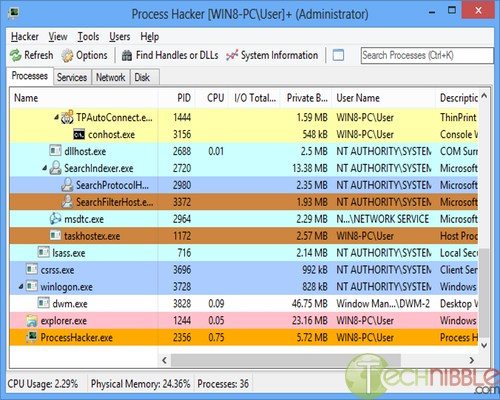
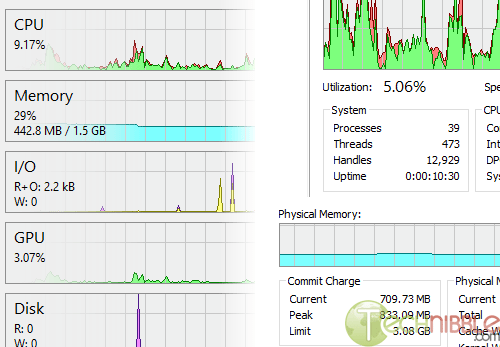
Process Hacker shows a detailed overview of system activity and supports process highlighting. It can also display graphs and statistics to help you locate processes that use the most memory and find runaway processes. You can also double click the graph to see more information about the process at that data point, even if the process is no longer running.
If you encounter a file that you are unable to edit or delete, Process Hacker allows you to search for and discover which handles or DLLs are using that file and restricting access to it. After running your search and finding which processes are using that file, you can simply right click the entry and close the handle. As always, proceed with caution when closing the handle as this can lead to data loss or corruption.
Another useful module in Process Hacker is the ability to see which programs have active network connections and the ability to close them if required. Included with this information is the local port, remote address, remote port, protocol, state and the owner.
Process Hacker can also display real-time information on disk access, which includes the read and write speeds, the total rate, I/O priority and more. By right clicking one of the actions shown in the disk activity section, you have the ability to go directly to the process, open the file location, copy the information displayed or view properties of that file.
Process Hacker has even more advanced features that have not been listed here, but are displayed on the developer’s homepage with fully detailed screenshots.
Do you have any experiences with Process Hacker or other similar software? Please share them below.
Screenshots:
Downloads:
Download from Official Site – 2.4mb
We use cookies to help you navigate efficiently and perform certain functions. You will find detailed information about all cookies under each consent category below.
The cookies that are categorised as "Necessary" are stored on your browser as they are essential for enabling the basic functionalities of the site.
We also use third-party cookies that help us analyse how you use this website, store your preferences, and provide the content and marketing materials that are relevant to you. These cookies will only be stored in your browser with your prior consent.
You can choose to enable or disable some or all of these cookies but disabling some of them may affect your browsing experience.
We use third-party cookies that help us analyse how you use this website, store your preferences, and provide the content and marketing materials that are relevant to you. However, you can opt out of these cookies by checking "Do Not Sell or Share My Personal Information" and clicking the "Save My Preferences" button. Once you opt out, you can opt in again at any time by unchecking "Do Not Sell or Share My Personal Information" and clicking the "Save My Preferences" button.
Your opt-out settings for this website have been respected since we detected a Global Privacy Control signal from your browser and, therefore, you cannot change this setting.
