
What is my Computers Maximum CPU Temperature?
A lot of users frequently ask if their computers are running too hot and want to know their maximum temperature for their CPU is. This article will show you how to monitor your processors temperature and tell you the maximum CPU temperature your PC should be running at.
First of all, you need a CPU temperature monitoring program in order to measure what your current CPU temperature is. There are many good processor monitoring applications out there and it is most likely that there is one on the CD which came with your motherboard. If there isn’t one on the CD (or you have since lost it) I recommend Motherboard Monitor which is freeware and can be found HERE.
Motherboard Monitor is useful because not only you can make it constantly show you the temperature in real time on your system tray, but you can set it up so that if the maximum temperature is reached an alarm will go off.

An example of Motherboard Monitors temperature monitoring in the systemtray.
Once you are in BIOS setup there will be an option called “Hardware Monitor” or “PC Health” section (mine was found under “Power > Hardware Monitor”).
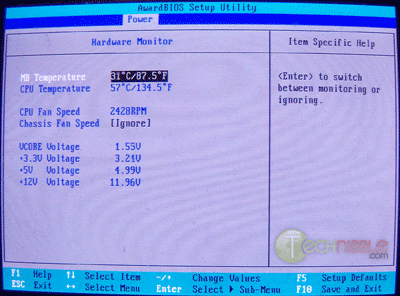
However this isn’t a very good method to measure your computer temperature because when your computer is in the BIOS your computer is doing nothing and therefore not generating the heat that is caused during normal computer use.
Ok, I know the temperature now, Is my CPU too hot?
Once you know what your computer temperature is you should consult the chart below to determine the maximum temperature allowed for your CPU type.
Note: If you dont know what your CPU type is you can use a tool like Everest Free to find out.
| CPU |
Max Temperature |
| AMD Althon, Althon Opteron, Duron & Sempron Series |
|
| AMD Athlon (socket) upto 1Ghz | 90°C |
| AMD Athlon (slot) all speeds | 70°C |
| AMD Athlon Thunderbird 1.1Ghz+ | 95°C |
| AMD Athlon MP 1.33Ghz+ | 95°C |
| AMD Athlon XP 1.33Ghz+ | 90°C |
| AMD Athlon XP T-Bred upto 2100+ | 90°C |
| AMD Athlon XP T-Bred over 2100+ | 85°C |
| AMD Athlon XP Barton | 85°C |
| AMD Duron up to 1Ghz | 90°C |
| AMD Duron 1Ghz+ | 90°C |
| AMD Duron Applebred | 85°C |
| AMD Opteron | 65 – 71°C |
| AMD Athlon 64 | 70°C |
| AMD Athlon 64 (Socket 939, 1.4 volts) | 65°C |
| AMD Athlon 64 FX | 70°C |
| AMD Athlon 64 X2 | 71°C |
| AMD Sempron (T-bred/Barton core) | 90°C |
| AMD Sempron (Paris core) | 70°C |
| AMD Mobile Sempron | 95°C |
| AMD K6 Series | |
| AMD K6/K6-2/K6-III (All except below) | 70°C |
| AMD K6-2/K6-III (model number ending in X) | 65°C |
| AMD K6-2+/K6-III+ | 85°C |
| Intel Pentium III Series | |
| Pentium III Slot 1 500-866Mhz | 80°C |
| Pentium III Slot and socket 933Mhz | 75°C |
| Pentium III Slot 1 1Ghz | 60 – 70°C |
| Pentium III Slot 1 1.13Ghz | 62°C |
| Intel Celeron Series | |
| Intel Celeron 266-433Mhz | 85°C |
| Intel Celeron 466-533Mhz | 70°C |
| Intel Celeron 566-600Mhz (Coppermine) | 90°C |
| Intel Celeron 633-667Mhz | 82°C |
| Intel Celeron 700 – 850Mhz | 80°C |
| Intel Celeron 900Mhz – 1.6Ghz | 69 – 70°C |
| Intel Celeron 1.7Ghz and Higher | 67 – 77°C |
| Intel Pentium II | |
| Intel Pentium II (First Generation “Klamath”) | 72 – 75°C |
| Intel Pentium II (Second Generation, 266-333Mhz) | 65°C |
| Intel Pentium II (350 – 400Mhz) | 75°C |
| Intel Pentium II (450Mhz) | 70°C |
| Intel Pentium 4, Pentium M (notebooks) |
|
| Intel Pentium 4 | 64 – 78°C |
| There are no specific stats for Pentium 4 CPU’s as P4’s have an ability to slow themselves down when they are getting too hot and thus, in theory they should never be able to burn themselves out. To get specifics consult Intel’s specifications for your particular model. | |
| Intel Pentium M (notebooks) | 100°C |
| Intel Pentium D (dual core) |
|
| Intel Pentium D 820 (2.8Ghz) | 63°C |
| Intel Pentium D 830 & 840 (3.0 – 3.2Ghz) | 69.8°C |
| Intel Pentium Pro | |
| Intel Pentium Pro. 256 or 512K L2 Cache | 85°C |
| Intel Pentium Pro. 1MB L2 Cache | 80°C |
Session expired
Please log in again. The login page will open in a new tab. After logging in you can close it and return to this page.
well hey iv got a intel core 2 duo e6300, what is that maximum please?
HI there…
Im having Intel P4… 3.2Ghz… n 915 chipset…
I checked out my CPU temp in BIOS… in Hardware monitor… It was 95 c…
is it normal…????
if not… what am i suppose to do…?
Raviraj, although the computer can run at that temperature, its definitely on the warm side. You should try getting it cooler with a few case fans or something.
My CPU is 90 celcius when running game (warcraft 3) P4 2.4A socket 478 (using original intel heat sink), i have 3 casing fan
wat should i do, is it too hot ?
peng – u should buy a new CPU heatsink and fan.
If your CPU is getting too hot its the CPU heatsink that needs addressing!
Hi,
I have P4 3gig HT, D915GAG mobo I was having heat issues and sorted it with cleaning the dust out of heatsink and applying a new dose of Thermaltake and adding a coupleof fans. Anywayz, now whilst monitoring the temps with MBM it shows two temps for the CPU with it been HT but there is a big difference between the two all the time ! like now its at ’33c and 48c! is this normal? is there anything I can do to sort it?
Hi! I have a P4 dual core 2×2.8g, cpu was 60-66c, is it normal?What can i do to low cpu temp
p/s:sorry My English is not good
ScunnyUK, 33c to 48c is normal.
Recca, 60c-66c is quite normal as well. Not ideal, but pretty normal for most store built machines.
Warcrafs SUX, play Lineage II
Hi, I have P4 2.8 GHZ.my processor temp is around 65-68 and can extend to 75 degree celcius.is it normal or there is another way to decrease the temp?
i have the same processor Faridz, (P4 2.8 GHZ) and my CPU temp is around 65-75. After i re-coated my CPU and Heatsink with thermal compound it knocked of a considerable amount degrees – now it varies between 45-59 degrees.
Tbh.. i would like 2 know if there are more ways to bring down my CPU temp to idealy 30-40 degrees. Thank You. :)
I have a pentium d 915 2.8ghz running at 45c is this normal intel says the max temp is 95f. Also im running 2 8800gts in sli if that helps with temp question
Faridz, Definitely on the warmer end of things, try getting some airflow happening in your case to get the hot air out. We have an article about case airflow here.
Jake2.0, as above.
k0pyofadeadklone, 95F is 35C so if your documentation is correct you are running too hot. However, I believe 45C is still fine for a P4 2.8.
Also under load my cpu reaches 57c and its not a p4 its a pentium d (dual-core). Ive reseated my heatsink like 20 times and removed old thermal paste and added antec silver 5. Nothing helps this is driving me crazy. Could my thermal chip be bad?
Hi,i have a Intel celeron(r)
3.06 GHz
And the temp.is about 66c
Is it normal,bad,or ideal?
I really need the answer…please…
Hi, Im running ASUS P5WD2-EP with a P4 3.6 and I just exchanged the original Intel fan to a Zalman CNPS9500LED. After swiping away old paste with Isopropyl I hooked it up and in BIOS I am now running a not so nice CPU temp of 85C (and temp software reported 90C). It is stable at these temps and I Imagine the frequency is going down by these temps? Plenty of space in the tower and no dust. Any suggestions on how to lower the temp, or is it only to remove fan and redo paste treatment off/on? Cheers!
k0pyofadeadklone, 57c under load is still ok. If you want to cool it down more consider looking at your cases airflow.
Renar, a little high. You probably will want to get it down to at least 50. As mentioned above, you might want to look at your case airflow.
Yebo, case airflow, as mentioned in the top paragraph in this post.
Any thoughts as to why my cpu temp is so high? As far as case airflow i have 1 150mm,1 80mm, and the fan in my psu is a 150mm all on intake. For pulling air out i have i antec 150mm, and the two 80mm blowers on my 8800gts’s. The reason im so concerned is i had this same cpu and hsf(Asus Silent Square http://usa.asus.com/products4.aspx?l1=16&l2=65&l3=0&model=813&modelmenu=1
in my last build and the temp never went past 40c under load. Usually with no load it stayed around 30c-35c.
I have a Pentium D 3.4GHz with Intel 945GTP chipset motherboard, been replaced several times under warranty, in the BIOS temperatures reads 90 degrees C plus, under OS and idle maybe 65 degrees. Have replaced case, etc, still happening. I’m really just over it. I would like to avoid having to replace the board and CPU at my expense now that warranty is running out, and avoiding having to get a whole new CPU and board if that is the only solution.
Any thoughts?
I use an Antec case with an airflow pipe to the CPU pulling in from the back.
Demosthenes, you should probably visit our forums for help like that and have some of the techs there give some answers.
I have a Pentium 4 with the motherboard running at 29 Celcius and the CPU at 68 Celcius, both of which are in the ideal range for idle, yet my computer still will up and turn itself off randomly, from what I see as overheating. Any ideas?
Alexj124, try the forums. You’ll get your answer there.
I’m trying to get a friends computer running properly as I believe it was running hot. Its a celeron 2.48 and it is running at 68-69c with only XP and SisoftSandra running, you give a range of 67-77c as max for anything above 1.7 mhz. Does the maximum temp depend on clockspeed or does it just vary from chip processor to processor with the larger Celerons?
p.s. I have already removed the heatsink and cleaned it out, used arctic white (I think thats its name) and checked the rpms of the fan
hello i like this website but i have a Field AMD Athlon XP, 2000 MHz (15 x 133) can u pleas help
ok nevermind
Ive just cleaned all the crap off my heatsink and cooler and the processor and reapplied the heatsink compound. The original temprature of my Intel Dual Core 3gig was about 64c-66c idle. It is now between 39c and 44c. Under load it is now varies between 54c and 59c.
I have a intel 3.4GHZ w/ hypertreading and it was running at 63c so I bought a new heat sink and it runs at 52c with playing rainbow six vegas… I still wouldn’t mind if it would run cooler… I have 2 case fans also… just don’t know what else I can do… is that a good temp?
i have intel pentium 4 and recently i find out that my cpu temperature going very high until 123c…i’m worrying whether it will burn the other hardware component..so what should i do in this case?
i have 2.8ghz intel,mercury motherboard,515mb of ram operating on xp.
i discovered that my cpu temp is 63c.
is this nprmal?.
I have a newer CPU then listed on the site, a Intel DualCore Pent D 950, running at 3.2 Mhz. My normal CPU temp is 50 C and it goes to about 60 C when under heavy use. The highest I’ve seen it get is 66 C. Looking at the eariler models of DualCores and taking a educated guess, my CPU can handle a max temp of 70 C. Still, it runs a lot hotter then my old system. System temp is around 30 C normal, 40-45 C under heavy use. Should I be worried at all?
CPU temps are such that any variable from machine to machine can make huge differences in results. Processor Manufacturers publish thermal specs for their CPU’s on their websites, use these as a guide to a normal temp for a given processor but remember case design, heatsink/fan combos, wiring obstructions (clutter), number of and location of case fans all have an impact on results. Also temp reading from mobo sensors for a CPU can and will be as much as 10 degress C off so what you see with a monitoring utility or in your bios is probably not 100% accurate. For best results keep your PC internals clean, unclutter the wiring to allow optimum airflow, and don’t sweat temps unless you have stability issues!
My CPU is Intel Pentium, The temp is (48-63).
Note: My Pc do shutdown always …. so i need a solution pls.
Get a small paintbrush and a vacuum cleaner and clean the shit out of your PC, clean the dust out of your heatsink and fan. If the pc ran cool when you bought it then it just needs a clean.
Get it off the floor.
Forget about what these geeks are telling you.
Where the fuck is the Freeware Motherboard Monitor ??? ffs if ur gonna post shit do it right ffs.
some of us need real help u know !
jq, seems the site that this article was linking to for the tool has since gone down. The download link has been fixed. Also, a quick Google search for “motherboard monitor” (which we mention the name of in this article) brings up many many results. Google is your friend JQ.
I bought a new alienware computer man has that thing got some power. I got the NVIDIA nForce 680i SLI Motherboard and i was wondering if i should be worried that it runs at 90-95c when i push it, should i be worried and purchase the liquid cooling or can the system handel it.
ok got a problem and ive already talked to hp there nuts. im a big everquest play got a hp with 4400 amd 64×2 duel core cpu. when i start everquest the cpu fan begins to run at max speed and does so with only bout a minute of down time. i have a temp monitor only seen temp get to 60 degress should i change my fan and heatsink. i have 2 other hp computer with smaller cpu’s and they dont do this. hp told me i need a new fan and video card so i got them and it still does it.
I have an alienware aurora, can’t remember the exact make, but it’s using an abit av8 motherboard and the processor is an AMD Athlon 64 4000+. According to my speedfan program, my cpu is running hot at 51 degrees celsius, is that too hot? Thanks, I appreciate the help!
Anything below 75-80C is fine, anything above should consider cooling.
hi, I have Vaio notebook with processor Pentium M 1.5 GHz and 512 MB of RAM. My processor temperature is from 50 to 90 C (this data are checked by program called Everest). The bottom side of the notebook and the mouse pad are very hot. Is there any chance to substitute with new cooler.
I have Pentium D Dual core 2.8 Ghz Processor
My Processor temp is 68 C
My Computer do always shutdown. can anyone help me??
Hi Everyone. I am running a Pentium Dual-Core 1.6ghz processor. My CPU temp is 21 Degrees Celcius, which is fine but I’m worrying about my system temp that goes up to 50 Degrees celcius at times.
I live in a very hot place and I don’t know if this can be attributed to the 50 Degrees. I have a cowling on my left side panel blowing in air and a extracting fan blowing out air on the back of my case.
What should I do to bring my System temp down by at least 10 Degrees.
Thanks
hi i have had this come for 2 years now, just upgraded the vid card to 512 e-geforce 7600GT(said it didntpass the windows logo test when i installed it)…i got a new 500 watt power supply to handle it…but when i try to play a game like world of warcraft or cs it freezes eiather imidiatly or after between3-15 min of play….i got he mother board temp thing ..says my core is at 85C is that normal? and CPU like 31. on ur forum its says shouldned b over 70 …so what should i do ….i even had a big house fan on it with the case off…and it didnt help
My comp specs.
AMD Sempron™ 3100+ Processor
(1.8GHz, 1600MHz FSB, 256KB L2 Cache)
Operating System: Genuine Microsoft® Windows® XP Home (SP2)
Chipset: VIA K8M800 chipset
Memory: 256MB DDR (1 × 256MB) RAM, 400MHz (PC3200)
Expandable to 2GB
Hard Drive: 40GB HDD (PATA, 7200rpm)
Optical Drive: 48x CD-RW drive
Video: S3 Graphics UniChrome™ Pro
64MB DDR shared video memory
Sound: AC ’97 Audio, 5.1 Audio (6-Channel)
Network: 10/100Mbps integrated Ethernet LAN
Modem: 56K ITU V.92-ready Fax/Modem
Peripherals: Premium multimedia dual-language keyboard, 2-button wheel mouse, amplified stereo speakers
Ports/Other: 6 USB 2.0 Ports (2 in front, 4 in back), 1 VGA External Connector, 1 Parallel, 2 PS/2, 5 audio ports (2 in front, 3 in back)
Dimensions: 14.25″H x 7.25″W x 16″D
Weight: 22.5 lbs (PC only, no packaging)
forgot to mention i upgraded my ram another 1 gig.
hi i have a intel pentium 4 2.93 GH processor and i am able to keep it running at roughly 23-25 celcius i already know that is great but i just wanted to let people know that the best way i have found to cool your cpu by about 10-15 degrees celcius is to upgrade your heatsink and fan to a thermaltake water cooling system. funning at full load i havent seen my pc get hotter than 86 degrees farenheit which i think is like 25 celcius i am not quite sure
fixed my problem…i just bought a new video card…;)
Hi I have a AMD X2 dual core 6000+
But when I measure temps with everest ultimate edition I get three temperature values for the cpu. 2 cpu core temps and 1 cpu temp. Which one should I refer to in your list?
The cpu temps gets up to about 46 Celsius and the cpu core´s around 60 celsius.
Is this ok?
I’ve got a Q6600 8 MB L2 2.40 GHz 1066 MHz?
When im just using it normally it only runs at 1.6 GHz. What multiplyer and clock speed do i use to get it to 2 GHz?
I have a pentium d dual core 2.66
temp is at 74c
is that normal?
if not, how do i decrease?
New mobo, new Pentium D … boot up system and cpu temp is instantly 100C/212F. After one minute the computer shuts off. Help?
Thanks
If you’re using the stock LGA775 heatsink, it’s really hard to seat.
You’ll have to take your motherboard out and set it on a couple of pieces of cardboard. Put some new thermal grease on the heatsink and push the pins down hard. You should hear them click into place, and you’ll see the pins through the rear of the board (they spread out to hold themselves in place).
Contrary to popular belief, the stock heatsink IS NOT BAD. I got an overclocked Pentium D to stay at 27 idle 33 load, which is not bad at all.
my computer runs at 25-30c lol i got a dream machine
if ur pc is shuting off like that it means u are overheating ur cpu BIGTIME it will burn out if u keep booting up cuz iv done it before best bet is to get a new heat sink and fan made for ur clock speed.
FUCK
Hello everyone..! im runing an pentium D 2.8mhz, with an thermaltake ruby orb…i bought cuse i thoug it will decrease my cpu temp..but well i have now 45C iddle and 55 full..is that ok??
hi all, i have temp 88 celcius at my laptop! running intel centrino duo, is it normal ?. also i have some unexpected shut downs when the processor is under pressure! this happens because of the high temp?
i have a P4 3.80ghz running at 127 degrees celius with no programs open on a Biostar mainboard {checked with PC Wizard 2008} is this normal it cut off twice already on its own
This is a handy site and I’ve had it bookmarked for a while now.
I’ve come across a couple of tables that may help you guys with the more recent processors:-
Intel CPU Maximum Temperatures
AMD CPU Maximum Temperatures
I’m not so sure they will answer your questions like above though :)
i have a pentium D its running at 96 c what should i do?
intel pentium d 2,60Ghz temperatures in Windows xp 65-75 degres Celcius.Under havy load got up to 80-85 degres celsius.My Cpu fan it’s made by intel.Does that matter?I heard that this fans have trouble and I should change it.Sugestions?
You are all a bunch of pussies, I have been building pc’s for 20 years, any cpu can run at over 100 degrees c for many years, when they tell you 80 degrees, that’s only the shutdown temperature, disable that and quit whining, a little heat aint gonna kill your cpu.
Your cpu and mobo components are made out of sturdy fibers that are meant to absorb and deliver heat, they are not made out of paper, why don’t you attach a freaking block of ice to your stove or oven smart asses??
Oh my god!! my little cpu is running too hot!! hahaha!!!!
To Pcbuilder you say that you build PC and have been doing so for along time yet you say CPU Temp at over 100c is ok. Yes some will be ok not alot of them mind you. so when people ask for help dont be an ass. not all CPU are made well and will not run good at high temp.
Just like some new car some run for years and then some fu*k up all the time from the word go. Plus the cooler your CPU is the better the Computer will run and the CPU will last much longer thats a fact.
P.S. (Why don’t you attach a freaking block of ice to your stove or oven Smart asses). Well you dont do that because there meant too be hot you ass. If CPU were meant to be hot then thay would call it a PCoven
(LOL just haveing fun)
i have found a nice website with all the max number of processor temperatures.
http://users.erols.com/chare/elec.htm
thanks a lot for information.
good job
The cpu on my cp is currently at 90% and enters the red zone as in cars to 100% then the power supply fails why?
Why I open up programmes like facebook it increases, so what can I do to do this please?
I have Packers Bell with windows vista
hi, i have amd phenom with thermaltake duorb eith my cou cooler fan and running at 70-80 C, is it normal?
Or i have a problem with my fan?
And Is it updated bios will change the temperature?
hi, recently bought an LG laptop Core 2 Duo T5750/4GB/250GB/Vista. all temp/fan monitoring programmes do not show existence of CPU fan. Is it normal? Temp runs upto 75C. i hope its okay. any advice?
my dell inspiron 1525
2ghz dual core
runs at 30-40 on a cold morning
and 45-60 on a hot night
anything over 75 in a laptop is too i think, u should think about adding a fan in or adjusting the fan speed or something
Card name: NVIDIA GeForce 7600 GT
Manufacturer: NVIDIA
Time of this report: 9/28/2008, 12:15:24
Machine name: PAL
Operating System: Windows XP Professional (5.1, Build 2600) Service Pack 3 (2600.xpsp.080413-2111)
Language: English (Regional Setting: English)
System Manufacturer: System manufacturer
System Model: System Product Name
BIOS: Phoenix – AwardBIOS v6.00PG
Processor: AMD Athlon(tm) 64 X2 Dual Core Processor 5000+, MMX, 3DNow (2 CPUs), ~2.6GHz
Memory: 3326MB RAM
Page File: 394MB used, 4821MB available
Windows Dir: C:\WINDOWS
DirectX Version: DirectX 9.0c
: 5.03.2600.5512 32bit: GeForce 7600 GT my computer sits at 47 but my core sits at 49 is that ok with wot i have in it
There’s and old saying “The light that burns twice as bright burns half as long” ok ok enough of that.. Simply having hardware run hot is not good.. My system spec: Q6600 2.4Ghz 2Gb Ram, ASUS8800 GTX, Giga MB EP45 D5Q have three temp sensors placed all around.. 22c – 25c works out at 70f roughly..cool as ice!! havent checked CPU temp BIOS sensor but guess it will be quite low…
Just to add: changed my tower from an ANTEC 900 Gaming PC to a standard Coolmaster elite 300 it was half the price and is 100% better, plus I dont have an inch of dust covering my electronics like I used to have…the 900 had5 fans just on the casing !!!… will update this site on CPU temp
Hi here’s what i think of overheating cpu (motherboard) .. case airflow , inpropper fan speed , PC dusty , room temp , inpropper power supply for video card , if you Pc shuts down at low temp , set your max temp system shut down (max 65 degree for P4 Duel core ) normal temp for most P4 idle- 30 to 35 degrees , demanding game (45-55 degrees) .. these specs are for my pc some can go higher or lower , but by reading all over the place about this this is what it comes to , i find to keep lower temp, is to change and try to get a power supply with duel fans( sucking air inside to out) If you have a Dell lol , take out your eggs you can cook them on your machine! I fried my cpu and motherboard , boy have i lurned off that machine .. so now i costum built Pc’s its the cheapest way. Hope i helped , by the way there are lots of software for temp monitoring make sure to get the one compatible to your machine , with settings like your desired tempature , also some come with alarms or system shutdown so you dont fry you machine , later!
IAM USING P3 550. WHAT SHUD MY NORMAL CPU TEMPERATURE BE LIKE???. SHUD I PRESS F2 ON START UP TO ENTER IN TO BIOS TO CHECK. PLS HELP.
I was having some serous heat issues. I had a P4 HT 2.8 Ghz/1m/533 ona ECS 651C-M mother board with only 250W PSU. I put it in and used plenty of thermal compound. When i locked the heat sink down on the CPU it wasnt very tight (stupid plastic lock downs). Well i fired up my computer and it was running at 60 Degrees C. I was had a shut down set to 70. I was using fan speed, and just wondered how it would do with a load, I put a load on it and the temps climed 10 Degrees in about 30 sec, and my computer shut down. I took it apart and everything was very warm. I decided to ditch that clamp, and grabed some Zip ties to hold down the heat sink. Current temp is at 34, under load i got it up to 45.
Lesson to be learned and shared. MAKE SURE YOUR HEAT SINK IS TIGHT ON YOUR CPU!!! it solved my problem
AMD atholon 64 Dual core is running at about 42 Celsius for the hard drive and my ACPI chip *i have no idea what this is temps and names are from Speedfan* I tried to adjust the fans to really get some air cooking but it doesnt seem that i have the capability to do this. I just ordered a Big boy fan *200mm fan* for my laptop. Please any other hints for getting this bad lads temp to drop, because once I get my game going, temps go up. FYI i do have a lap fan currently not as great as my new one but still a fan don’t know if that matters.
I installed the CPU monitor program that came with the mother board. As soon as I ran it the fan speed went to maximum rpms (with excessive noise) and the CPU temp showed 31C. Why does it kick up the speed? I monitored the temperature in the BIOS and it shows 36C. Help!
I have a Pentium 4 3.06MHz and I have it overclocked to 4003.2MHz and it runs anywhere from 50-53C load or no load with factory rear fan and factory heat sink and fan. Is this acceptable?
Celeron D are not dual core! They’re just socket 775, I mean 3.2Ghz Dual core, come on thats Core2 Extreme teratory!
Hi
i builded my pc 8 months ago , with Pentium D 3.0 with original intel fan, pc was running smoothly with no problem until it start to shot down by itself , in the begining i thought it was an error somwhere, so i restart the pc and continu working to find the pc turn off after one hour ….now pc is turned off after max 3 minutes , i used a free monitor software to find out that CPU temp hit between 97 to 101 C , THAT IS HOT …. i clean few dust from the cpu fan and all inside and cpu still hot and turn off , so is there a real solution for that ???? thanks
Great information….
Please update the List with new cpuz and Gpu if possible
Yes I have a pentium D dual core. Idle im 44c, under load i get up to 65. I have a form factor case. So i read and i already plan on getting a better case. That being said i dont think thats my only problem i have a evercool cpu fan i just bought it runs at max RPMs all the time even though my bios are updated. It just pumps max so i ran some additional hardware monitoring software and Im thinking new fan?
There’s and old saying “The light that burns twice as bright burns half as long” ok ok enough of that.. Simply having hardware run hot is not good.. My system spec: Q6600 2.4Ghz 2Gb Ram, ASUS8800 GTX, Giga MB EP45 D5Q have three temp sensors placed all around.. 22c – 25c works out at 70f roughly..cool as ice!! havent checked CPU temp BIOS sensor but guess it will be quite low…
Did anyone accually did what people above advised:
CLEAN YOUR FKN SYSTEM INSIDE OUT OF ALL DUST!!!
RESEAT CPU HEATSINK USING GOOD PASTE!!!
For 95% of people posting here heat problems will be solved if you do it!
hi,
i have a genuine intel core 2 duo with 2 ghz in my laptop and i have constantly a temperature of 68 °C, is that normal?
i already checked is the fan is blocked by dust, but negativ, its pretty clean…
I have a pentium 4 3.2 ghz. my computer temperature is 29 celcius on idle. i think its really low. how do i increase it? im afraid it might catch a cold.
I have had cpu’s that run hot the best way of cooling them is with a solid copper heatsink and fan or by water cooling. A good copper heatsink and fan you can get for around £10-30.
If you are running a socket 775 cpu go for the freezer pro 7. I use it and the max temp I have seen is 54c at idle my system is at 34c. I also use gold heatsink compound which is 30% better then the silver. You can get a new fan that can move more air.
hii all..
i have pentiun d.
at bios, temp between cpu and system not same.
cpu temp is higher than system temp.
why it happen.
is it because of cpu fan.
I just bought an old Dell and it runs so hot it shuts off. The fan only runs now and then, for one thing. What’s a fair price to pay for one of these to be fixed so that this does not happen? Fan, coating, ect.?
I have a dv9000 that is a couple years old it is running at 80c what should i do?
Hello,
I have an AMD Athlon 64 X2 Dual 5200+
Been reading some high temps 90+ now i got an error saying 1 bridge or something.. would i be right in saying the one core is fried??
I have an Intel Celeron 2.6Ghz and 1Gb ram, and it runs idle at 90F but under heavy load, rises to 145F within a few seconds.
The cooling system I built myself, with an air duct clamped to the case rear, running from one of the house A/C ducts, a fan midway to suck cold air from the A/C duct, and another fan to draw that boosted air over the CPU, 1 front fan sucks from outside the case, and a top fan draws the air out, and still the CPU peaks at 145F under heavy load, then freezes completely and after 10 seconds, the systems shuts down.
Case internal temperature varies around 68-72F
The heatsink and fan uses the largest possible for the mounting hardware to support, all cables are routed along the case edges and along the top, so there is no cable cluttering.
Dust filters are used anywhere there’s a fan, and because of my goegraphical location, the filters are cleaned out once a week.
So my conclusion is:-
It doesn’t matter what is used, and how it’s used, or how much cooling is done, or even if the computer is being run at the north pole, is a CPU is intented to run at a particular temperature, then that’s what it’ll run at, and there’s NOTHING!!!! that anyone can do about it.
CPU’s these days, are mass produced, meaning they are made disposable, thus if one burns out, buy another.
That’s what I do, and I’ve spent just about $1,500 in 1 year replacing my cpu 7 times, because there’s NOTHING that can be done to stop a CPU from over heating.
HI ive got a D/C 2.93 pentium and ive also got a GTS 25 BOTH run IDAL temp at GPU 45c and CPU 53c but when i play game such as COD mwf1 on 1920×1080 it goes up to GPU 55+ and CPU 74+ i know thats NOT good But ive got a COOLMASTER centurion 590 and also got 1 stock 120mmfan at front INLET one 120mm fan side-bottom inlet,to try to keep GPU cool, and 2 120mmm fan ABOVE as EXAUST (soz bout spelling) PLZ hlp i dont know where im BUGGERING UP…????… d(-_-)b
I have a Pentium D950 CPU “overclocked to 3.83GHz” in a Gigabyte 8N-SLI-Quad Royal Mobo. Nvidia 7950 GX2 VGA. A thermaltake TMG i1 CPU cooler. 12 CM case fan at back “blowing hot air out”, a 20CM fan on the side panel “blowing cool air in”, a 12 CM fan cooling the hard drives, and a 12 CM fan on the power supply “blowing air out”. Good cable management in the case “Thermaltake Eureka” Idle temperatue is 20-23c. 30-38c Under game load “Fifa10, full 3d options enabled at 1680×1050 resolution”. 25-30 under Adobe premiere pro 2.0 when rendering video.
What makes the difference is the big side fan which reduced the overall temp of CPU, RAM, HDD, and VGA by 10-15c.
Make sure case is really clean inside and have a good cable management.
cheers
Hi
My laptop is Acer 5720 Intel Core Duo processor T5250
My CPU temp goes over 70 when on load ..Is it critical ..What should be the ideal temperature for this type ???
Regards
Pahan
A lot of the CPU’s mentioned here sound as if they are running a little too hot.
The chart above mentions that 1 laptop CPU even runs at 100, which is silly. The underneath of the laptop would be too hot to actually have on your lap, although it is true that many Pentium M CPU’s do run very hot.
If you suspect a too-hot CPU, remove the FAN & HEATSINK. Take the fan assembly off the heatsink (only usualy held on by 4 obvious screws) and give the heatsink a good blow thru to clear it all off, and check the fan itself is clear of fluff and dust.
Before refitting, get some good quality HEATSINK COMPOUND PASTE, and smear that on the top of the CPU, cover it evenly about 1mm thick.
Laptops need this kind of cleaning done about once a year in dusty homes, and towers maybe sooner than that if kept in a corner and forgotten about but used often.
Usually if acpu is really getting beyond its acceptable heat, it will crash the PC, normally causing Blue Screen errors, as it starts to fail inside itself.
Manufacturers seem uneasy about giving accurate running temps for CPU’s, so there are few exact details for most.
i just bought the pentium D dual core 2.8 processor.The temperature of it become slowly very high from 55c to 68c so what can i do to decrease it. I recently replace my power supply of 220W to 350W ..but it little bit decrease the temperature of the system…plz tell me what can i do to decrease the temperature of the processor…?
I don’t understand what the A with the~or the A with ^ above it means when you post the temperatures mean. Thanks
Hi.
My cpu is about 40-45 at idle i have an 3,2 Amd athlon 64 x2 processor, and i am happy with that. The question is.. Why are my fans going at 100% at idle when it really doesnt have to? I installed speed fan and turned them down to 45% speed manually. The temperature of the system stays normal at idle, but the fans wont go back up in speed when i put load on the cpu. this makes everything much hotter. How do i make the fans go faster when the cpu gets hotter? I have the automatic fan speed function enabled but it doesnt work:(
hello
my processor is intel dual core E5200
and its
system temp.. is-38
CPU-42
AUX-35
core0-53 (seems over heat)
core1-52 (its to)
is it normal?
I am having a shutdown problem with my dell inspiron 1525. It shutsdown when i am watching videos or opening any heavy softwares. I removed the dust from heat sink and still the problem continous. I am using Vista home premium. If i use Windows 7 will this problem be solved. Please reply.
ploca mi je socket 478,procesor intel 2.4(R)klokujem ga na 2.8 radi ali nema zvuka kad ga vratim na 2.4 ima zvuka dali bi radila ako kupim muzicku kartu za komputer pa da ga onda klokujem na 2.8 molim na odgovor..?? hvala u napred. :D
i am running a Intel® Pentium® D Processor 925 the temp is between 64 to 68 is it normal and this is happing after i changed my old intel motherboard to new asus motherboard please give me the info
Hi I Have an Intel Celeron 450. At idle it runs at 47*C. Under absolute max load by a program called ORTHOS (Its used for creating load to test stability and max temperature after overclocking) it will reach 69*C. CPUID Hardware Monitor also says somthing is running at 128*C but it never fluctuates so I’m wondering if that’s a bad sensor. I have not overclocked or opened my computer yet.
the best to to cool down a hot cpu is dusting it, and taking off the side panel of you computer case
Hi everybody & hello trmer88! ur idea aint wrong, but cpu temp. usually goes high for the comp. users like Gamers apart from those editors and graphic designers, and for gamers apparently have no tym for dusting their cpu regularly and side panels stuffs etc… even graphic designers r too busy and concentrated in their work!
I have an AMD Athlon 64 X2 5600+
At heavy load it runs at around 65°C-75°C
Is that ok?
If I recall correctly, the computer shuts off before it can do damage to itself, right?
the answer is running at 32 to 38 celsius…h50 cpu cooler from corsair..awsome…iam running an I7 chip everything is over clocked…the cpu cooler is the trick
According to everest, i have an Intel Pentium III Xeon, 2100 MHz (8 x 263). It is running at around 63 degrees at the hottest, is this okay?
I run a QX6700 at 19c uner standard load, which is amazing considering i keep my apt at 29c. It is liquid cooled nort bridge south bridge and processor I haven’t gotten new liquid cooling blocks for my new 9800GTX video cards so they aren’t done yet. but when my radiator is fully furry and clogged my temp can jump up to the high 40’s. my GFs toshiba laptop runs around 80c core stable no load under multiple HW reporting softwares, I’ve thermal pasted it with artic silver, and new thermal pads for the GPU, and all this seems to do, is drive the temperature higher, i am very well versed at liquid cooling as i have built computers for years and never had problems like this, no matter what i do, i cant get the temp down, any suggestions that dont require an external solution (ie. cooling board for a laptop) it’s an AMD Athalon 64 X2.
in my last post, i said well versed in liquid cooling (which i am, as I was a hardware builder for VOODOO PC), but what I meant was, well versed in thermal pasting, \I carry around thermal paste and razor blade in my backpack everyday (i’m still waiting on the day a cop stops me, searches my backpack and askes me what they’re for, at which time, i would explain that it was the kick ass new drug craze, until i got bored and called them an idiot). but every time i do it (today was the 4th time) the average load temperature goes up. the fan seems to work fine, the heatsink is unscarred and effective. i dont get it.