
- You are here:
- Home »
- Blog »
- Manage Your Computer Business »
- Virtualization and its Uses in the Tech World
Virtualization and its Uses in the Tech World
Written by Guest Writer: Luke Shillabeer; Virtualisation is a term that’s been floating around the computer world since its start in the 1950’s. Recently however, due to increases in computer processing power and storage space it has become somewhat of a hot topic as it gives simple, powerful solutions to some of the biggest computer issues; security, privacy, compatibility and portability.
I know, I know, it sounds like a horrible buzz-word from the dot-com era that a marketing guru would have used to drum up some investment capital, but fortunately there’s quite a bit more to virtualisation than the flashiness of its name!
Introduction
The Background Stuff you kinda need to know a little bit about…
Virtualisation is a very broad topic in computing, and for a fantastic overview of the topic click here to visit Wikipedia; otherwise it’s enough just to say that virtualisation is the process of grouping or trapping computing resources (processing power or storage space for instance) in order to complete tasks either impossible otherwise or to increase efficiency.
Today however, we’ll be narrowing the focus to one topic within virtualisation; Virtual Machines. A Virtual Machine is a piece of software which emulates (pretends), to be machine (computer) to do an abnormal task such as running Windows on a Macintosh computer for example, to occur via the trapping of computer instructions. It is quite literally a computer running ON a computer. One of the by-products of this is that the two systems can be entirely separated from each other, which allows a level of security that just can’t be matched.
Practical Usage
Read: The Interesting Stuff.
In the previous section the idea of virtualisation was explained in order that from here-on in, you will have not only an idea of what a Virtual Machine’s advantages are but also how they work and why they are important; here we go!
Security (and Privacy!)
In a Windows Environment, security is a precious commodity. People spend hundreds of dollars to make sure that their scanner of choice is up to date and keeping the baddies out and their personal information in. Security packages, virus scanners, programs that wipe all traces of browsing, the list goes on and on.
A Virtual Machine can give you a very simple, 100% secure browsing environment. The process would go as follows; Download VMware Player, install it; download the VMware browser appliance and run it. Inside the VMware Player window, a BIOS-like boot will occur, Ubuntu will start (fantastically fast I might add!) and you’ll be in front of a Firefox browser window. You’ll be browsing in a Linux environment, so you are essentially virus and spyware free, but even if somehow your Virtual Machine became infected the degree of separation between your Virtual Machine and actual machine means you can simply just re-install the virtual machine and the ENTIRE infection will be gone and your real machine will be perfectly fine.
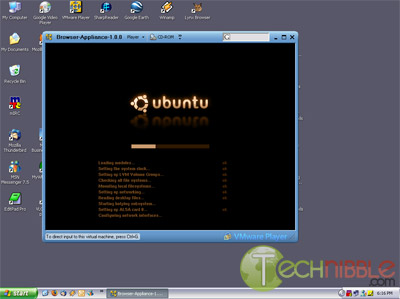
Loading the Ubuntu based Browser Appliance in Windows XP
Session expired
Please log in again. The login page will open in a new tab. After logging in you can close it and return to this page.
[…] machine you may ask? One of our guest writers explains it in one of our previous articles titled Virtualization and its Uses in the Tech World: A Virtual Machine is a piece of software which emulates (pretends), to be machine (computer) to do […]
In another article somewhere on this site, there was talk of using VMware (http://www.vmware.com/). I have tried their product and was not to happy / impressed with the results… After some searching however, I cam across VirtualBox (http://www.virtualbox.org/). It is created by Sun Microsystems, its FREE, and is a snap to set up. I have had an awesome time installing Ubuntu, Solaris, DreamLinux, Fedora and Vista, all on my XP machine. the virtual OS’s hardly ever crash, and when they do, it does not effect my host PC. I am using the software to get familiar with other OS’s so that I can help more customers. Unfortunately Apple does not allow their OS’s to be virtualized, so doing a Mac is not possible right now.
Yep, a virtual machine is cool. I have Windows 2000 and Windows XP SP 2 running on my Windows XP SP3! The downside is that, there are some language that you can’t install e.g: Thai, Thaiwan, and some more language.
Umpteen reputable, accredited universities can be found online, providing Numerous types of programs and areas for further study in future. universities and colleges may supplement their traditional campus programs with online courses, or exist as online schools only. Today, most conventional institutions of higher learning also provide certain online learning options to stay competitive. Either way, you can obtain advanced degrees in business, nursing, health care management, education, information technology, liberal arts, or Numerous other fields. Read more: study masters degree online
[…] ask? One of our guest writers explains it in great detail in one of our previous articles titled Virtualization and its Uses in the Tech World: A Virtual Machine is a piece of software which emulates (pretends), to be machine (computer) to do […]