
- You are here:
- Home »
- Blog »
- Starting A Computer Repair Business »
- Starting a Computer Shop
Starting a Computer Shop
Today, businesses and schools are the only places where you will find powerful computers, the PC has become a perinant fixture in many homes and some even have more than one. In this article we will talk about setting up a computer repair store.
The Workplace
Your computer store can be in any number of locations. If you don’t have much capital to start up the business or you are just a hobbyist, your workplace is most likely to be a spare bedroom or garage set aside in your home. For this article we will be focusing on setting up a workshop for a PC Repair business. However, much of the information in this article also applies to other types of PC related businesses.
The Location
There are quite a few considerations you should look at for selecting a location for your PC shop. First the area should be well lit, clean and dry. It should be located in an area so that it easy to transport whole computers and components in and out of the area. For example, an office space on the 4th floor of a building with no elevator would not be suitable.
Your work area should contain enough space for at least a workbench; a cabinet for spare parts; shelving for catalogs; books and other reference materials; space for test equipment and tools. You will also need to determine the amount of space you will need depending on the amount of spare parts you will keep in stock and the amount of computers you expect to be repairing at once; estimate for more than you currently need as the space required will most likely grow as you get more work.
When you are determining the location of your workspace you should also consider the concerns with electrical power. Your workspace should have enough power outlets and be located conveniently near your workbench and the power should be clean meaning that other appliances such as air conditioners, freezers, fridges etc.. should not be on the same electrical circuit you intend to do repair work on. The type of devices can cause electrical spikes which play havoc on computer equipment.
Organization
Always keep your workbench clean, it is annoying when you bring a computer to your workbench only to find there is nowhere to put it down. The best way to avoid unwanted workbench clutter is to avoid the temptation of putting tools down on the bench when you are not using the, even for a few minutes. A good tool caddy where you can easily drop tools in and take tools out will well with this.
To organize the computers you are working on such as who owns them, what the computer is and what is wrong with it, a whiteboard with a layout similar to the example below is a great asset.
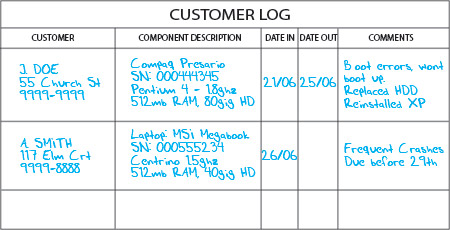
Whiteboard with Customer Details
Setting Up
You will need to determine the type of work area you need based on how much you want to get into PC repair. For example, if you are a hobbyist you may want to set up a room in your house permanently with minimal equipment and stock-on-hand and pay for stock as you need it. If you intend to start your own business then you should set up a permanent work area with a complete set of tools, equipment and stock which contains a bit of everything.
Session expired
Please log in again. The login page will open in a new tab. After logging in you can close it and return to this page.
Thanks for the tips. I’m trying to open a computer shop in a city in Romania. I will use the info you posted here. Thanks again!
I too am starting a computer repair business on the side and I am very greatful for the informationthat you have provided.
We equally need to have a sample shop setting.
hi i m ishant here i want to open a computer store.
i m having a lil bit capital with me so can u please help me abt this..
let me kno how shld i start wat all i need in this???
thank u
Hello “ishant”.
I really don’t know what you are talking about, maybe you should type in proper English?
I do pc repairs for family and friends and my uncle started calling me Angell Computers and I was thinking about putting it on the ‘invoice’ i give people but do I need to actually register this name or as it is just me from my bedroom and i’m just doing it on the side, as a student, can i get away with it?
Try partnering with a local business that will trade retail space with you maintaining their computers. That’s how we got our very humble start in 1989.
Do what you love and the money will follow!
Great idea. We sort of did a similar thing. Let me tell you partering works.
Im starting a home computer business, what I wanted to know is where do computer stores buy their parts from? They are able to currently price match stores like Newegg.com so they must be able to get cheaper. Anyone know where?
do you know of any wholesale places where i can buy stock in bulk(im going to be based in uk) any suggestions wud be appreciated
This is appealing to me.
Really looking forward to opening a laptop repair centre in lagos, Nigeria.my major challenge is sourcing for parts and accessories.i need some help on that…
hai i am going to start a computer sales, services & spares but my friends said that now a days computer business is not good sinces new things are updating daily. we have know to keep stock correctly. please help me to start from were. where to purchases things. how much i need to invest for these. reply please
Wow what a very base little article… And really books? What kind of PC shop have you ever worked in that had a library included? As a long time tech I can tell you this much. You can read about it all day long but as soon as you get in the field take you book and toss it out the window. Sure we’ve always had a whiteboard, but rarely did we use it, I mean it’s a tech shop man, use PCs. It also helps your business when customers can see you working on the equipment you are trying to sell them. I could nit pick all day… Also if you are in the US or any other English speaking country, you must understand how to read/write proper English in order to communicate effectively with your customers.
just what I was thinking, thanks jake
sir,
i will like to start up a computer shop and i am interested in sales of computer parts and networking equipment. i am based in nigeria
thomas, ajayi
sir/madam
i m planning to start my own business(computer and mobile ) store but i dont have must budget. can u please guide me to open with small amount of money.
Your website is amazing, have you contemplated getting it included to dmoz or yahoo directory?
Hello, Im 15 years old and ive ben fixing gomputers since i was six. Do you think i would do good in business. I already work on computers for friends and family, and sometimes school when the IT guys arent here.?
Thanks for the advice. There isn’t very much good information on internet about starting a computer store. The only other good article I have found so far is here:
How to Start a Computer Store
Now then the info was very informative, im currently looking at a location to set up shop but before i go and blow lot of cash on premises and stock i am looking for reliable suppliers in uk any suggestions