
- You are here:
- Home »
- Blog »
- Computer Technician Tools »
- ShellExView – Customize The Right Click Menu
ShellExView – Customize The Right Click Menu
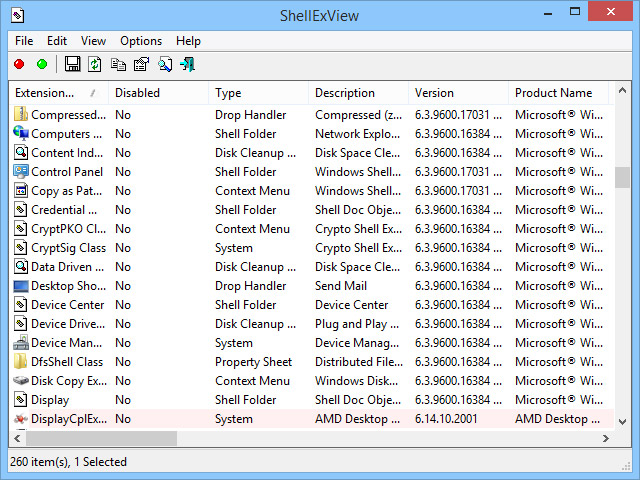
ShellExView is another great offering from Nirsoft. ShellExView is a small, freeware and portable application designed to allow you to customize and clean up your right-click shell menu. You can edit the right-click context menu from the Windows Explorer menu (like “Scan for Viruses” or “Send to 7zip” menus) or edit Internet Explorer-specific menus.
This is especially useful for when a shell menu object is causing a system to lag, crash or it is just becoming too cluttered. When using the application, there will be a lot of entries that you have probably never seen before. To get an idea of where that particular entry appears on your sytem, scroll right and there is a column for My Computer, Desktop, Control Panel, My Network Places, Entire Network and Remote Computer. Any “Yes” entries under the Desktop column will appear when you right click on the desktop for example.
Using the green and red buttons you can either enable or disable any of the entries or if you goto the File menu, you can delete some of them completely. This is recommended for advanced users only.
Screenshots:
Downloads:
Session expired
Please log in again. The login page will open in a new tab. After logging in you can close it and return to this page.
I also love their utility MyUninstaller: http://www.nirsoft.net/utils/myuninst.html
So useful when a client asks you to remove 134 games on their computer. Batch uninstall to the rescue!!
I have great joys using this program. I love being able to log out form a right click menu. Thanks a lot!
This just saved me some frustration. I’ve been having issues (error) every time I would try to use the context menu.. but no more after using this utility!
Thanks for the tip.
Indeed very useful program. Simple but effective. Thanks for share.
Thanks for sharing. Amazing, really it is great. I have just trying and it works simply perfect.
Thank you for sharing :)