
- You are here:
- Home »
- Blog »
- Computer Technician Tools »
- PCIDatabase.com – Download Drivers of an Unknown Device
PCIDatabase.com – Download Drivers of an Unknown Device
After you do a clean install of Windows, you go to the Device Manager and discover the dreaded question mark next to an “Unknown Device”. You could just download the driver for this device, but you don’t know what it is! This is where PCIDatabase.com comes in handy.
PCIDatabase.com is website to help you identify unknown PCI devices without using any special software.
To find out what a PCI Device is, go to Device Manager, right click on the Unknown Device and choose Properties.
Go to the “Details” Tab and choose “Hardware ID’s” from the dropdown box. You should see something like this.
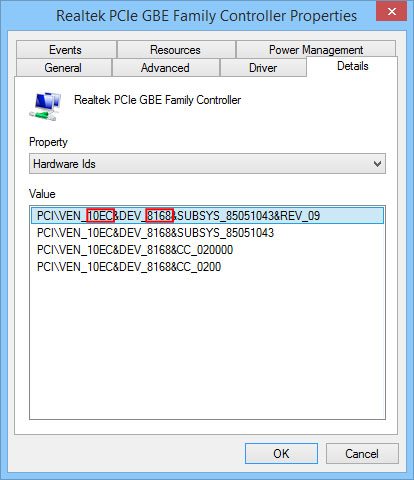
You will want to get the ID starting with VEN_ and the ID starting with DEV_. In this case the Vendor ID is 10EC and the Device ID is 8168.
For this example I am just going to use the Device ID and go to PCIDatabase.com. Enter the Device ID into the “Device Search” text box and press search.
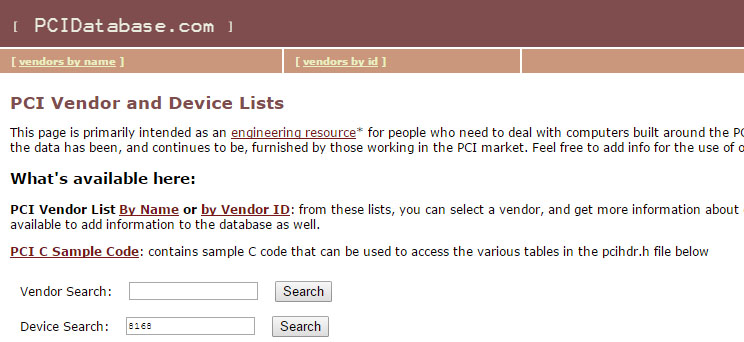
If it knows the device, it’ll come up with something like this:
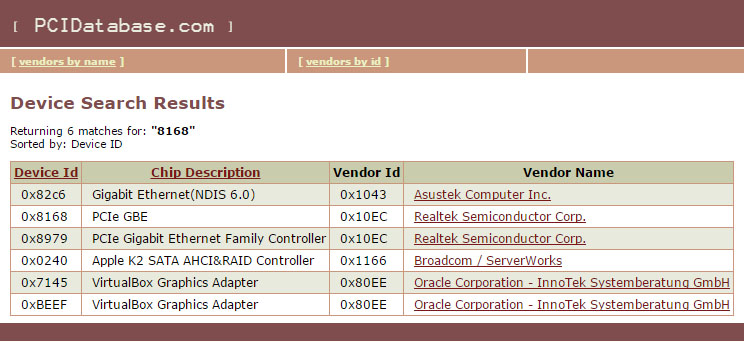
Keep in mind, this site is based off user submitted data so there are no guarantees about its accuracy.
Site: http://www.PCIDatabase.com.
Thanks to forum member rusty.nells for recommending this.
Session expired
Please log in again. The login page will open in a new tab. After logging in you can close it and return to this page.
Oh yeah, we’re gonna use this! Thanks!!!!
thanks for the source Bryce…
Does every “driver resource” have to end up pointing to driveragent.com?
I actually use that quite frequently. What’s even better is, if you’re lucky, they will have a link to the driver in the description, too.
Awesome tool. I stumbled onto it when searching Google by hardware ID for unknown devices. Saves me a lot of time.
Thank you for the new tool Rusty and Bryce.
http://www.drivermax.com free software also has this function of determing what Unknown Hardware is.
— Patrick B.
Great tool!!
a good alternative to Lavalys :D
More good info from technibble.
Keep up the good work!
Thank you for the excellent resource. It will be bookmarked for use at work. This should easily save us an hour of work a week!
Great site for searching for unknown PCI devices. It will help me in desperate situation, when my clients almost loose confident in me.
Awesome. Bookmarked.
it helps a lot…. thankzz….
better device doctor !!! it check you whole system and download the drive you need