
How to Fix “Outlook Not Responding” Error
Most users of Microsoft’s email/contact/calendar software “Outlook” have most likely come across this problem at some point. It can occur when Outlook is closed and then the user tries to open it again from its system tray (near the clock) icon. This icon will remain in the system tray until the computer is rebooted and can cause problems if Outlook is shared because the database remains open while this icon is active.
The user would see something like this:
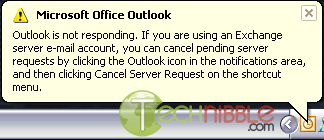
How to fix the “Outlook Not Responding” error:
The First Method:
- Press the buttons CTRL, ALT and DELETE all at the same time to bring up the Windows Task Manager
- Goto the “Processes” tab and find OUTLOOK.EXE in the list
- Select OUTLOOK.EXE (by clicking it once) and press the “End Process” Button
The Second Method:
- Goto Start Menu > Programs > Microsoft Office > Office Tools > Application Recovery.
- Select Outlook in the dialog and choose End Application.
How to prevent the “Outlook Not Responding”:
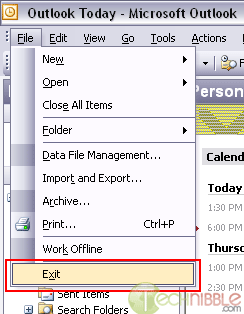
It can be prevented by closing Outlook properly using the File menu.
In Outlook, goto the menu up the top and choose File > Exit.
Session expired
Please log in again. The login page will open in a new tab. After logging in you can close it and return to this page.
Hi
With regards to your article, I have a different angle to the problem.
Outlook starts to load and then stops. Opening Task Manager gives me the Program Not Responding. Additionally, when clicking in task manager, a second Outlook not responding appears.
I can access Outlook perfectly in Safe Mode.
Any ideas ???
Thanks
In my case, the same .pst file works well in another PC, but not in the original laptop where it was created. Problem:
Contacts/Address book does not appear.
None of the repair tools I have tried, work. MS Inbox repair tool hangs. MS office was reinstalled, Windows was repaired, no viruses, plenty of memory and HD space. I’m stuck.
> Is there a way to find out what is wrong, and then do a good repair?
Antti L
OUtlook 2007 kept “Not Responding” for me. I tried a bunch of things suggested on the web bu nothing worked.
In the end, I spotted that my anti-virus protection wasn’t working. I uninstalled it, installed a new one and it all started working again.
Yeah nice tips – I’ve always had success using Method 1 but it’s only happened to me a few times. I guess I’m lucky or I always close the application right.
It work, thanks!
The MO Outlook 2007 keeps “Not Responding” and I have to use the “Ctrl” “Alt” Del” …. every time. sometimes it happens to me 3 or 4 times in a day.
Is there something someone can suggest to get rid of this?
I was having the same problem with MS Outlook 2007 not responding. The problem was caused by the download of Google Desktop that was running in Outlook and in the right icon tray. Once I uninstalled the Google Desktop the problem stopped. Hope this solution helps.
This is not a fix!!
Any person with half a brain would know how to stop the outlook not responding problem the way this idiot says. This is in fact not a fix, we need help to the serious outlook not responding errors. this guy is an idiot.
I have to agree… This is not a solution. If anything, it could corrupt the Outlook database worse. End Task is NOT exiting Outlook normally. :-\
^
I agree! These are just speculations of what MIGHT have caused the issue, remove this, remove that, if it worked for you then good but mostly it WON’T WORK for the rest of us, now it’s either something’s causing it, or it only proves that microsoft products are garbage!
I have a problem in opening Calendar. When I click on a date to book an appointment, it comes up with the hour glass and hangs. I have tried Method 1 and nothing is happening.
I am the P.A. to the M.D. Please help, as I need to reply to his meeting requests!!!
Thanks to the OP for helping me access my tempremental outlook long enough to export all emails and addresses. But a bigger thanks goes out to the nubs who flame the OP but offer nothing of their own. Keep up the good work guys, you rock :-)
im using laptop i have a problem with Office Outlook 2007. when i start a office outlook it is going not responding, after that i can’t do anything. how can i fix this problem
The most accurate information I’ve found on this issue says to disable add-on in Outlook. The main culprit was Itunes, but others reported other programs that also improved Outlooks speed. I have the same issue on my home PC. There isn’t any database to address, but there are PST files for the local mail storage. I reduced the amount of email I have and that made no difference. I will search for Add-0ns when I get home tonight.
How to make CTRL+K (Check names) work in Outlook 2007 (if not working by default) :
Here’s how to change the address book order:
1. In Outlook 2007, open the Address Book window and choose Tools, Options.
2. Click an address book and then click the up and down arrow buttons that appear with the When Sending Mail list to rearrange the address book order in the list.
[Select ‘Global Address List’ from the ‘Show this address list first’ dropdown Now ‘Add’ the ‘Global Address List’ into the ‘When sending email…’ box and move it to top. ]
3. Click OK to close the dialog box.
From : rb031280 [at] gmail [dot] com
The moment I did the Microsoft Office updates from microsoft.com my outlook 2007 quit working altogether. The error screen says the file has erros and access the help screen or run scanpst.exe. The problem is the program won’t stay open to run it. I went back a did a system restore to when I was not having the problem, but it is like there is a file lost or corrupted – how do I get back into using my emails. Everything I have in the way of mail for accounts etc is in there. Thanks Trish
When I open Outlook, it hangs up at the very beginning. It will not open the framework for the email. Hourglass sits and sits. Nothing appears in the message window. I can’t access my folders or address book. Nothing coming in or going out.
Ran PC Doctor, checked out clean. Checked task mgr for unknowns, but nothing helped.
I’m open for suggestions, please.
FIXED IT. Found I had a plug-in for XARA for Mozilla. Don’t know how it’s all connected, but after removing the plug-in, my Outlook worked.
We have a strange problem. Outlook 2007 on a Windows 7 machine sometimes hangs when opening the address book. The mailserver is Exchange 2010. It does not hang in Outlook 2010, and it does not hang in Outlook 2003 working with an Exchange 2003.
In my Check Point log I see lots of traffic on port 49155 and 51957 towards the domain controllers. This traffic is being blocked due to “stateful inspection” saying “TCP Packet out of state: first packet isn’t SYN..”. I am working on how to disable stateful inspection on this traffic, IF this is what is causing the problem. Anyone who knows more about what this traffic on port 49155 and 51957 is?
Thanks, these methods work really great! Moreover, I’ve read from some site that the usual cause for these program-not-responding errors or Windows not responding errors is outdated device programs or software versions. That’s why, it’s important to update your system regularly. In addition, I found out that there is a free software to carry out these tasks and make life easier. Here’s my source:http://windowsfix.org/how-to-fix-not-responding-errors.html
You should warn that “ending process” for Outlook not responding problem will erase all earlier mail and most importantly the WAB.
I LOST EVERY THING
This is NOT a solution to the MS Outlook problem. I continue receiving “Not Responding” messages even after I restart. This article just rehashes what almost everybody knows and it is not a permanent solution.