
- You are here:
- Home »
- Blog »
- Manage Your Computer Business »
- My Onsite Technician Gear
My Onsite Technician Gear
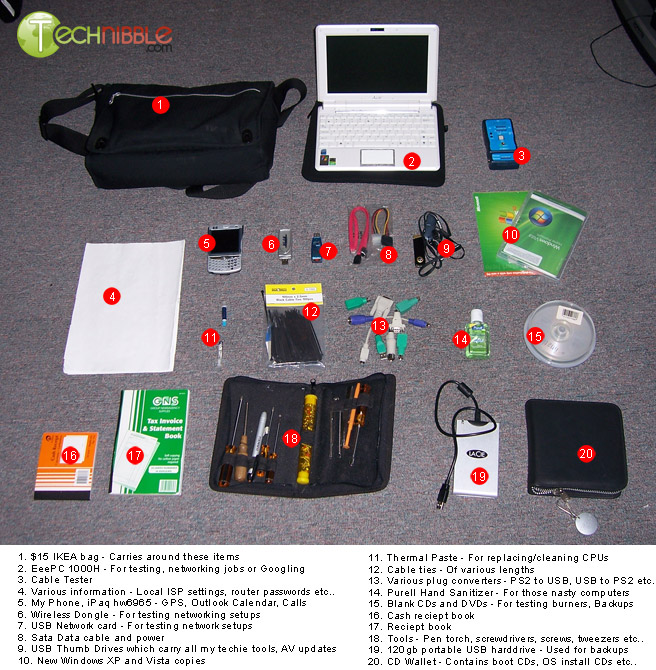
In the past we have had a few articles featuring what you take with you to computer repairs. For this article, I wanted to show you my Technician gear. I have taken two photos of my Technician bag and the parts that I take onsite with a description for each item. Hopefully this helps some beginner techs create their own.
By no means would this setup be able to handle everything, but it handles just about all jobs I end up with. In fact, I could just bring my USB thumb drive and be able to handle 70% of them.
I keep a few of the main computer parts (motherboards, CPU’s etc) at my workshop and bring them onsite on a as-needed basis. Also, some parts I tend to buy on the day since I dont want to hold onto parts like hard drives for too long. This is the gear that I always bring to jobs:
Click Images for Full Size Versions:
My Technician Bag:
Parts I Take Onsite:
I carry these parts in a large tub that I put in my car when I go onsite and take it back into my workshop when I’m not onsite.
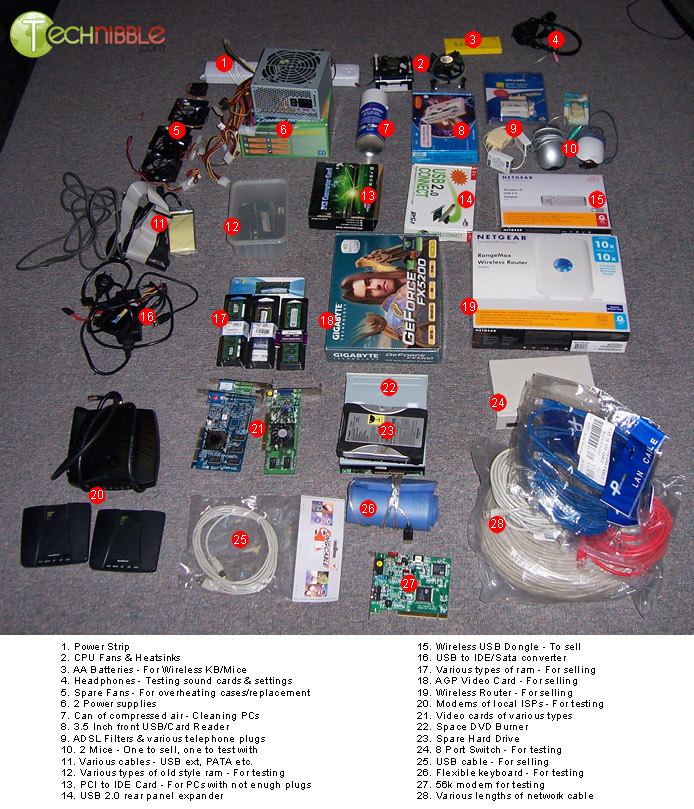
Not shown: Spare Network card, PCI-E video card and Sound card
Session expired
Please log in again. The login page will open in a new tab. After logging in you can close it and return to this page.
Wow thats a great piece of kit, did you acquire those items from just any computer shop or by wholesale ? if so which wholesalers ?
Awesome! Thanks so much for taking the time to lay out all of your equipment and share this with us. This is a perfect example of why I LOVE this site!
Go Gators!
Andrew, I got them from all over the place. It was built up over a few years as things were needed.
Just about everything from the Technician bag picture was bought at a retail level except for the Sata cables and the Windows OSes.
Most things from the parts picture was bought at either a wholesale level for computer swapmeets with the exception of the modems. They were given to me by clients who no longer needed them.
Thanks for the reply Bryce, its certainly a good topic for those wanting to know what they should carry in there kit.
Great kit! Just wanted to note two additional things that I find invaluable in my own kit that wasn’t mentioned here for anyone that’s interested.
First is a good power supply tester. The one I use is a “Rexus PST-3” and it works great. There are many ‘clones’ of this tester under different brand names, many of which are available on NewEgg. It has successfully helped me diagnose many power supply issues in under a minute, saving lots of time with fiddling with a known good power supply (which I also carry with me just in case). This tester imparticular gives you a nice digital readout of all the different voltages and such when plugged into the ATX plug (20 or 24 pin) and can also plug into a molex, berg, sata, P4, or PCI-e power line to check for errors. These run for about $20 american, and are small and light for easy carrying.
The other thing not mentioned that I carry with me is a decent POST card. One of these will give you a digital readout of the POST process from the motherboard just by plugging one of these into an empty PCI slot. This has helped me with seemingly dead PCs many times. POST cards will often give a more specific report than a beep code will. The one I use myself (http://tinyurl.com/5eaplj – I did not buy from this seller) can also plug into an ISA slot in case you have to work on something ancient, and has a digital readout that extends from a ribbon cable outside the case, so you can easily read it. This also allows you to scroll through the last POST codes as well up until the code that the PC hung up with. With the hex code given to you, visit bioscentral.com and look up the BIOS/OEM model of the motherboard and you can pinpoint a problem location.
That is awesome. I definitely need to make mine like that.
Two more addons I can think of:
1. Connect-A-Desk Laptop Holder (for using laptop while standing)
2. Desktop Tower Carrying Strap (so you don’t have to worry about dropping someone’s tower).
To be honest, I’d be more concerned about dropping someone’s tower when it was in one of those straps.. I think I’d sooner trust my own arms rather than some plastic buckles!!
A different Andrew, I feel the same. I do actually own one of those straps and computers do tend to slide around in them somewhat.
And then of course there is one important gear and thats your brain, I got guys that are out there, does not matter what they have. Will show the guys how jacked you are on, its impressive.
I’m just curious how you have these sorted out in this tub? Do you have them organized somehow or are they all mixed together?
Wow, great list! I’ve never seen the sliding straps, but I love the idea of the pci post tester.
ahh…. more toys. :-)
Go Gators!
Benjamin,
Great question! I’ve been carrying around a small Drs bag with my tools all cramped in there. My wife “caught” me searching for a small screw driver that had slipped to the bottom and needless to say, it wasn’t the best appearence that we strive to project while on-site.
Her solution was to use plastic zip lock bags to organize the inside of my tool bag. It’s the most organized I’ve ever been!
For me it is interesting to know the detail of a computer technician tools. Those look complicated for me.
Benjamin, only the things in the bottom picture are in the tub. Its mostly just thrown in there but there is some order to it. I use the larger boxes like the router as deviders.
How about a text file detailing your equipment, so the item list will be easier to read!
Connect-A-Desk Laptop Holder
HAHAHAAHa i would be scared to bring that to a clients house out out of fear of getting punched for being such a dork
I myself would add/subtract certain items from the list. I like to keep supplies for making my own nework cable’s, I also carry a small lcd moniture with me for testing purpose or too attach to my laptop. Customers freek when they see me using two screens and I can sometimes sell them on a new video card and a new/used lcd screen. I don’t make much off the screens but every penny counts and I only keep two on hand.
I am working on building a wheeled cart so that I can better organize my gear that I take into the house. I don’t wont everything just wont to organize better. I am not the best looking repair person so I need to add to the first impretion anyway posible.
I keep a major amount of gear on hand to troubleshoot. That is a great list but there are some items I would add.
USB Floppy and box of disks. (You never know when BIOS or boot disks are needed)
I carry two different power supplys:
Old School – 400W with 4pin connecter
New School – 1000W with 8pin MOBO and 8pin PCI-E
On big jobs I use a KVM switch, you dont when you need for big jobs.
Universal Laptop charger – customers don’t know when you say know to those doggy chewed cords
Every copy of DOS, Windows 3.1, 95, 98SE, 2000, ME, XP OEM and retail and Vista Ulitmate OEM and Retail in x86 and x64 bit editions (I’m overly cautious.)
VGA to DVI converter
I carry EIDE and SATA 2.5in and 3.5in just to test if I can load windows.
PCI, AGP 1.5v and .8v and PCI-E 6200 low profile (for those crazy slim lines) and a 8800GT
Wow! That’s a lot of stuff you use. It’s amazing how everything fits in that technician bag of yours. You definitely mean business, you take your carer very seriously. I like that.
Among other tools, I keep a copy of BartPE and a Linux live cd w/ NTFS support reg editing tools.
Great list of tools guys! I am not a pro like all of you but I work on friends and family machines. The best tool I have found is a USB 2.0 to IDE/SATA Adapter, Works with 2.5″, 3.5″ HDD, 5.25″ CD/DVD Drive and SATA Drives. I use the Bytecc BT-300.
It can save a lot of time if the HD won’t boot due to suspected virus / malware. I plug up the drive to the adapter and can then scan it with software installed on my pc or laptop or back up the files.
The best thing I have ever used it for though was upgrading a friends laptop to a bigger HD. The old one was working fine, he just wanted a new larger one in it. I installed Acronis True Image on his laptop and made an image of the whole HD. I then plugged in the new drive to the adapter and connected it to his laptop via usb.
I transferred the image over usb to the new drive, shut the laptop down,removed old drive, installed new drive, and booted back up. It worked great and doubled his HD size in less than 2 hours. No re installation of tons of software or OS, and all his files intact!
The best tool of all: Internet+Google.
Nice!!! Tech Gear Bro.
I’ve been a tech for around 15 years.
All said, nice kit.
It’s more then I carry on site but it does cover that 2 or 3% that I curse.
I like the idea of a P/S tester but I have never found a post card to be of any use either in the shop or in the field. POST cards can help make up for a lack of proper training and diagnostics abilities to some small degree but it sure doesn’t inspire my confidence in someones skills.
It is missing the one item I find useful for house calls. I find that lot of times peoples homes do not offer a good work area so I have a heavy vinyl roll up anti static mat that I can lay out over the carpet or lino floor to use as a work space.
No 2 Phillips Head Screwdriver and 15 years experience is 90% of the tools I carry.
But I agree that some of the ones listed can come in handy sooner or later. As I also specialise in Secure on site Hard Drive destruction I also carry a 14″ drop saw and 6″ angle grinder in my van. Living in a small city I find most computer stores carry enough stock that I don’t need to drag around umpteen different types of spares. I can always get spares airfreighted to me from a retail store in Brisbane cheaper and quicker than I can buy wholesale in Townsville and if I order before 9.00am I can generally get them that afternoon around 4.00pm if I pick up from the freight terminal. One thing I do carry that I didn’t see mentioned is a LED head lamp for working in confined areas where I need both hands free.
Where could I get the bag that you use? I’m using an old laptop bag right now and it just doesn’t do the job.
That one looks good. Links would be nice :) thanks
Bryce you missed the most important thing, a pen. Without it you wouldn’t be able to document ANYTHING. And you know how important it is to keep track of what your doing. And when you need to push one of the little reset buttons, having a pen handy is nice.
Some sort of a notebook or pad of paper is nice to have with the pen of course.
And a marker, Sharpie or the like is always useful too.
I know those are obvious things to have but you’d be surprised when you’ll forget the most obvious things because your worrying about the not so obvious ones.
I always carry with my keys:
Swiss+tech utili-key: phillips screwdriver and knife the size of a key.
Inka pen: A pen always handy.
Corsair Survivor 8GB Flash Drive: For apps and documents.
Imation Clip Drive 8GB: For tools and AV.
Nice group of tools. I have found that the best way to obtain most of these items is by going to http://www.freecycle.org
You would be suprised at how many things are given away.
Also I have purchased the Craftsman toolbox at my local Sears http://www.sears.com/shc/s/p_10153_12605_00959307000P?keyword=tool+box
It is built as stackable trays, very nice and cheap.
Excellent variety of tools and parts but how about the multimeter,pen flashlight,anti-static wrist strap or mat.
wow! nice…it may took a long time before i can complete that set…but as of now i’ll just start with a screw driver & a couple cd’s…hope to have mine & more compact someday…^_^…thanks Bryce…
Nice collection :-)
A couple of things I don’t see here that I usually carry: pcmcia adapter for both usb 2.0 and firewire, phone cable + rj11 connectors
Nice list! I’d add:
a label printer – eg P-Touch PT-1280 – adds a nice professional touch; ethernet hub for diagnosing network issues with wireshark; a paper clip for reset buttons and the occasional tray ejection.
Being prepared always feels great when you need that little something you’d otherwise have to drive somewhere to get. Things I would mention:
-VGA and DVI cables
-PCI USB 2.0 card (already mentioned but get one with a slimline bay cover included)
-Powered USB hub for laptops with too much stuff plugged in or to replace questionable hubs
-Offset screwdriver (good for those tight areas)
-A few jumpers in with the screws
-USB extension cables
-Molex splitter cables and molex to sata cables
-honorable mention: 2x Linksys WRT54GL routers loaded up with Tomato firmware and set up in WDS mode. I’ve found this is by far the best way to do wireless in big houses. Just be sure to teach them how to power cycle their network!
-Of course, the most important tool is your flash drive with all your tools on it. Better yet, bring two or three so you can work on multiple computers at once!
im a nerd when it comes to kvm switches
Bryce, thanks so much for this guide.
I recently lost my job and with this economy can’t find a job. I plan on starting my own tech-support business because i can fix almost anything wrong with a computer (Doing it for friends/families for years now) and it’s something i enjoy, so why not try to start a business right?
Your guide helped me a lot, so thanks, I’ll let you know how it goes!
Something simple I like to use is a roll of 1/2″ masking tape and a marker, for labeling cables.
.. please don’t use masking tape for anything other than short-term (a few days) use. If left on, it leaves a gummy residue that attracts dust/dirt and looks messy. Proper cable labels are much preferred.
Great list and the additions have been great too. I try an pack everything I might need with me. At $100+/hr it is too expensive to go to the store. It is really cheaper over time to have $1000 of repair parts with you.
Hiren,s boot CD, UBCD, & 25K drivers.
Floppy drive & disks (create an ERD or FSR) put in a baggy and tape inside the case with my business label on it.
Business label to put inside the case with date and repair code(s). When the computer comes back with a problem and I was supposedly the one who fixed it. I know! Kind of like a watch maker scribing service inside the watch case.
As well as putting Business card on inside I’ve also read suggestions that you put a card on the outside, or a sticker. It is a way of “marking” your territory and provides immediate reminder of who to contact if there is trouble (for generating future work).
A couple of more items:
Power extension cord, Power board,LCD Monitor Cleaner liquid and PS2 Keyboard as sometimes USB Keyboard or usb2PS2 converter doesn’t function during POST, happend few times.
Great Post! Very Helpful – thanks for sharing!
Where can I get a copy of the operating systems?
Thanks for the information posted.
hi i have a kit “PC DOKTOR 7.5 PREMIER and http://www.pcdservicecenter.com/ also a test pc van coolermaster i use differend usb with anti virus and i have a M.R.I disk ,a usb with in all in one solutions an many diffrent os win 1.0 to server 2008 and also DOs disk a power supply 420 and 1000 w many types of ram a lot of cables sata ide usb utp vga dvi and so one a dell labtop a router AGP ,Pci-e PCI vga cards sound card lan card a toolbox complete with everthing you ca thougt a ESD mat scerwdrivers cuters multimeters a have run my business now for about 3 weeks sorry for my bad english i live and work in the netherlands
@Rm I going through the same thing, I’m just starting my computer repair business, Thanks for the tips Bryce
List of tools/equipment compiled from the photos and comments:
Tools
1. $15 IKEA bag – Carries around these items
2. EeePC 1000H – For testing, networking jobs, or Googling
3. Cable tester
4. Various information – Local ISP settings, router passwords, etc
5. My Phone, iPaq hw6965 – GPS, Outlook Calendar, Calls
6. Wireless Dongle – For testing networking setups
7. USB Network card – For testing networking setups
8. SATA Data cable and power
9. USB Thumb Drives which carry all my techie tools, AV updates
10. New Windows XP and Vista copies
11. Thermal Paste – for replacing/cleaning CPUs
12. Cable ties – Of various sizes
13. Various plug converters – PS/2 to USB, USB to PS/2, etc.
14. Purell Hand Sanitizer – For those nasty computers
15. Blank CDs and DVDs – For testing burners, Backups
16. Cash receipt book
17. Reciept book
18. Tools – Pen torch, screwdrivers, screws, tweezers, etc
19. 120Gb portable USB harddrive – Used for backups
20. CD wallet – Contains boot CDs, OS install CDs, etc.
Parts
1. Power Strip
2. CPU Fans & Heatsinks
3. AA Batteries – For wireless KB/Mice
4. Headphones – Testing Sound cards and settings
5. Spare Fans – For overheating case/replacement
6. 2 Power supplies
7. Can of compressed air – Cleaning PCs
8. 3.5 inch (something) USB/Card Reader
9. ADSL Filters & various telephone plugs
10. 2 Mice – One to sell, one to test with
11. Various cables – USB ext., PATA, etc.
12. Various types of old style ram – For testing
13. PCI to IDE Card – if (something)PCs with not enough plugs
14. USB 2.0 rear panel expander
15. Wireless USB dongle – To sell
16. USB to IDE/Sata converter
17. Various types of ram – For selling
18. AGP Video Card – for selling
19. Wireless Router – For selling
20. Modems of local ISPs – for testing
21. Video Cards of various types
22. Spare DVD burner
23. Spare Hard Drive
24. 8 Port Switch – For testing
25. USB cable – For selling
26. Flexible keyboard – for testing
27. 56k modem for testing
28. Various lengths of network cable
Items from comments
1. Power Supply Tester – Rexus PST-3
2. POST card
3. Connect-a-Desk Laptop Holder
4. Desktop Tower Carry Strap
5. Brain – your own
6. Zip Loc bags
7. Network Cable Kit – (cable, connectors, crimp, wire cutter,?)
8. LCD Monitor – small
9. USB Floppy and box of disks.
10. Power Supply – Old School – 400W with 4pin connecter
11. Power Supply – New School – 1000W with 8pin MOBO and 8pin PCI-E
12. KVM switch
13. Universal Laptop Charger
14. Various OS – Every copy of DOS, Windows 3.1, 95, 98SE, 2000, ME, XP OEM and retail and Vista Ulitmate OEM and Retail in x86 and x64 bit editions
15. VGA to DVI converter
16. I carry EIDE and SATA 2.5in and 3.5in – test to see if windows loads
17. Various Graphics Cards – PCI, AGP 1.5v and .8v and PCI-E 6200 low profile (for those crazy slim lines) and a 8800GT
18. CD – BartPE and a Linux live cd w/ NTFS support reg editing tools
19. Internet Access – Google
20. Floor mat – heavy vinyl roll up anti static mat to lay out as a work space
21. Phillips Head Screwdriver – #2
22. 14″ drop saw and 6″ angle grinder – On-site Hard Drive destruction
23. LED Headlamp – confined spaces
24. Writing implements – pen, pencil, Sharpie
25. Notebook
26. Swiss+tech utili-key – a Phillips screwdriver and knife the size of a key
27. Multimeter
28. Anti-static wrist strap or mat
29. pcmcia adapter for usb 2.0
30. pcmcia adapter for firewire
31. phone cable + rj11 connectors – splitters, f/f connectors
32. Label printer – eg P-Touch PT-1280
33. Ethernet hub & network protocol analyzer – ie wireshark
34. Paper clip – reset buttons
35. VGA and DVI cables
36. Powered USB hub – replace questionable hubs or overloaded laptops
37. Offset screwdriver – good for those tight areas
38. Jumpers
39. Molex cables – splitter and molex to sata
40. honorable mention: 2x Linksys WRT54GL routers loaded up with Tomato firmware and set up in WDS mode. I’ve found this is by far the best way to do wireless in big houses. Just be sure to teach them how to power cycle their network!
41. masking Tape for labeling cables – Proper cable labels are much preferred!
42. CD – boot, UBDC, drivers
43. Floppy Drive & disks – create an ERD or FSR, put in a baggy and tape inside the case with business label on it.
44. Business label – inside case with date/repairs, outside for future business
45. AC Power – extension cords, power strips, surge protectors, UPS
46. LCD Monitor cleaner
47. Keyboard – PS/2 – in case USB doesn’t function during POST
48. Technibble Computer Business Kit
Ace thanks for making that list.
Lately I’ve been doing a lot of home wifi, so I bring a pringles cantenna (painted silver so it looks professional) and a dual-boot asus netbook loaded with NetStumbler, Kismet, Airsnort and wireshark.
I’m thinking of adding the USB spectrum analyzer that I just saw in a catalog, but that’s more toy than tool for what I’m doing.
After reading this post, I find I am very unprepared! Good post by all, and Thank You for making me aware of my lack of preparedness.
I am so grateful for finding this site! I have about 90 percent of the tools mentioned in this article. I actually have a creative “Workshop On Wheels” (W.O.W.) that I keep much of the equipment in when I do on-site work and I can just easily roll it, throw it in the car and bring it back into the shop when necessary.
Nice list you have going! I also bring some alcohol wipes, laptop screen cleaners, my mini-duster, among others for those really dirty computer repair jobs :)
can you please tell me how this all costs? Approximately?
Thanks for you help.
How do you deal with the original windows cd.
Did you take a copy that you can sell (retail version , oem ) ?
Where can I get one like this ? On microsoft website ?
And so your charge increase…
how do get on with the OS discs? do you just use them to reformat and reinstall? i mean there are so many clients with different versions like xp, vista, 7 and versions within themselves such as home, pro, premium, ultimate and 32bit/64bit. thats ALOT of genuine discs to buy and keep!
hello, i recently joined ur website forum. what is the USB repair utility kit mentioned in 1 of ur posts & where can i find it??