
How to Tell What Type of Windows XP CD or License Key You Have
For the not-so-techie readers, not all Windows XP CDs and Licenses are the same. There are many different types of Windows XP CDs available:
- OEM – Which are usually sold with the computer
- Retail – Brought stand alone in stores like BestBuy, CompUSA etc..
- Upgrade – To upgrade from a previous operating system
- Branded – Specifically branded copies from large computer manufacturers like Dell
- Action pack – Was part of the Microsoft Action Pack
- Volume License – Typically used in large businesses, government and educational institutions
The problem with different versions is the license key from one version typically wont work on another version. If you have a retail license key, it wont work on an OEM disk.
To make things worse, lots of people lose their Windows XP CD. However, they usually have their license key attached to the side of their computers. So how does a computer technician know which XP CD they should use for their clients license key?
JohnR from Technibbles forums has posted an excellent tip about how to visually determine the difference between Windows XP CDs.
How to determine what type of Windows XP CD you have:
The way to tell if any given disk is OEM or not is to look carefully at the words in the hologram. If it says “Only for distribution with a new PC” on the front of the disk, it’s an OEM copy. If it doesn’t say that, it’s Retail.
If it says “Upgrade”, It’s Retail. To use an upgrade disk you’ll need a valid disk from a lower version like 2000 or ME to put in when the installer prompts you for one.
If it is a branded CD (such as Dell or HP), its OEM.
How to determine what type of Windows XP License Key you have:
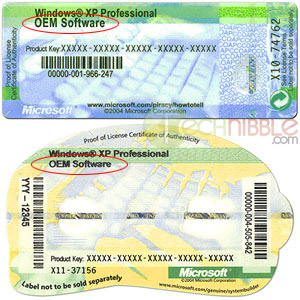 To tell if the user’s license key is OEM or not, look for the license sticker. If it’s on the case of the machine, it’s 99% likely to be OEM. If it says the name of any computer company on it, it’s OEM. If it says OEM, it’s OEM.
If there’s no license sticker on the computer case, it’s probably a retail copy. If they’ve got a brightly-coloured 8.5×11 paper folder with a CD holder and a license key on the folder itself, its a retail copy.
There’s no easy way to tell if a user’s key is from an Action Pack subscription or a volume license deal, both of which require different CDs from the OEM and the retail ones, but the good news is that if they’ve got those, they almost certainly know it, because those are not the kind of thing you find on a home user’s personal PC.
Session expired
Please log in again. The login page will open in a new tab. After logging in you can close it and return to this page.
It’s worth noting that the “Branded” installs are just OEMs that have a custom installer on their installer disk. You can use an OEM disk to reinstall using a key from a “Branded” copy. You don’t need the branded disk to do it. You will, however, almost certainly need to find drivers for hardware that the Branded copy would have installed for you.
There’s a reason why I keep a stack of burned Windows CDs in my toolkit. That way, I’ve always got the one I need for the license on the current machine.
Great article, I was just searching some info on license keys and this article answered lotsa questions!
Thanks JohnR, updated the article. Thanks for sharing your knowlege with Technibble readers.
So i’m guessing that an OEM copy of Windows is for use on that machine only, while a retail copy can be reactivated on any PC? Is there no way to use your OEM Windows on another PC?
So i’m guessing that an OEM copy of Windows is for use on that machine only, while a retail copy can be reactivated on any PC? Is there no way to use your OEM Windows on another PC?
That’s right. The OEM license only allows the copy to be activated and used on the one, single, specific set of hardware it was sold for. It can be reinstalled and reactivated as often as you like, but only on that machine. There is no legal way to move an OEM license to a different machine than the one for which it was sold.
A retail license can be moved from machine to machine, as long as it’s only ever on one machine at a time.
Hi There
By looking at the file setupp.ini in the I386 directory of your Windows XP CD you can tell what kind of license key you have. An OEM version has the text “OEM” include in line that says “Pid=XXXXXOEM” and a retail version has just numbers.
My question is how can one tell by looking at the contents of the CD whether it is a an Upgrade or Volume License CD?
This could come in useful if someone has lost their CD and needs to use another CD (be it a friend’s or a copied CD or whatever CD for that matter) with their original licence product key.
Great Info!
Hi I have an oem pc that needs a new install of xp home. I also have a retail version of xp home that i use on another computer. Can I use my retail disk with the oem license to bring my oem pc back to life?
Nope. I just found this out by experience. You MUST have an OEM disk of some variety in order to use the OEM key on the side of your PC. Doesn’t have to be the OEM disk that came with your PC, though–so if you have a friend with an OEM disk it might work for your PC with your OEM product key.
Oh, and one added point. Even if Windows XP Installer accepts the product key you type in before installation commences it doesn’t mean you’re golden. After installation is done you still have to activate Windows. Then (and only then) will some product keys be recognized as invalid. So it’s possible (as I discovered) to waste a whole bunch of time doing an upgrade only to discover you have to back the upgrade out and redo it with the proper retail version disk for your retail product key(or an OEM version with your OEM product key).
Maybe a bit of an obvious point, but make sure that the CD is also the same Edition (Professional Edition or Home Edition) as the one you have a key for.
Thanks for all your help guys
One small corrention. I have installed a Dell Dimension Windows XP Pro Disc on an older Compaq laptop just to see if the laptop still ran. It did and now we know that not all OEM discs are worthless to other computers.
Hi there,
You would be of great help to me if you’d answer a question:
If a computer has a Windows XP installed on it which is licensed as part of a Volume License, is there needed some special kind of CD in order to perform a clean install or will it work with a regular OEM one? The computer I’m talkig about has a little sticker on the case with a product key, so perhaps the initial instalation was performed with an OEM CD.
I was curious if Microsoft or another company had a web page, that will let you find out what VERSION of Windows XP your product key is for…
For example.. I have a few LEGITAMITE keys wrote down, from computers that have been trashed with retail software still intact, but I have forgotten if the Key was for Media Center, Professional, Home, Etc.
Is there any program or web address I can type the key in (without a hacker stealing it), to find out which version I have.. (instead of trying to run installs to find a match)
Thanks,
Josh
Damn good question Josh. I’ll chase that up.
Hey Teo – I believe the rules described above that apply to the OEM and Retail version, also apply to the Volume disks. So if you have a Retail key, it will only work with a Retail CD, and will not work with Volume or OEM media. If you have a Volume key, it will only work with a Volume CD, and no other media. Same thing in any combination.
Josh! I love that question! My hunch is that even Microsoft doesn’t know how to tell if a key is OEM or Retail! I base this on the fact that if you load one successfully but are prompted to call Microsoft for Activation, they don’t seem to know. They ask test questions. If you answer correctly, you get Activated. If not, you don’t. Seems to me, if they could know, they would.
I recently bought a computer from a used computer store and it came with the Windows XP key, but every version of Windows I tried to install tells me that the key is invalid.
All it says on my key is
Microsoft Windows Xp Professional
HP
Can someone please tell me which windows to install?
I tried OEM, Retail, Corp…
Hi Bob,
Certain Manufacturers have ‘make’ specific installation CD’s that only their key will work in tandem with, the one’s I know of are:-
*Fujitsu Siemens
*HP
*Dell
You will need to get a XP Home installation CD specifically for your make (HP) either from the manufacturer or elsewhere.
Is xp 9in1 legal?
Any luck on that website you were chasing Bryce?
Are keys language-specifik or could I use my swedish key on an eng. xp?
I need to tell which version my keys are, i have a few from old computers and cant find a disc to install it.
The only thing i can think of is to in stall with a valid key and then change the key once in windows.
any luck finding a decryption tool ?
Hi Bryce
I want to ask , if its possible to download a OEM CD from the internet? I have a Original Key but unfrotunately NO CD. I cant use that key with Retail version also.
Please suggest something. (can u please email me at the above email address, cos I dont see any subscribe button here, to get updates and the chances are that I might not find this great blog again)
Thanks
Josh, Bryce and Ant,
When I saw the initial request for a way to determine the type of key one has, I KNEW I had recently seen a breakdown on how to tell what type of install disk you’re holding or modifying/creating (the flip side of this query). It took about an hour to relocate it, but this is some rather useful info.
http://www.thetechguide.com/howto/setuppini.html
I also recall coming across a page describing the differences in the serial numbers themselves, but relocating that page has eluded my search efforts so far. I will continue the chase as time permits, but no promises on an eventual ‘payoff’.
In retrospect, I sure wish I had taken the time to write down the information.
On a side note, I stumbled across this site two days ago and have yet to close my browser. Bryce, you’re doing the rest of us a tremendous service here and you deserve a ton of Respect for your efforts. I own/operate a free email tech support group hosted by FreeLists.org called PCTechTalk that’s been in operating since mid 1998, I teach a basic computer maintenance class at EclecticAcademy.com and I’ve been at this stuff since 1983 (remember punch cards? I still have nightmares lol). I feel I’ve learned more in the past two days from reading about various member’s experiences that I ever have from any coursework.
Thanks folks and keep up the good work.
I need help!
On the stickers posted above where it shows OEM, my sticker just shows Alienware instead.
Since it was designed for alienware doesn’t that make it an OEM? Is there another way to find out?
John
I purchased a used computer with a COA stiker on it, I got a bag virus and had to do a full format XP Pro. After installing and activation
I used it for several months then when i was updating media player it failed the authenticity test. Microsoft tchnical said that the Key was legit, software was legit but it was a volume licence and I was not the license holder.
Guys in my experience, sometimes you call Microsof finding a “NO” as a solution, no matter your arguments, but like a magic treak, if you insist calling a 2nd or 3th time, finally one guy will solve your problem, (most of the times happens at the 1st try) just stick on your argument that you changed your HDD and that you are using a copy or your original CD cause you lost your original CD, and that the original key on your sticker is no longer working, then they will provide you with a new key. It works for me like for more than 50 times so far, cause I repair PC’s. I don’t like or approve to cheat Microsoft, but honestly if you have an hologram sticker, it means that the particular PC that you are refering, already paid for a valid license, and it is not fair to re-paid again for a new license, but only probably for a CD copy in case that you lost it, but also with the chance to get it from a friend. It is just a matter of simple and common sense,why you should pay for something that has been paid?? Well I hope this comment help.
can a pc with Japanese version of window home edition, be changed to genuine english version? Can the window XP bought “Only for distribution with a new PC” be used for a laptop?
When you install an OEM version of ANY windows component on anything other than the designated machine it Violates that individual license. Once you get all of the updates and microsoft confirms what you have done, then they declare it invalid. I’m no expert but if you download the service packs sepaerately and install them your self instead of autoupdates, then good old BIll Gates will never no that its not on the proper machine. (in theory) NOw as I mentioned before this would be against the microsoft agreement and this is just a theory( wink wink)
I think to really have all your bases covered, you’d need a CD for every OEM and/or Branded XP CD in your tool kit. Add onto that the different versions of XP Retail as well. For example, a key that works with XP Pro SP2 will NOT work with XP Pro SP2c. So in short, you’ll need a ton of XP disks in all flavors and varieties…..and soon all of that will be useless anyway as Microsoft will stop supporting 32-Bit Hardware/Software.
I say screw it.. Just install Linux and be done with it. :)-
All you want to know about Windows Product IDs. Think this was the page you were after SeegerSystems.
i m not satisfied with this answer because there is file in windows cd which contains some code. and we can know from the code which type of licence this window is use.
Can u tell me the name of the file
setupp.ini is the file refferring to the code.
but if u meant a code that has the product key.
you mean unnattend.txt/winnt.sif
Ok, so let me get this straight…..
I have a IBM Thinkpad with a 25 digit Product Key sticker.
I have a Dell Windows XP Reinstalltion CD
The Setupp.ini file has the following:
[Pid]
ExtraData=786F687170637175716954806365EF
Pid=76487OEM
The WINNT.SIF has the following in it (I changed the letters of course):
[UserData]
ProductKey=”23sfs-sfsef-kjsud-akskj-sksju”
[Data]
MSDosInitiated=0
UnattendedInstall=Yes
[Components]
Fax=On
So if I wanted to use the Dell CD (which is OEM) on my IBM thinkpad 9I believe that the 25 digit product key is OEM), I would leave the PID alone and the just chage the Product key on the CD to match the IBM Product Key from the laptop?
Well, I will do this tomorrow an see what happens.
I had a Toshiba laptop with OEM Product Key for Win XP Pro. No CD to reinstall Windows. I used a Dell OEM install CD to install (which gave the wrong Product Key). I used a program called ‘RockXP’ to change the Product Key. Activated ok.
I had an OEM CD of XP Pro purchased as a single item at a legit computer store, installed it on three comps, one laptop, two desktops and all were activated.
OK. Here’s the ? of the day. I upgraded a couple of PC’s with the same Windows XP Pro disk for a nursery school. Year later, we are running updates and got the darn MS warning that license may be pirated. I’m don’t recall that but in any case, I’m attemptimg to change product key so I can activate PC properly. I have an handful of unused licenses (different XP versions) that are from decomissioned PC’s. My problem is, that no matter what key I put in, it says invalid key! How can we tell throught registry or any other way, what OS is running SO we can add the appropriate key. It says (My Computer propertes). Windows Xp Professional Ver 2002 SP 2. Thanks!
Is there a universal Windows XP cd that works with all types of keys?
I have a similar but different problem. MB died on a Compaq OEM installed XP Home. I moved the HDD to a different PC. Windows asked me to activate – no problem.
Now I have rebuilt another PC with a new MB, etc. When I boot with the XP installed drive, it loops at the screen offering safe mode, repair, etc and I can’t get any further. No CD, so I was going to create one using the I386 directory and various online information. However, after reading about WAP, and the OEM install being tied to the BIOS and existing hardware, am I wasting my time trying to create an install/repair CD?
Yea, there’s software that can do that for you.
you need to understand the reasons for having oem software and how product keys come into play here. this wasn’t done solely to differentiate the software distributions that’s just the framework of it all, it’s a given that they are different classifications. for example, one is not to distribute the oem discs with other used systems, they are to be distributed with a new system. by the point this original (oem) system and it’s software are used you are still only selling the original system the software was intended for. what people are talking about is this tangent of “oh can i use this oem disc with this other system or some product key i ripped off”. that’s a little different, and the answer is plainly no you are not supposed to. setting aside the fact that certain types of keys are tied to certain software distributions (discs) then what you need to consider is the legality and ethical nature of “transferring an oem distribution” by retiring an old machine. you are in technical violation of the eula although nothing can be said for changing or upgrading hardware–so what proving a violation comes down to is your package. if you are re-using a paid-for product key and all release types match microsoft sees you re-activating oem software, and that’s about it. in this respect the eula conflicts with their practice of verification based on activated copies of the software. consider situation where old/original/new system (depending on your pov) is retired, sticker either attached or remaining on package is bundled with or without cd and other now used system is sold with a fresh install. should microsoft be happy, of course. in the end given historical enforcement here you will find they are only attempting to protect piracy, but the debate goes on. hope this helped :)
that is protect against piracy :D save yourself the trouble and don’t rip off keys, package your systems with everything you can and never ever include a cd distribution without a key. this is why your big web sites will not allow you to sell oem software without the original equipment. you will find this stance of being allowed to sell equipment with properly licensed software but not oem software without the equipment in most major suction sites (ebay) for example; this is because no one knows why you are ditching software that was intended for some original machine without the original machine.
I have an Office Pro 2003 CD and a key, but no documentation of the license type, date purchased, etc., to prove they are related.
We’re too broke to buy 50 copies of Office, so whenever I setup a machine (either new or a re-setup of an old machine), I use the key I have to activate the Office install.
How can I figure out the license type?
Does anyone know how to find out the license type with Windows Vista Ultimate?. If it is in a proper case, does that rule out a MSDN license, if it doesn’t is there anyway to distinguish whether it is MSDN or not?. I ran the WGA diagnostics, and it showed up as 5 – Retail. I gather that it is definately not OEM because I know that they don’t come with a case.
Hi, I bougt a IBM thinkpad at a gov. serplus sale with no hdd.(I installed a new one) It’s sticker said “windows xp pro, IBM corporation” on it. All I had was a oem dell xp pro disc, I used that and it installed and during the install it went to ibm and got all the drivers for touch pad and such and all seems to work fine. My question is, is there any advantage to have used the ibm disc? Is there functions that the mboard isn’t using as the disc was not meant for this specific computer? Not sure how to tell as there are no problem devices and all seems fine but if there is an advantage to using the ibm disc I would like to reinstal with the ibm disc if I could find one.
Cheers
If you have a branded PC (Dell, Compaq, HP, etc.) and
If that PC uses XP Pro and
If you have an XP Pro retail CD and
If you are comfortable making a custom, bootable CD then
Yes, you can make a new XP disc that can be used to reinstall that system. It will be legal and it will not require activation and it will pass WGA because it uses the “license” that comes with the computer. I put “license” in quotes because this process will use a generic key from MS’s site that will work due to this install re-tying the OS to the hardware.
Step 1: copy XP CD to your HD.
Step 2: extract the boot image from the CD or download a new one (search the net for instructions or a copy).
Step 3: replace 4 files in the \i386 folder with the ones from the computer in question (or from a matching branded computer). The files in question are all named OEMBIOS but with different extensions. They need to be compressed; makecab.exe in the same folder will do it. Note: only three are needed, but I got tired of remembering which three.
Step 4: open setupp.ini and modify the pid entry so the last three characters are OEM. In my case, it’ll look like Pid=76487OEM (full strings can be found all over the net).
Step 5: burn the new CD. It should be identical except for those 5 files.
XP Pro generic OEM CD key from Microsoft’s own website:
MVF4D-W774K-MC4VM-QY6XY-R38TB
If the case has a COA sticker, that key should also work.
If the system uses XP Home and has a COA sticker, the same process should work; but use the COA key!
A lot of sites all over the net have you making a LOT more changes than these. Many of them are convenient but these are the bare minimum required to make this work.
For those curious:
Step 2 makes the CD bootable (not needed, but a HECK of a lot easier).
Step 3 ties the install to the hardware which is what makes this legal and allows it to pass WGA. The install is the same, it’s only the source that’s different.
Step 4 tells the install to accept OEM keys instead of retail ones.
Your information is very generic and not specific at all if one is attempting to buy XP on eBay. There must be something about the key itself that identifies the version and you ignore that completely.
Granto, noone is going to show you the key over E-Bay. They would just copy and paste that and never buy the product.
If all you have is a generic OEM WinXP cd, and don’t have the OEMBIOS files for the Manufacturer, you can still install. However, you can’t use the SLP key the Manufacturer used (this is the product key you find when using jelly bean and will be different from COA key). The generic XP OEM key from Microsoft will probably not work either (don’t know for sure, haven’t tested). Instead, you have to use the COA key located as a sticker on the outside of the computer. It will work like OEM Product key that must be activated. The 1st time, it should work online. After that, you may have to activate through phone or MS may just give you another key if you reason w/ them and tell them you changed hard drive. I have used the COA key recently on a computer and was able to activate online using a generic OEM XP disk.
Erik has raised a topic which has puzzled me for ages. Why does Jelly Bean sometimes reveal the same product key as is on the COA and sometimes something which is completely different?
I am attempting a repair (XP Pro OEM) on a PC which was rebuilt using the Product Key generated by Jelly Bean but, the repair installation now says that this key is invalid!
I will try the generic key quoted by MikeB and report back.
Well, the generic key worked but not my key generated by Jelly Bean – even when I tried to change the key using various methods! Will try to activate over the phone with MS later but it looks like we may have to upgrade to Windows 7 before the 30 Day Activation period runs out.
All topics very helpful, but has anyone come across my situation?
I recently bought a secondhand DELL laptop which has a License key for Windows XP Pro. However, the OS on the computer itself is Windows XP Home, which seems to suggest that at some stage, there has been a reinstall, but not as per the License sticker.
Despite the latter, everything seems to be working correctly, and Windows updates are occurring perfectly OK, but is there any (simple) way for me to change from the Home version to the Pro version, especially as the laptop does have a License key for XP Pro?
(The laptop didn’t come with any XP CDs, whilst I do have a ‘reinstallation CD’ for XP Pro which came with my DELL desktop PC).
Thanks
John,
Your dell desktop CD will work (it is an OEM version and your sticker will more than likely be a OEM copy). However the update will involve a compltete re-install of the operating system so you should ensure you have all data and programs backed up before you attempt it.
If windows updates are still working correctly and you dont need any of the active directory and advanced networking features pro offers (you probably dont unless your on a domain network) then I would just leave it as is.
If your windows updates suddenly start informing you your software might be pirated then its time for the change over.
Hi,
I have a IBM/Lenovo COA product key Windows XP Pro (Without recovery CD’s) and original Windows XP Pro SP2 OEM CD.
Despite the PID: OEM on the CD the key is not accepted during instalment “Key not vallid”. Am I missing something?
What if a person does not have the sticker any more but the license key is valid and validated by Microsoft as legal and one writes down the key but has no one of determining what version it is,, OEM or Retail or which ever??? This happened to me with one of our clients, he does not know where the license key sticker is but the key installed on the system is valid and is the system, its not a cracked version, its all legal, I extracted the key from the registry and now I am struggling to repair the installation. Is there anyway of checking with the key which version it is?? I know its XP Pro,, but Retail or OEM I dont know. Thanks in advance.
^^Going by what has previously been said in this thread^^
Go C:\I386 & in the mass of files look for settup.ini
In here look at the PID key, if it has OEM at the end of about 5 digits it’s of course OEM, if it is all numbers it’s Retail
though hopefully i am not showing ignorance here, i’m relatively new to computer repair & eager to improve. Great Site!
Oh, you’re going just by the serial Key…
Sorry, misunderstood.
Hi all.
What if the sticker on the PC says NEC not OEM
what is that?
Cheers
J
Clinton,
Not quite what you asked for but maybe close enough? This doesn’t ID the key but, assuming no one is playing with the install, it will ID the install type:
Registry:
HKEY_LOCAL_MACHINE\System\Setup\Pid
I have one value named Pid. Follow the same rules for modifying the PID to figure out what you have. Mine ends with 000 so it’s retail. If it ends with OEM, it’s (duh!) OEM. Anything else, search the net.
Pokey’s idea may also work; but in my experience, if there is a “C:\i386” folder then it’s OEM. I could SOOOO easily be wrong though…
Several months ago, a question was posed if there is a way to determine what OS a COA is licensed for. I currently have on my bench to repair a Sony Vaio laptop that has a what looks to be a retail version of a Microsoft COA, however, no indication on what type of OS, i.e., Windows XP Home, Pro, etc. Is there an online resource that one could use to look up a COA and find out what OS its for?
John,
To upgrade from home to pro: locate an OEM pro cd and boot from it. From the first screen select install DO NOT SELECT REPAIR. hit f8 to accept the agreement. Once it detects the previous installation (XP home) tell it to repair. It will upgrade it to pro and ask you for your pro key. can’t remember if it needs activation.
I have an IBM Thinkpad laptop and I have an OEM product key on the laptop without installatin CD, I need to re-install the windows xp professional because of many viruses.Can I simply download a windows xp from the internet and enter the product key? It passes WGA and it is valid?
I have wondered about the original equipment installation requirement. At what point does the computer change from the original equipment? Motherboard change? Memory change? Case Change? It’s a bit like Triggers broom “I’ve had this broom for 20 years, and in that time it’s had 10 new heads and 20 new handles”. Every component on a computer can be changed so when does it become a different pc?
I have a difficult situation regarding windows keys. My client bought a Acer Aspire one KAV60, and has formatted the notebook without creating system disks. The license is bleached out and all I can make out is the key. So, I dont know if they had windows 7 32 bit, or 64 bit, or is it windows xp? If so which version? It would be great if there is a place where one can type in a license key to find out which version was originally on the notebook. Anny help would really be appreciated ;-)
Hey Schalk,
Belarc Advisor should tell you
all that info.
how to make my windows xp to genuine?
@san :
buy it…
Hi! I bought a second hand laptop and it was running windows xp. there was sticker with product key on the back bud doesnot say which os. I computer needs to be formatted I called microsoft and stay on hold for long time and finally they said it is windows vista business product not xp. Now My friend is having same problem. Instead of asking them, is there any way that we can Identify operating system from the product key? I would appriciate if you could give me this solution. thank you
I thought I had this thing beat, with the pids and coa’s, Tried a few on VM and all worked fine. then on the (LOT)dell bought from a college I could not get past enter product key.
Does it matter which service pack is included with the xp install disk? and if so, that makes alot of disks to be carrying around in the repair kit.
I have genuine Windows xp cd but i lost that key at some where please help me how to find that key please..please…..
Stumbled across this discussion group. I have a question maybe you can answer. I volunteer at five different nonprofit organizations. They all have Volume license disks from Microsoft. Over the years I have taken the CDs home to work on each of the organizations PCs. I think I might have mixed one Nonprofits Cd with another one. If i use Belarc to get the product key off one PC at a nonprofit. Can I determine which Volume license CD is the correct one?
same prob here Swami, I have genuine Windows xp cd bought retail in 2005 but being new to this I opened it and didnt try to install it for 2 weeks and thru away the plastic wraper that had the key on it unknowing to me at the time it needed a key, how do I find a retail key w/o calling MS and buying one again?