
How to Remove MSN Virus Project 1/ Generic2.EXO / Backdoor.Generic3.SAT
This MSN virus is a new virus which spreads via MSN Messenger. Once a computer is infected it will send copies of itself to every online contact on the infected users contact list.
The message says (or similar to):
“is that u on that photo :|
http://lollypics.xx.funpic.org/pictures.php?photo656.jpg†(link edited to prevent people getting further infected)
Other links may include:
picture-database99.com

Once clicked, it will open Internet Explorer and prompt you to download a file called photo656.pif or another file with a similar name (note: it is now a .pif file being downloaded, not a .jpg). Once run, the computer will be infected.
This virus also installs a toolbar into Internet Explorer called “Toolbar888â€Â.

AVG Antivirus Detects this threat as:
– Trojan horse Generic2.EXO
– Trojan horse BackDoor.Generic3.SAT
How to Remove MSN Virus Project 1/ Generic2.EXO / Backdoor.Generic3.SAT:
Goto: Start > Control Panel > Add/Remove Programs.
Find Toolbar888 and click the “Change/Remove†button to uninstall it
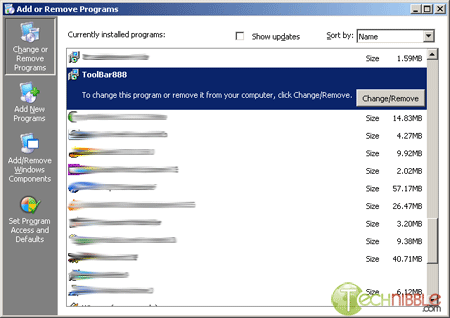
Press CTRL+ALT+DELETE all at the same time so you are viewing the “Process†Tab.
If you find any (or all) of the following (don’t worry if you cant find all of them):
- Update.exe
- goll.exe
- loadadv455.exe
- drsmartload.exe
- goll.exe
- two.exe
- vcncr.exe
- rorjxk.exe
- eyewblbby.exe
- cgqrvrva.exe
Highlight the name and click the button “End Process†to each of the above you find in the list.
Find and Delete The Following Folders and their Contents:
- C:\Program Files\Common Files\{28676FB5-0AE9-3081-1205-03030930003d}\
- C:\Program Files\Common Files\{38676FB5-0AE9-3081-1205-03030930003d}\
Find and Delete the Following Files with the Folder (NOT the folder itself):
In the folder: C:\Windows\system32\ (don’t worry if you cant find all of them)
Find and Delete:
- goll.exe
- drv.exe
- loadadv455.exe
- one.exe
- two.exe
In the folder: C:\Documents and Settings\[current user]
(replace [current user] with the name you are currently logged on as, don’t worry if you cant find all of them)
Find and Delete:
- goll.exe
- drv.exe
- loadadv455.exe
- one.exe
- two.exe
In the folder: C:\ (main level of C drive, be careful here, don’t worry if you cant find all of them)
Find and Delete:
- goll.exe
- drv.exe
- loadadv455.exe
- one.exe
- two.exe
- drsmartload.exe
Update your Antivirus with the most current virus definitions and run a full system scan to clean up any remaining files. If you do not have any antivirus software. AVG Free is a great option.
You may need to reinstall MSN Messenger again.
Session expired
Please log in again. The login page will open in a new tab. After logging in you can close it and return to this page.
Help i couldnt find any of the files that you meniioned apart from toolbar888 avg always claims to delete it but it doesnt iv deleted the part which sends out the messages in safe mode though.
thanks fuzzyshan
Fuzzyshan, Try deleting the file that AVG cant delete while in safemode.
Ben, your problem doesnt sound like this virus. It sounds like your DLL’s became unregistered.
There are two ways you can fix it. Download and run this to fix it automatically or you can read this site here to fix it manually.
g’day mate,
I can’t sign into MSN or windows Live, and none of those files i could find and i didnt have the toolbar 888…
do you know what i can do to fix it..
whenever i try to sign in it say that there is an error and the error code is 80072efd.
Thanks,
Ben
“@[fwpscript]Version:01.03.02.07|Icon:none@[/fwpscript]”
My msn buddy says she gets this message come up everytime we are in msn text mode when I sign out. Can you give me some further information as to what it is? A virus? A worm?Sure hope not!! I am brand new to this pc game. I am running Norton Anti Virus all the time.
TY, Sandy
hey thanks for the pointers, but i couldnt find any of the files and i dont have the toolbar 888, but i do have the…..well whatever it is because i can only sign into msn for a few minutes before it sends out those messages to all my contacts again, i have swprt my computer about 5 times and norton antivirus tell’s me i have nothing??? what can i do?? thanks for all your help
kaitlyn
While using msn and talking to a brasillian woman, I opened a zip tha read: C:foto_celular.zip
This is a virus that nudges the other persons computer and sends this file to be opened to infect the other computer. How do I get rid of it on my computer ?
Rick…
oh..and I have a trojan called: C:windows.osystemhaha.exe
How to fix?
Rick Quint, the trojan you have isnt this infection. Your best bet is asking this on our forums here: https://www.technibble.com/forums.
Thnx for pointers did what u said then when i got to the deleting files e.g * goll.exe
e
Couldnt find any of them.I deleted the bar888 file
my anti virus still said i still had the virus. What else can i do and does the virus affect the computer or just messenger?
i still had the msn virus,please help me take out,thanks.
thank you!!! i love you “Bryce W”
I am using yahoo messenger but my buddy gets this message after I have sent my first message: “@[fwpscript]Version:01.03.02.07|Icon:none@[/fwpscript]. What must I do ?
Our old Windows ME system has just received this virus through MSN, and we are now unable to boot – it goes to a blue screen, even in Safe Mode ! Help ! Any ideas ? Can’t do the things suggested to de-install.
To be more-precise, I get blue screen (‘Windows protection error. You need to restart your computer’) when I try to boot safe mode. In normal mode it gets as far as the Windows splash screen then reboots.
everytime i sign in i will keep on sending this is this you or something like that to my friends and the next day my friends says that i gave them a virus. now my computer is really slow too. i couldn’t find anything to delete that was bad so WHAT SHOULD I DO???????????????
hey i seem to have the new msn virus. For a week now as soon as i sign in each time a chat request box pops up with the option of accepting the person- so they can see whenever i am online or not. I press cancel and close this request so many times but then when i open a chat window after 2 minutes of talking the window just closes and then i cant open another one although i click the option to open another one. i would then have to sign out and sign back in every couple of minutes with the request popping up as soon as i sign in each time. Please help this is frustrating A.S.A.P. Thanks a million
Also i am not seeing the toolbar 888 in the add/remove programs. And i am getting programs popping telling me they have detected trojan something or the other. forgive my ignorance. I hope this helps you figure out whats the problem. thanks again
On Internet Explorer i am seeing error404dns.com on Internet Explorer in the search results space
I dont have that virus bot everytime that i have a messenger window open and im talking to someone the messenger automatically sends a nudge and then sends a file named C:/foto_celular.zip
thanks Luis
Hey, I’ve got a virus extremely similar to this one, it was also passed on msn, but with a different link concerning “photo8” and “stupidorbeauty”
From investigating I found that two programs, “oo.exe” and “net.exe” start on running msn messenger and spam messages of the same link are sent to random contacts on the messenger.
Extremely annoying virus; anybody have any idea how to remove that?
I tried deleting the two programs several times, and it doesn’t have any extra program installed such as the toolbar888 mentioned above..
:( help please?
I tried everything you said, and didn’t find any of the files at all…….please help. I don’t know what I have, but things just keep poppin’ up..
mi messenger esta infectado con el virus c:/foto_celular.zip.
ayudenme a eliminarlo!!
porfavor ayudenmen mi pc esta infectada con el virus Foto_celular zip
hola !!!!
porfavor ayundenme a eliminr el virus C:/Foto_celular zip…por favor he hecho casi de todo
AYUDA!!!!!!!!!!!!
GRACIAS!!!!!!!!!!!
While using msn and talking to someone, I opened a zip tha read: C:\foto_celular.zip
This is a virus that nudges the other persons computer and sends this file to be opened to infect the other computer. How do I get rid of it on my computer ? :S..
i have the problem for the photo thing coz i accepted it(stupid) and i want to know how to get rid of it please!!??? i want to no how to get rid of it without having to pay for anything
josh, did you try the instructions listed above?
I couldn’t find any of the files anywhere or the Toolbar888 and everytime I open msn Norton AntiVirus says there’s a virus and whenever I login to msn it starts messing up my computer can anyone please help?!?!
For those of you with Foto_Celular.zip, Try downloading this tool:
https://www.technibble.com/downloads/removal-tools/Foto_Celular-Removal-Tool.exe
It is untested (use at your own risk) but should remove most of the known variants of foto_celular. Please let me know if it works for you.
I don’t know if I have the virus or not but most of the time it won’t allow me to log on despite the fact that I have hotmail.com running ok and everything else. Is there anything I can do to fix this problem?
Tina, that wouldnt be this virus. Its just a standard networking/connectivity issue. It will give you an error message/code of why it cant connect. If you post that on our forums located here then we can help you out with it.
I couldn’t find any of the things in your instructions, although my virus had very similar qualities to the one described. observe:
http://www6.xxx.x.imsector.com/m.php?m=ianukem@msn.com those ur pics? (link edited)
can you help
i have the exact same problem as Ikenna. Would appreciate any help I can get. Thank you so much.
Ikenna, can you please send me the full URL of the virus that you go though our contact form: https://www.technibble.com/contact-us/
I’ll infect one of my test computers, see what the virus does and come up with some removal instructions for you.
[…] » How to Remove MSN Virus Project 1/ Generic2.EXO / Backdoor.Generic3.SAT – Technibble – A Resource … Might help you. I remember the virus and at one time had the cure on my personal site. Alas I don’t have it anymore. __________________ k. […]
Another machine infected by this virus. Thanks for looking into this. I look forward to any help you may be able to offer.
Apparently this is a serious problem in China. http://www.shanghaidaily.com/sp/article/2007/200706/20070602/article_318161.htm
They mention “The self-replicating Worm/MSN.SendPhoto”.
Symptoms:
* I have noticed that it modifies the HOSTS file to prevent access to many antivirus/antispyware sites.
* Also causes msconfig and Process Explorer to terminate.
* It appears to be brought in by the startup programs, because if I use SAFE mode, or if in SAFE mode I use msconfig to turn off all startup programs, the symptoms I have described go away.
* Also, I am very sure I had system restore turned on, but it is now off, so I cannot restore to a previous state.
Unfortunately it is my daughters laptop and she didn’t do regular backups, so there are no copies of the system state. (I have been able to copy her data off, so if I need to clean the machine she doesn’t lose anything but time — mostly mine.)
Quick fix found. I cannot guarantee that this removes all the problems, but it improves matters on my machine. I am reasonably computer savvy, but at a less detailed level than this, so please correct me if I am wrong.
The trouble maker appears to be c:\windows\system32\pmracv\services.exe. The program makes this directory HIDDEN, so you won’t find it with simple searching. I renamed it (in SAFE mode) and rebooted. You get messages at that point about being unable to find this program, but if you ignore them, it comes up fine.
The cause of these messages are LOAD and RUN entries in the registry. I would prefer to leave instructions of how to clean that up to someone with more experience than me.
You still need to clean up the problems I listed in my previous message.
* windows\system32\devices\etc\hosts will have mappings of security sites to 1.1.1.1. Just delete these lines.
* fix System restore to your preferred state.
* set Explorer/Tools/Options/View to show hidden files and system files, if that is your preference. (It kept switching these off, so that the PMRACV directory would not be obvious).
Hope this helps until someone wiser than I can give more complete instructions.
we roooooo com dti??
I have recently got the msn virus and i havent got the toolbar888 and the AVG anti virus software detects it but will not remove it.. Why is this?… I was wondering if i did a factory restore will it remove the virus ? Please reply back… Thanks
GOD, A factory restore will probably remove the virus but make you lose all your settings and files as well.
i don’t seem to have any of these files that i can find but when i start msn a file called WR-1 appears on my desktop thats an installer2 when checked with properties, i scanned whole system with nortons but says theres nothin the display for the icon of WR-1 is 3 boxes 2 on the bottom and one on top with a blue background anyone have any idea what this is…?
PLS…help me through this….
HOW TO REMOVE THE VIRUS THAT PREVENTS US FROM VIEWING THE HIDDEN FOLDERS AND FILES….please help me with this…
IF I GO TO “TOOLS>FOLDER OPTIONS>VIEW>SHOW HIDDEN FILES AND FOLDERS…it is not viewing the hidden files…please help me how out with this
Guys, why get stuck with MSN? There are so many free instant messengers out there compatible with AOL,MSN,Yahoo! etc, under the GNU, which do not suffer from viruses-trojans. I won’t say names now, I do not want to “advertise” any of these. But it worths trying installing one, instead of trying to find and uninstall a virus…
Hi, I must have gotten some kind of msn virus too cause once I login to msn after a while my whole pc freezes and if I restart it it keeps freezen after a minute or so after windows start-up. I tried safe mode and restoring it to an earlier checkpoint and as long as I dont login to msn everything is ok. I also formated my HD and once i donwloaded msn and logged in again the problem reappeared. I have now formated my pc for the second time but i do not dare to login to msn before I get a clue of what I am facing. Is this a virus or something?
oh, also when I formated my pc for the first time I used zone alarm to try and block anything coming through msn but that didnt help either
Giorgos, what your explaining doesnt sound like a virus. Its most likely an incompatibility between MSN Messenger and your computer. Are you using the latest version of MSN Messenger? If thats the one thats causing the problem, try using the previous version, if you are using the previous version and its giving problems, try the latest version etc..
Hi..ive been infected with a thing like this… but i dont have this toolbar888 and not any of those exe. When i log in on msn .. it keeps sendinf this webcam message to everyone on my list ..What cna i do to remoove this ?? please help mee
Cassandra
Cassandra, try our removal tool located here:
https://www.technibble.com/downloads/removal-tools/MSN-Virus-Removal-Tool.exe
i went to control pane and change or remove but i didn’t find anything that say toolbar888 what can i do
oh also this virus in my computer doesn’t send any document, it says the foto_celular.zip file cannot be found , but when i’m talking to somebody it opens the send a file to the person who you are talking and it just send a nudge. and i don’t know what to do please help me this is making me crazy.
When I talk to my friend it would say(after her first post such as “Hi”) on my end of the conversation:@[fwpscript]Version:01.03.02.07|Icon:none@[/fwpscript] I asked her what it was the first time and she asked me what I meant all she said was “Hi” I copppied and pasted and sent it to her, via msn conversation. As soon as I said it it said that she said it right under my post. Like:
Lucy says:
(my friend) says:
@[fwpscript]Version:01.03.02.07|Icon:none@[/fwpscript]
(my friend) says:
@[fwpscript]Version:01.03.02.07|Icon:none@[/fwpscript]
She couldnt see the strange message, but she could see everything else. My dad told me that someone was hacked into msn and sending and intercepting messages. Is that true?
Hi….
Got myself an MSN Virus yesterday, which seems different from those described above, and others I’ve read about. I have no ToolBar888 or any other problems, only that when I log onto MSN this virus starts a conversation with all ppl onlie. In 3rd msg it sends a file called either photo000, photos000, picture000, images000, album000 (000 can be any random number)I’ve searhed my computer for these files and it seems it keeps generating them. If I delete them, some new pops up after 6 minutes. So there must be some generator or smth, but I can’t find it!
I don’t know the name of this virus, and it wasn’t foud by the above mentioned removal tool :S
Help!!
Hi,
Some MSN viruses already removed by MSNFix
http://sosvirus.changelog.fr/MSNFix.zip
regards
Hey, when i try to use MSN removal tool it says that theres no msn virus but it still sends copies of itself to every online contact. So whats wrong ? :S
I just recently got a msn virus, it was sent from my friend. along the lines of this i forgot, “check out my volleyball team” and it sends me this photo72.rar i deleted it from my recieved folders and from my recylcing bin, and used ad-ware professinal SE that free downloable one and it didn’t find any viruses, but if i was stll on the latest msn it would open windows to my contacts and send them the file saying different things but sending a .rar files saying its pictures. and now apparently my brother said that when he restarts it says that there’s an error and the OS wont load. So i can’t go into safe mode would it work in MS Dos mode? and if so what would i have to do?
help ive got that virous above, i triad to remove it but it says no virous detected. i no ive got it because it maches the describtion abouve. it send a file to all my contcats online in a picture form. some of my contacts are infected to. Ive traid to unistall msn messanger but it wont let me also it wont let me turn my computer off correctly only if i do it by the mains. help
anyway am here 2 tell you that i ad the same problem for the photo thing coz i accepted it like a plank lol but i did get rid ov it and 2 do that is 2 do a ,”’system restore”’, date it back. and it did work for me
as soon as i sign in each time a chat request box pops up with the option of accepting the person- so they can see whenever i am online or not. I press cancel and close this request so many times but then when i open a chat window after 2 minutes of talking the window just closes and then i cant open another one although i click the option to open another one. i would then have to sign out and sign back in every couple of minutes with the request popping up as soon as i sign in each time
hello
something is wrong with my msn, it keeps sending pic to my friends and i dont send them, it say “hey check out this pic of me in the beach” or something like that and then it just sends my friends webcam pictures. i have made a new msn, but it still send pictures what should i do? plz let me know bye.
Hi..
I hv d virus, tried d msn virus toolbar remover as below, but it didn’t work, it didn’t find d virus..
https://www.technibble.com/downloads/removal-tools/MSN-Virus-Removal-Tool.exe
Need assistance. Thanks.
RELAX!. JUST DO SYSTEM RESTORE AND ALL WILL BE FINE!
erm,how am i supposed to do the system restore?
Hey Everybody theres a new msn virus or whatever going around bout some zip thing it has a url or what ever n says have u seen this women maybe u no her have a look n if ya click on the link it f*cks ya hole msn n i was dump n did now i’m trying to fix my msn n if anyone no’s how to get rid of it could they message me at iceman-94-rocks@hotmail.com plz rlly i need get rid of it
the new msn virus still can’t be remove using the msn virus removal tool no use at all n all of them got the virus already n until nw still can’t remove it
Hey everyone.
Like everyone else has said, I have a couple of friends with a case of a MSN worm/virus. Most of them seem to have the same variation as Villium mentioned: sending a file (usually pic_###.zip, image_###.zip, you get the idea) where the numbers are apparently randomly generated. I’ve told a few of these guys to try doing a system restore to a point where they knew that they weren’t sending out the messages. Some reported cases of success and some didn’t.
I’ve seen a couple of posts with utilities and such, but not all of them address which problem they are treating. Could someone (preferably the Admin) list these in a following post, specifying which one treats what (and especially if it treats this problem)?
Thanks in advance.
Thanks a lot for the help, used the removal insructions on posting 30 and just like that the nasty virus was gone. I spent a week trying on my own and one click finally did it. Many thanks, I appreciate you guys so much I was about to delete everything on my pc and you’ve saved it and my sanity.
Thank You Keep up the good work.
i can’t do anything of that can u do it for me please
my laptop is infected with this ‘haha’ when i used my thumbdrive in one of the desktops in the school.
now, i cant seem to find the whatever files that this site have listed. what should i do? i downloaded all the removal tools suggested here but to no avail.
need help
i used avg to scan and it deleted the ‘haha.js’ file. i dont think that my laptop is affected with the msn virus but after the file is erased, i cannot click into my c and d drives anymore. This is inclusive of my thumbdrive too. i need help. i cannot format my laptop because i have important assignments in both the 3 drives. can anyone give me a solution without having to format it entirely? please and thanks.
nanen
I used the tool and it didn’t delete anything…
Phil, try doing it manually.
There is a new virus… it sends zip.zip without any text and in the Task Manager, wscsvc.exe and tzvusxkgaswh.exe or any random letered .exe appears…. i tried deleteing both but they come back… scanned and nothing…. update the msn scanner for it?
I have an MSN virus, it sends messages to certain contacts saying things like “check out my new pic” or “Do you think I look fat in this pic” all the messages refer to pics. When I’m online on MSN…my curser disappears and my contact’s “pop up” like for a second…when it’s over…all of them have these messages from me that I didn’t send! Any advice?!
The virus i have is called trojan.pandex and my norton internet security always says that they have blocked the virus and that my comp is secure, but after that i am never able to go on internet. i cant find any o the things you said to delete up there. I need help cuz im seriously spazzing out.
please help
how can i removethe MSN virus in my computer
i’v got same problem. “check out my new pic” or “Do you think I look fat in this pic” all the messages refer to pics. When I’m online on MSN…my curser disappears and my contact’s “pop up” like for a second…when it’s over…all of them have these messages from me that I didn’t send”.there’s any new anti virus for that?
HI,
I have this virus that everytime somebody tries to send me a pic or a file it restarts my MSN,,please guys help me solve this problem..
thnx
ok my friend has the same problem but… my friends one if kind of werid cos we went to the same schholand then it goes check out our old school pics well i open it and then my avast anti virus sais warning deleting this filr it has a virus well same on my lap top wich has norton ani vir 2007 i tried tot ell them but it wont work and anyway with the ‘“@[fwpscript]Version:01.03.02.07|Icon:none@[/fwpscript]’ thas a hacker problem on msn servers i tried emailing microsoft but i keep getting from them what are you talking about? but now since the last 5 days its stopped.!!! oh yer
ok now i know what wrined my computer 6 months a go thx no im carefull
i have the same stuff going on as ivke, but i havent accepted the .rar file? any solutions
i know of a few bad msn virus’ and i have fixed my own and friends probs many a time and now i’m willin to help you guys too, i will post back with some more help for you all, but i read posts that were not even related to msn, so if you have a Blue screen , or msn won’t sign in or you can’t boot to windows properly then redo your search for that prob, but i have some good help on the way and i will chat with an admin of this site to see what i can do on this site for you guys. until then read some posts and use msn carfully, buhbye
Are there any other files that need to be deleted? I also downloaded the new Msn virus removal. It said that there weren’t any known Msn virus files. But my computer continues to send files to the contacts on my list. I want to continue using Windows Live Messenger. And I haven’t found any of the files that were mentioned on here in my computer. ?! So, are there must be more files?
For the virus/trojan that sends msgs to ur contacts on MSN I used AVG antivirus. The free one. I did a scan and it’s brand new now. Found the trojan removed. Rpoblem solved!
I faced the same problem as what Totu said (4th Nov 07). Eventhough i used AVG Free (Dora said – 9th Nov 07), MSN virus still can’t be removed. Anyone can help?
my problem is that everytime i log on to msn it asks a question to all of my contacts like “hey can i use this picture of us on my display picture” and then asks for a file transfer but it seems to not affect my com in any way any help?
how to remove Haha.js virus from my external hard disc …i cannot open my extrnal hard disc coz infection from this virus ..i try clean the virus use AVG update anti virus still cant remove the virus
A msg keeps getting sent out to ppl on my list. ie: check out this picture of us. Im sure its a virus! How do I get rid of it?
I have the msn virus but i dont have the toolbar888 or any of the files it says to delete. i tried using the technibble program but it says i have no viruses. my msn is still sending the virus messages to my friends tho. i dont know what else to try.
This is why i love mac… but hate when others i know get these viruses and it keeps bugging me… have fun dealing with this everyone :D
Ohk.
I thought i had some sort of msn virus. It sends a message to all my contacts telling me i changed my hair, to read some guys shirt or that i dont like my picture on facebook or myspace. But when i used the msn virus removal tool, it says i don’t hve an msn virus. Then what is it ?
hmm, my friend recently got a msn virus that comes as a .zip file and once opened it start sending itself to everyone on your contact list. When he got it was named pic08.exe but it rename itself. Know what it might be?
i cllicked a link on msn, the link said you can see who has blocked you i clicked it like and idiot, and now i have the virus.
any way i can get rid please help.
I seem to be sending ppl links and stuff and its all virus i have run all i can through comp please help me to get it off my msn fang_out@hotmail.com
i dont even know its being sent
i just realised that number 96 on this is the same thing i cliked on bloody hell what a knob i am
ok guys if your gona use AVG you must use it properly. install AVG and then run a “boot scan” which means it will restart your computer and scan your whole system before it reaches windows therefor being able to clean every nook and cranny this has removed the virus for some people but others are SOL! for now
also check your received files or “My Received Files” for something that is or has .Zip on the end that could very well be your virus. note to be followed, do not accept anything in another format other than .jpeg .mp3 .bmp .jpg these are known and safe :P
msn virus removals are usually made to remove this virus or that virus and were not made to remove all the virus’ so the safest way to get rid of them if they are the .zip or .exe virus’ is to “boot scan” your hard drive with AVG to remove them… and do not accept .exe or .zip or .rar unless you know what it is forsure
Re Postings 96 & 98
This is not a virus. You have probably followed a link ‘Free stuff for you’ supposedly from a friend through MSN. Then you put in your username and password to access a site that also supposedly would tell you has blocked you on MSN. Well you have provided your username and password to a complete stranger who is now accessing your mail and using your MSN to send more links. Go to your hotmail account and change your password. It may be an idea to change all passwords. Tell your contacts to change theirs also. That should sort it.
I cant find any of those gol.exe and stuff but my friends say i caught a virus that says i think this picture is terrible but dont show noone and it sends them this photo 646 thing plz help
hi a friend messaged me and there was file download. me being to trusting i clicked on the link. I asked my friend what the file was and she said she never sent me anything. now some of my firend on my list are getting these fransfer requests from me. they said hte file names keep changing. pls help me and tell me how ot solve this problem
Yesterday I was stupid and accepted and ran a file that was offered to me by an im that asked me if i wanted to see her pics before she put them on facebook. Now my msn name is doing the same thing. Any suggestions?
my msn is doing the same thing like everytime i sign on it sends everyone on my contact list that appear online a mssg saying something along of ” does my hair look to dark in this pic” ” i made this pic in photoshop do u like it” or msggs along the line of pictures could u plzzz help me i dont know wat this is or wat it comes from and most importantly how to get rid of it – would appreciate help:(
this is Big Problem of MSN virus names image2007-12.zip. without my authorization it opens the window of the contacts from msn and send then this zip file infront of me and i am handicaped to do anything accept shut it down from endtask window the entire Window messenger.
Do anyone have solution for this
THIS WAS NO HELP AT ALL I CAN’T FIND ANY THING UP THERE AND ITS TOTALY SCREWING MY COMP. :@
ok… i have a msn virus that’s sending zip files saying “omg is that you” or “my eyes are so crooked on this photo” to my contacts and while doing it virus signs me out. i tried to remove it by changing my password a dozen times but it’s not working. it’s very annoying… please help!
thank you
i have a msn virus thats sending people zip files saying “omg is that you” to my contacts and i cant get rid of it please help! im getting moaned at by them
Hey guys, got the gey msn virus on my computer, downloaded the msn virus removal tool but that didnt work, tried the readme thing at the top of the page that didnt work either, the link that i accedentaily click was some think like this, click here to see who has blocked you on msn. hope someone can help me out. cheers guys
yea everyone on my list is saying, man u got some annoying virus tht keeps sending me stuff, i havnt been on for a week, but how do i delete it, jus gimme a link, NETHINGG, k thx
i’m not sure if i have the virus or not. I got a message sayin r these you pics? and a link beside it. I clicked run. A few hours i kept sending it to everyone else. But after that it hasnt been doin it.
Do I have it or not??
If so how can i delete it
I also clicked on the link which said…”Found a picture and it just looks like you” now I’m sending different messages about pictures and diamond necklace an ebay, I have no control of this and have no idea i’m doing it.HELP!!!
hi i have got the picture virus but i deleated all my pics and stuff just in case and the toolbar but it still have the virus so how do i get rid of it cause it is reli getting to me now
hey i got the virus;
[cause i accepted it]
it apparently as other viruses to download
and overthrows my administrator abilities
on windows account.
[i cant download ANYTHING or am prompted to let anything access the internet]
facebook-pics!.exe
andd many more trojans
help?
i got this virus too I HATE IT i have tryed like 5 different ways to get rid of it and none work i don’t even know i am sending them i got it from my frinds boyfriend and he said me some thing like: hey i found your picture on wwww.hotornot.com. then he sent a file, thinking it was a picture i acceped it and now i have had it for 3 months and my frinds are geting annoyed i keep sending them it like my frind said that i said this before i sent it: look at the pretty sunset in the picture. and then i sent her the file. its so stupid! if some one could find away that accually works then i am all up for that i wiss be so happy! so please help!
I dont have toolbar888 either, when i sign in msn it flashes up my contacts but then they dissappear so i dont no who it has sent the virus to. it seems to have stopped but can it just go away like that? My computer has said it cannot detect any viruses. help x
This virus is a real pain!
It keeps sending all my online contacts messages like:
“Someone took this picture right before I passed out…”
“dang, this person really looks like you! ”
“You get any action on New Years? I sure did! ;)”
“Just got a new webcam, the picture I took looks great! ”
“Do you think i should have sex with it”
“Does this profile picture look too dodgey”
It also keeps sending a zip folder which is called ‘new pics’.
How do we get rid of this, i’ve tried downloading the tool above but it says i have no viruses on my msn, which obviously isn’t the case.
When it sends the random messages, your computer freezes for about 10 seconds and you cant move the mouse, it then closes all your conversations and you have to sign out of msn and sign back in.
I cant find the toolbar either which it ays to delete….?
Any help would be greatly appreciated
thanks
DOWNLOAD SOFTWARE FROM AVG. FREE DOWNLOAD, JUST MAKE SURE YOU DOWNLOAD THE NEW UPDATES!
Ive just found 3 trojan horse files, one of which is Pic20.
Hopefully this will sort it!
Good Luck!
x
i keep gettin my m8s tellin me that my msn accounts sendin foto’s(virus) askin if i look good in these underwear? help get rid of it please
I just got an virus, donno what it was really, but when the chat window came up it said “look at my pitcure… http//.www…” you know what I mean. But i have looked all over this, and nothing is the same. but now after 10 min Norton found the files. Ive started a scan, but nothing so far. How can i be sure of that its gone?
hi im having the same problem as all theese people to its like zip file with things saying here is my new msn pictures i have tried to everything you say at the top but nothing seems to be working…please help me its driving me mad and i dont know what to do i have a anti virus and used a scan and stuff but its comming up with nothing..
GRRRRRRRR knew i should have never clicked on that file stupid me please help im in desperate need and going insane
Thanks kim x
Administrator.. will a system restore help to solve this problem completely? Will it leave my regular files i use for work (word files etc) on the computer?
hey today i got a trojan horse virus via msn.
my friend had sent me a picture in url form.
when i clicked on it it came up with a file.
and i stupidily accepted it.
“Hey, is this your picture? http://www.msnimages.net/images/viewimage.php?”
that was the message i got.
i was wondering what i could do about this. as now i cannot use msn.
i clicked on the program above and i let it do a test, however unfortunately it did not fina anything to destroy.
do you have any ideas of what i could do instead?
please get back to me asap
thanx for any help
Please could someone help me.
Last night I stupidly opened the virus that people have mentioned here which was along the lines of “hey is this your picture” and then had my email address attached too.
The upshot is my pc went totally black screen on me and when i reboot it comes up with the message “Error loading operating server” and a flashing cursor. If i press enter it asks me to enter a password.
I can see the instructions here of how to get rid of the virus but how do I get into my pc to be able to do this?
Thank you
Elizabeth
:-)
k.. have dat virus where it sends randomly to ppl.. the one i have is “is this picture to KINKY for my myspace” lol although i find it very funny , it is far from it.. i tried what u said and the virus removal tool says i have no virus blah blah blah .. uve read em all jus seeing if i cud be the lucky one to some info to guide me thru it(y)
Hmm, I’ve seen two other people with the same issue as the one I have. A friend of mine has this also, but he sent me a link yesterday saying check this website to see who has blocked you. This is one of my closest friends, so I figured eh ok. Blam! No sooner then I do it, another friend ims me saying, You’ve been virused. He tried to help me by finding it, but as I read this site. The two other people had failed to mention one thing, and that is, while logged on to MSN, it will kick you off and your computer will tell you that you have logged on from another computer click here to relog on this comp. Also, I turn my computer off at night, and it seems that someone or something logs in on my MSN and sent something to another friend around the time I KNEW I was asleep. So I am going to run through all my sites, that I have been on since this has happened, I am going to change my passwords, and hopefully, this should work. If there is anything else that you could possibly think of to help by all means. Spam me with it lol. Thanks in advance and I hope that others who have this will somehow get directed to this site.
Make that 3 people Gemini. It’s exactly what ‘s happening to me as well, & I’m on a MAC!! Get the same ‘blocklist’ text from a contact & then get kicked off saying I’ve logged somewhere else, & then it gets sent to my contacts aswell.. Bastard thing this..
my msn sends or zipped files that say random things like” check out my new computer” or ” like my new hair colour” and it sends them with zipped files…. what is this?
umm i have this hotmail virus that i cant get rid of if any one can help it would be appreciated
there is another taht acted similar to this one. TrendMicro picked up the Trojan it did not show up in any of the other files above but was found in C:\WINDOWS\systems32\drivers\etc\hosts
this is after I reloaded MSN/Yahoo and performed the above scan twice.
[…] for removal This tells you how to remove it
[…] sort of virus, just read the other post instructions here for removal
Another good removal tool that gets rid many of the MSN viruses is http://www.msnvirusremoval.com
For those who have gotten the blocked list thing. I do agree with the help stated a few marks above. I just changed my password to MSN and any other important site I logged into when I had the issue. So far as of now, I haven’t had anymore problems. :D
Hi
I recieved a file from a friend that said this looks like u. I clicked on link it said unknown publisher but i ran it anyway. I have tried doing what is said above but there is no toolbar 888 or any of the files that it says. It has sent the link out to my contact list. I dont know how to get rid of it . Please help
please help! i know this is the virus i have and i want to delete it but i cant even turn my comp on. It turns on but it continues to restart over and over again i tried to go in safe mode and the one about the last working networks but it STILL continues to restart over and over! what do i do?
i had this virus too but i just held f12 or sumthing to go into recovery mode and theni fixed my computer from there on.If This Dosent Work Then Just Email Me At kk111999@hotmail.com
i have found that sometimes when people log on then send you a link then says thumbs up or wink or sumthin.
If Someone Can Tell What This Is It Would Be Really Helpful!!
o for my last message thanks
i have this and yet everything you have suggested isnt working and ive tried everything to try and fix it and im starting to get to the point of throwing my laptop out the window can some one please suggest something that will actually WORK
im having the same problem has carmen
My girlfriend clicked on a link from msn. It came up this kind of looks like you and we got hit with the virus. Now my laptop won’t even start up. I turn it on and it comes up error loading operating system. I have a dell latitude. How did I get back up and running and get rid of this?
Thanks
Garett
garett_leaman@hotmail.com
[…]
For those people who still have the virus, go to http://www.msnvirusremoval.com and download MSN Photo Virus Remover. Run it and it should clear the virus out for you.
thanks. Yes it worked for me and i recomend it.
JUANA L.
http://www.uyumsuzluk.info/list this is the new msn virus it sends u to a block list does anyone know how to remove this one?
yea i have the same viruse as you sil, and then it sends out messages to all your contacts with random URLs all the time, even when your not online, does anyone know how to get rid of this one?
[…] How to Remove MSN Virus Project 1/ Generic2.EXO / Backdoor.Generic3.SAT […]
^ That doesn’t work for me. I don’t have a ToolBar888 on that change/remove list.
And I downloaded that MSN Photo Virus Remover from http://www.msnvirusremoval.com but it said I needed to be the administrator of that account or something while it was searching for the “registry” something.
Can anyone please help me? I have that one where I typed in my msn address and password on that “block list” website and now my msn signs me out and then something signs back in by itself and sends the same link to people in my contact list with a little wink emoticon after it.
Should I just change my msn password will that work?
Please help!
Hey guys,
I got the same bloody thing as Michael n a few others..it sends a weird link with a smiley wink at the end n when u click on it it takes you to this “See who has blocked you” page and when u key in yout email and password u get signed off saying “you hav signed in on another system bla bla bla” n it loggs you off and at that time if u sign in again it sends the same bloody link to my contacts..I hav done everything fr the removal tool to even reformating my laptop..didn’t work..wat else can i do..PLEASEEEE HELP MEEEE!!!! Really annoying!!!!
Ben
Yes … I get That Msg too … same as Benedict … My mate keep sending me wierd msg , and i did send too .. dammit , help plz !
[…] using this tool. Download, let it scan and remove the virus. If the tool doesn’t work, visit Technibble.com for a manual removal […]
Ok, i was also stupid enough to open this link, but mine, flashes, and i see snippets of the people its sendind it to (like a flash) of other msn users and u see a flash of their chat window… i have tried the automatic , and it doesnt detect it, i dont have the toolbar888, and what MANUAL option is there..? does anyone have a way of getting rid of this, without it seeming impossible?? I would really apreciate it if someone could help me…=(
I too have the same problem. I could not find Toolbar888 or any of the .exe files. I have tried many Anti Viruse programmes and all say i dont have anything. Yet i can only be signed into MSN for a few minutes before it sends this out to everyone.
Please can someone help me. I work for GameSpy Arcade / IGN Entertainment. I have alot of staff and clients on my list. Doesn’t look good me sending them a virus…
Any help would be appreciated.
[HELP]Lisa_Huggles
Official GameSpy Arcade [HELP]er.
I run the stupid is that you on the photo. After a while when i open my internet explorer maybe 30 minutes later i cannot open my internet properly and i get a blank screen. I also don’t see ant Toolbar 888 or any other programme mentioned on the internet toolbar when i before 30 minutes. I left this page open for some time so as not to lose this page.
Administrator…Please help me..I’m going to lose all my friends..They’re all annoyed as i keep sending them this stupid virus.Some messages r even attached along with the pics like “Hey,is this your picture?”, “You look sexy in this picture”, or “Please try this sex picture”
OMG!and everytime my comp send the virus,the control freeze for a while.i tried many antiviruses,and they all say there r no virus in my comp..
and one more,my problem seems to be the same as Josh.When it freezes,i see flashes of msn windows of every online contact.it disappears very fast..Then my friends start to blame me.I found the ‚¬Å“Process†thing and deleted it,but can find toolbar888..Pleas help..Not free also okay…I’m tired of this..Has been almost a month
i recieved this virus and none of the solutions work in getting rid of it.
i dont’ have the toolbar or the other bit it tell syou to find and the manual option hasnt’ sorted it out either.
this is complete bullsh1t
goood day pls hel;p me how to remove this threat virus deteted althought i have stall the anti vrus but it always reflect the threat detected every tym iam going to open the cumputer.not only twice to show,instead i close.what is d best thing i can do to remove
I ran the msn anti virus thing at the top of the page and it didnt delete it, im getting really confused, it said no virus found and i still have the virsus.
HEEEEELP PLEASE X
Hi,
I am stuck with this virus on my MSN that sends a note to all my online contact: “hey, look at this picture from ebay. Its a necklace I want so badly”. I just can’t get rid of it…. is there something I can do?
[…] Then you can use the following article (there is a removal tool) to get rid of it : How to Remove MSN Virus Project 1/ Generic2.EXO / Backdoor.Generic3.SAT […]
For a more simple solution, visit:
http://www.makiek.nl/msn7.php
pourriez vous me dire comment doigt procéder pour supprime un virus qui ma étais envoyer par un ami a travers msn le non du virus et friends.iquebec
Hi all, yes it’s taken me two days to get rid of this virus and I literally did everything I could! Ok first of all anti-virus does not pick this thing up as it is classed as a worm. The file does get passed on to all your msn contacts! Basically delete all your msn files and clean up your registry. Here’s what I did, and just to say all it does work if you can remember the file extension that you downloaded, now mine was a zip file! Here goes. Click on the following on your pc:-
START, then goto SEARCH. Click on ALL FILES AND FOLDERS. Where it says all or part of the filename, type in .zip.
Where it says Look in, make sure it is your C: drive.
Underneath that you will have more options for e.g MORE ADVANCED OPTIONS. You need to click on this and select the following:-
SEARCH SYSTEM FOLDERS
SEARCH HIDDEN FILES AND FOLDERS
SEARCH SUBFOLDERS.
Make sure the boxes are ticked. Then click search.
The file in question, would appear as another file and not the zip extension and basically you would find it going by the date. However the file would have your contacts name and the file extension attached to it. E.G. fred34565.xml
So even though it has downloaded as a zip file it becomes something along the lines of another file.
The best thing to do then is just delete it from your pc and then again, try and clean up the registry to make sure it has been fully deleted and you are free to re-install windows messenger again.
HOPE THIS HELPS!
if u have a msn virus just do a system restore it will get rid of the virus and let u use msn withput problems
hey i dont have the similar virus but ive accepted one of those foto…..(stupid)stuff and my computer is infected now im even scared of signing in because my sister tried signing in once and it sent all of our personnel stuff and my sisters password so now some one hacked into it.(her email) ive tried so many ways ive downlaoded your msn virus software and all the other anti-spware and virus and nothing changed plz can u help me i dont want to pay for nothing plz!!!!!!!!!!!!!!!!!!!! help me
Strange.
I just got the virus, and I wasn’t able to delete it from my desktop where it was saved…
I restarted my PC, and began to look at this page for a solution. I couldn’t find anything that this page told me to find, but I went back to my desktop and was able to delete the file I received. I emptied my recycling bin soon afterwards.
I tried to scan the file using both AVG and Norton, and it said it did not show any threat…And I have both AVG and Norton on scan, and I have yet to find anything that would be a Trojan of some sort.
A friend of mine was also able to delete it, but now she says she receives virus threats on windows explorer….I use Mozilla Firefox, and I haven’t gotten anything like that.
I did everything this site said including run that virus scan at the top of the page. Both it, and AVG can’t find anything related to this, and i could not find any of the files mentiond in C OR D drive. I was able to delete the icons off my computer & empty the recycling bin but that is all. There is no sign of it other than that.
I also unfortunetly do not remember the file i originally saved it on my desk top with, but i’m trying what Lisa has suggested, I’l see how that goes. This is really dissapointing.
I have had an MSN virus for a while now, I can not get rid of it, tried deleting MSN off my computer and re-installing it, I’ve tried loads of other things that these websites suggest, I can’t find ANY of the files that im meant to delete and its getting extremely annoying.
The virus sends every time i log in, change my status, when someone else logs in, when someone else changes there status, sometimes it just sends randomly, can ANYONE help, my anti-virus is plain rubbish and cant detect it and ive also delete all the zipped folders that came with it, now it only sends to some people but sends them it about 50+ times in one go…
Please someone help!
Laura
P.s. This is one of the things it says:
‘Laura Bradley (Solihull College) says:
What color do my eyes look in this picture?
Laura Bradley (Solihull College) sends:
Accept(Alt+C) Save As…(Alt+S) Decline(Alt+D) ‘
(It does say lots of different other things aswell so not just always ‘what color do my eyes look in this picture?’
Hello,
My MSN doesn’t work properly after the following message appeared in my screen which i clicked on it. The message is:
hey, is this really you??
http://images.aokhost.com/viewimage.php?=eleni533@hotmail.com
What am i supposed to do??I have used a lot of antivirus and antispyware programms and i still have the virus and lots of trojan horses.
elenious, i got that virus too. just search for it with avg if u have it. its recognised as Trojan Horse Dropper. Delf.AOY. if not kill the process. its msn.com. the process that is and also remove it from the registry and common files and also from the system restore
oh and also delete
C:\WINDOWS\Msn.com
Very important to do that
Norton and AVG did full scans for me and found nothing. My MSN hasn’t been acting up, nor have I seen any dramatic changes in my PC (though Firefox was going slow on G4tv.com, youtube.com, and facebook.)
I also just did a quick sign out/sign back in, and asked my friends if they got the random link…They said no, so I assume it’s gone.
Also, I don’t use MSN. I just have windows live messenger if that helps any.
Also, the MSN virus tool has not been able to find anything.
THANKYOU SOSOSOSOSOSO SOOOOOOOOOOOOOOOOOO MUCH! It work. YAY! This worked. U r wonderful. itsaid there was none but after that it stopped. YAY! THANKYOU. Ur the BEST!.
regarding virus related to this:
“hey, is this really you??”….
i think i’m infected with this virus… i immediately uninstall my msn and reinstall afterthat… and i realise that there’s some problem with my pc now!
whenever i click on START-> MY COMPUTER-> C: or CONTROL PANEL or even SYSTEM RESTORE , i cant access to any of the files/folder as the box closes by itself. what can i do about this?
ok i’ve solved part of the problem… everything seems to be working fine but whenever i load windows when i turn on the pc, there’s this msg that says: error loading C:\users\………dll
i’m not sure if i’m infected with the virus. i know that i clicked the link sent to me on msn, but nothing seems to be different. my msn is fine, and the tool bar that was mentioned was not installed. i’m currently using McAfee. i’m wondering if im infected at all.
-Hilary
Ok, I have look at the responses on this page but have not gotten one that explains what this is: @[fwpscript]Version:01.03.02.07|Icon:none@[/fwpscript]. It pops up each time one o my friends sends the first message in Yahoo IM. What is this?
Hey!
Think i´ve found a new msn virus on the web. One of my contacts sends me a link to a webpage while he´s offline with the following webpage: http://www.vvkoxhno.info . And now when that has doing it for some time it sends me a new message with his mail adress as a webpage! Something you know about? Heard it before?
Regards Tobias Johansson, Sweden.
P.S. People! Don´t press on the in the previous message!!!
al my friends say that i hav a virus sayin ‘look at me in this pic’ but when i download the msn removal, it said that i hav no viruses
help
Hey folks! have a lil probs here too….had some kind of MSN virus(kept sending itself as a pic) some time ago but spybot 00ed it :):):)
anyways now someone i know has got one too, telling her she s already logged in somewhere else when she tries to log in…it keeps sending it self too…
spybot doesn t work :(
i got a virus called ^^% %^%^^ %%%^ ^^^%%. i found its in system32 but i cant seem to delete it as its ‘in use’. need help asap plz
so the only way to get rid of the virus is to do system restore, reformat, or restore to factory settings cause theres a new one out that asks you to go to a site to find out whos blocking you then it puts a file on your computer that has 40000 infected movie link files in it. dumbasses
try http://software.techrepublic.com.com/abstract.aspx?docid=355340
a guy sent a virus to me it was some thing like is this a pic of u http://www.messengerblahblah.com/buzzipup@hotmail.com!? :s yeah unfortunantly i clicked on it and ran it when ever i start the compu up it asks to run the file with a webstie as http://www.livemessenger.com fake for msn and the path is C:\WINDOWS i have norton and AVG and i scanned with spybot and have nothing i just want it to stopcoming up on start up.
Hey I firstly downloaded the MSN VIRUS REMOVAL TOOL, and even with a successful download it did not find any msn infections or virus’s what so ever, then i tried the next following steps you reccomended by open up control pannel, add or remove programmes then searching for “toolbar888”.
But annoyingly i couldnt find that either! so now i am at a complete loss, and i still know it is there as all of my contacts repeatedly remind me whenever i sign on!
Please Help me A.S.A.P! I would be so appreciative!
thankyou for your time.
Need help all my friends say there getting a virus that says look at this cool pic of me, and the it comes up with downloading a .RAR file. Virus scan found nothing, The msn virus removal did nothing, friends are very anoyed and want me to stop it. If you got anything for me contact me at Timbats@hotmail.com, Thanks in advance
http://video.stream.idoo.com/video.php?=baby_rose_79@hotmail.com
dont click this, its a virus…its a msn virus spreader, need a hint on where to go to delete this from my computer, as AVG and various other anti virus tools wont stop it
i also have a virus on my MSN.. its a very weird one.. its allot like the “is this you on the photo” virus, but i tried following these directions, found nothing… a friend told me how he deleted is, and said the sorce of the virus for him was http://www.msn.com.exe. well my computer doesnt even have that. i tried getting a friend to give me the name of the file so i could do a search on it, nothing came up… later found out that each time it sends itself out, it changes its name… so i cant do a search for it. can someone give me some pointers, or ideas on what i can do?
after i posted my last thing, i went to sleep, and this morning i had an idea… is it possible to make a program that you download, and then it watches what gets sent out over msn such as one of these viruses. and when it detects one, it automatically tracks it to the source of where it came from? because it seems all these viruses send out right as you log on and such, a program could watch for that, and as soon as it find it, traces it… letting the user know. a program like this would make it easier.. wouldnt it? instead of having to create a new program, or upgrading one for each of these viruses?
@No one:
If you havent already, go to http://www.msnvirusremoval.com and Save the file MSN Photo Virus Remover then run it. Press start and wait to see if your strain is detected.
If it isn’t detected then download MSN Virus Info Gatherer, it will send a report to me and I’ll add your strain to the Virus Database.
As for your second post, it is definately possible to write such a detection method, and that is in the midterm plans for improvements to MSN Photo Virus Remover. However don’t hold your breath, we have many short term projects happening at the moment that should increase the detection rate and speed at which the Virus Database is updated. Also this method might sound straight forward in theory, but in practice can be rather complicated.
Anyway, if you need to submit an MSN Virus Info Gatherer Report, then do so asap as an update will be prepaed in about 10 hours time. Only submit one if your strain is not detected or if you still have the virus after the scan.
i had the same virus/work whatever antivirus wouldnt get rid of it so heres what i did went to control panel,user accounts created another xp user account like for example joe2 make sure its an administrator,then went to my computer C: made a new folder there and dropped all of my important photos,files into this new folder and then logged off my xp user account and then onto joe2 and went to the control panel,user accounts,change account and simply deleted the old account and it deleted all infectred files,registry entries without formatting,losting a lot of files,time took about 5 minutes :)
^take note only do this as a last resort because i think you need to shut off system restore so the virus does not duplicate you can do that by right clicking on my computer then clicking properties,then click the system restore tab and disable a lot of people just format when they become infected it does take less time if you have 2 partitions to store your data this is just something else you can try besides formatting
i also purposely infected a test machine with this virus it was rather simple to remove just uninstall MSN messenger,uninstall any IRC program like MIRC,then go here http://housecall.trendmicro.com/
it is a free online virus scanner,and choose delete for all infections this cleared it up for me quickly on my test machine.
i think the virus hides somewhere in the MSN folder and i uninstalled MIRC because it read an IRC trojan sorry for spamming the board just though i might be able to help :P
yes
[…] since there are a very large amount of virus’ for msn. However, I google’d a bit a found this How to Remove MSN Virus Project 1/ Generic2.EXO / Backdoor.Generic3.SAT – Technibble – A Resource f… I have not checked the authenticity of the recommended remover so use with care. […]
pleaase help me i have been infected with the virus and nothing is helpin my pc. it has it
i opened the file not knowing it was a virus and my computer got infected and i cant log into my messenger, hotmail or facebook i need help please!!!!
a few days ago i was on msn and i got message from a friend saying i found a photo of you on hotornot or something on that order..and it showed a folder with a zipper on it..well without thinking i clicked on it.. and now everytime i sign in it sends a similar thing to all of my friends that are on…or the same thing when i sign off.. and i tried going under control panel and removing programs and such.. well i did not find anything on the line that you were explaining.. and i to the start am not so good with computers and i dont think that we have an anitvirus program on our computer we used to (nortan antivirus program) but people required we took it off due to it giving viruses.. can you help me with this problem to remove it
help… i have the msn virus that sends out zip files to all my buddies, went through and did everything this article told me to do, didnt find any of the files of the toolbar888, and the thing i downloaded said no known msn viruses found
what do i do now?
Hi I seem to have the same problem as Cally & Sarah… to say I am getting fed up of downloading anti virus programmes and doing full scans is an understatement!!!!
I already have McAfee nstalled & have also downloaded & run crapcleaner,spybot, Ad Aware & a few others i have forgotton the name of, i have spoken to broadband security who are aware & have sent some more sites for me to try… so far no good!!! please someone help me!!! i really dont want to be stuck on the friggin computor for the rest of my holidays!!!!
Any ideas pleeeeease?
mega thank you people!!! xxx
i cant fond the toolbar
and the tool doesnt find teh virus but who i boot come a error projekt 1
and sry for bad english ;)
i cant start my computer anymore, it just gets stuck on the loading screen.
I do not have Toolbar888 but your pic shows XP, I am running Vista what do I look for and where I tried searching for the toolbar888 but came up with nothing. My messenger is sending the unwanted message, how do I remove it please?
its doesnt work ..
my msn virus keeps sending out the virus to other people ..
i tried your scan but i cant detect
norton anti virus scan also cannot detect ..
futher more ..
i cant start a conversation with those my com have sent the virus to ..
and ive already deleted the file ..
Hi. My msn is sending out links to everyone on my contactlist. Ive tried all above, nothing helps and no files mentioned found, not even toolbar888. I think its not an infection on the computer but msn itself cos i get it when i log in on my msn anywhere. Work, home, laptop or at a friend.. please help me.
Help appreciated.
When i talk to someone if i click on something else then go back to the chat or click on a diff chat it signs me out!
I had this virus, drove me crazy, some days were better than others, but on bad days about once an hour MSN would send the file to all or some of my contacts and lock-up messenger, I had to sign out and sign back in. Myvirus program (rising) would not detect any virus. I downloaded the home edition of Avast, http://www.avast.com/eng/download-avast-home.html
then reboot and run the boot scan, it found it and deleted with no problem.
Guys, I have a similar virus…basically every 5 minutes it sends a message to my contacts (in basic font, not my custom one) saying something like ‘this is my dream computer’ or, ‘is it ok if I put this picture of you and me on facebook?’ stuff like that, then a link to a picture file, which is actually not.
I’ve lost 4 contacts because they got so pissed off with it, if any1 can help, then please do :(
Just yesterday I got a message from a friend telling me to look at his “vacation photos”. Thinking it was genuine, I downloaded the zip file (pic_973) and now my MSN is sending messages to my contacts telling them to download the zip to look at photos.
I’d appereciate any help on how to fix this.
Thanks.
to the last 183 comments: did you try reading the above instructions? -.-” Its titled ‘“How to Remove MSN Virus Project 1/ Generic2.EXO / Backdoor.Generic3.SAT”’ incase you cant find it… if this isnt your problem then your in the wrong place.
Hello there. I think the best idea is:
1) – Download a free antivirus AVIRA ANTIVIR (it’s a good one)
http://www.avira.com/en/download/index.html
or the best Antivirus: Kaspersky, a free trial (www.kaspersky.com)
– Download two free antispywares:
* Spybot (http://www.spybot.com/en/mirrors/index.html)
* Superantispyware (http://www.superantispyware.com/)
2) Update everyone of them
3) Desinstall every messenger (yahoo/msn)
4) Restart the computer in “safe mode”. If you don’t know how to do that:
(http://www.bleepingcomputer.com/tutorials/tutorial61.html)
5) Scan the PC for virus, malwares, trojans, etc.:
a) avira antivir or kaspersky
b) spybot
c) superantispyware
in that order
6) Save every virus report, if you see any suspicious files in the
report; some files with extension *.exe that whichever of the
antivirus/spywares mentioned above cannot read because the file is blocked:
“DELETE THEM MANUALLY” (it has to be *.exe AND suspicious)
7) Now restart the computer in “normal mode”
8) Install again the messengers (whatever you have)
9) [optional] You also can use a cleaner register like ccleaner or something like that
I hope this is useful, because that was I made on my cousin’s computer and I could fix it…
Sorry if you don’t understand my english… really sorry
check out the pics from the awesome party http://crazydinesh_21.crazy-party.info
i keep on receiving such mails…unfortunately i cliked on this link…and since then my msn keeps on blockinh and thus flashes..help plz
some one sent me and then .He immediatly sing out
ok well mine keeps saying all theese weird things like “does this picture make me look dumb, i wanna put it on myspace?” and then it will send a link
it annoyss me and i dont noe how to get rid of it
i dont have any of those things that it says to check for!
so.
I have the bot/virus on MSN but I hope
Kaspersky will KICK IT ASS!!!
I have that exact problem. But it doesnt say
‘ toolbar 888 ‘ help?
The trick is to not rely on Main Brand AntiVir software, try Kaspersky, eset NOD32, BitDefender Antivirus. Second trick is to use common sense… if a random link appears in a msg window, ask the sender about it, when was the last time you started a conversation with a link ? Third trick… DONT CLICK THE LINKS OR ACCEPT THE FILES.
As always when removing infected files;
1. Install the program and update it (program and virus database)
2. After installation, scan in Safe mode (see further on for how to)
3. Reboot if and when it asks you to. (you have limited pc use in safe mode – networking/internet etc)
4. Rescan your PC one more time, even if you have been told the removal was successful. (either in safe mode again, or normal mode)
Safe Mode
If the computer is running, shut down Windows, and then turn off the power
Wait 30 seconds, and then turn the computer on.
Start tapping the F8 key. The Windows Advanced Options Menu appears. If you begin tapping the F8 key too soon, some computers display a “keyboard error” message. To resolve this, restart the computer and try again.
Ensure that the Safe mode option is selected.
Press Enter. The computer then begins to start in Safe mode.
When you are finished with all troubleshooting, close all programs and restart the computer as you normally would.
Try Kaspersky first, as it usualy does the trick first time round.
Help, its not working, get it out.
my msn is sending pages with e-cards. with which antivirus can i remove it? this one doesnt work. can someone help me?
thnx
I did the chack and it said that i didnt have an msn virus but it still send the link to everyone, i also did a full McAfee check but that came up clean too. :S, What can i do?
Please e-mail me if you know how gemma_tovey@live.co.uk
please note that i have parental block because im only 13 so it needs to be a website that i can go on without the block. :)
I went to a website called http://www.f-secure.net which is a website that does a real time scan for viruses, malware, spyware, and adware. The wonderful thing about the site is they update their databases about once a week so they usually have a cure for newer viruses on the market. I ran this program in safe mode with internet explorer the program won’t work with firefox or any other browsers. I ran it for thirty minutes or so and it found 12 viruses and 8 pieces of spyware that my avg and adaware 2008 missed. After i shut down and rebooted i no longer had any problems with msn or my browsers. Hope this helps everyone
hej
har fått in ett virus som heter backdoor.win32.ircbot.aza och ett som heter trojan.win32.agent2.bcp. vad ska jag göra för att bli av med dessa? jätte tacksam för svar..
tack på förhand / linda
hello there, i accidently ran the virus :-(
and saved it, then unintentionally deleted the file, now what do i do?
i tried following all your steps but i didnt find any of the files mentioned above.. help!
I used the software you have there but it didn’t work (I coul installed anyway)
It’s the worst what happened to me ever! i didn’t found none file you say and I couldn’t fine the toolbar also, pleae help!
well!! i had the same virus up at the top of the page…and it said no virus’s were found…
which is not good…:@
I have the same problem with the msn virus. I tried the above steps but cannot find any of the files and it is still on my computer. Anything else I can try?
Please boot in safe mode (keep pressing F8 on bootup). Then make sure your CPU is not being accessed by winkey+r then enter cmd \n netstat) do not worry. Download superantispyware. Seems dogey, but not. Peform full scan. Install ZoneAlarm. Make sure to stay aware. Thx for reading.
It seemz tht thtz da virus i got buhh wen i go on control panel and then add/remove programmes derz no Toolbar888 :S
So how can i install it?
hey um i got a virus how do i get rid of it?
My AVG Professional refused to accept the down load and removed it from my system! What now?
Trevor
ye my avg wont let it to dwnld your tool it sees him as a threat and i can’t locate it from the goll.exe etc can’t find it what now ? pls help :'(
Hi , my friends tell me that when I sign out/offline they get a message sayin Im signed in on another computer ??? whats all that about Im not signed in on another computer ? How do I fix it ?
just go to this site and download a standalone msn virus removal, it is that simple!
http://www.msnvirusremoval.com/download/
The download link u gave us has a virus
I can’t find any of the files that u mentioned…Even while I’m not signed into my account my address sends weird files out to my friends… Please HELP… I would love to get rid of this problem
when I am talking to my friends on msn it closes the convo and then I can’t open it again I have tried the anti virus msn tool but it says there is no virus??????
I found this floder called “tracking” and I know it is a msn virus so I tried to delete it and it says it can’t because it is open in another program
please help
Hi!
If you want to avoid all this stuff you can just use http://www.meebo.com instead of the real messenger. I’ve been using it for a long time and I’m happy with it. :)
i sused the thing at the top of the page that your supposed to first to fix the problem and my firewall by comodo says the thing that just downloaded from you is a virus and malware so wht the hell are you doing to us on here or is that the response from the msn virus in my comp? so who do i believe and how does it get into my computer in the first place when i have never clicked on any of those links?
gone through evey thing you told me above and cannot find a thing anything on any part of waht you told me to do so what is wrong with my computer then if i do not have the virus and then why does it keep booting me offline and sending out the virus to my friends even on wifi it does this with a 100% signal? so what do i do now to get rid of this anoying thing? any help would be helpful…do not need to pay to get my computer fixed again..please email me back with some help and if you know of a person by the name of kyle wrightson he is partly responsible behind the spreading of the virus in the first place and tweeking it for to go into chain letters and he can be found on twitter site alot .. no security there for him to hack into your comp and steal stuff and add things even iof you have a firewall… and most computers come with windows defender and firewall it comes with your running system you just have to find it and turn it on..and this conflicker virus????
Hey guys,
ivé got the same problem, i had tried to delete the infected files in safe mode, but i can’t delete files with AVG in safe mode.
Hey!
I just don’t understand.:S Kaspersky and this program recommended above don’t find anything, but my msn is sending text to my contacts?!?!!??
hi i have looked throught my add and removed programes but that toolbar thing isent in it and i cant even find windows live messenger? so i went to look in downloaded items but rememberd when i downloaded it i paniced and deleted the contents of the downloads box. now i cant get this virous gone. do yoiu know any other ways or somthing?
last week on msn , my friend send me this link & i was completely oblivious i clicked on it. It showed nothing but a page that saus cannot view server or something likt that. my friend told me it was a msn virus –” therefore , now i have it. my internet is EXTREMELY SLOW & my msn keep on sending those links to some of my contact list PLEASE PLEASE help ! i have windows vista.
On opening windows messenger I had 13 of those messages, I closed them all and uninstalled Messenger and will not use it again,I have changed my password also on MSN, my thoughts are that for me to get those messages my friends passwords had to be used, anyway I downloaded your tool to run and Macafee told me it was a trojan, Generic!Artemis and it deleted it
Regards Cheryl
help!
i have a virus and i cant get rid of it.
and ive looked on my programs and theres nothing that says toolbar 888
HELP!! :S
The Msn Virus looks more likley to be a bothersome virus…also it is more like a spyware…so i tried some anti-virus but nothing the one you got does not detect it that good..so ive tried spybot search and destroy..it controls it but does not remove it…
I recently got the MSN virus.. and I don’t have ANY of those files you’ve mentioned, I really have no clue why, or if I still have it, because I’ve been told deleting your MSN will get rid of it, and I did several times, but I don’t know if I still have it or not.. :( I think I will run Ccleaner.. I have AVG, it didnt detect anything.. and I have avast! it detected something, I deleted that, but I think it was something unrealated.
Hey,
Virus is all gone! WHOOOOOOOOH!
It doesnt send porn links naymore!
toby how did u get rid of it. i get links of other people and my friends say that i send links to them to when i dont and i just want it gone :(
hey,
whenever i try talking with people on msn, it says: The following message could not be delivered to all recipients:
and sometimes if im lucky my message will be sent, but not anymore. msn does not work! and i dont know how to fix it:( any advice for me please?:)
hi, my msn keeps sending emails out to people in another language that i dont know.. also will send links to people for things like phones. scans have come up with nothing and i dont have toolbar888… any ideas? thanks
no virus, trojan or malware software programs will sort out msn messenger virus links, the reason being, is that although they will search every file and find it, the bug/virus renames itself as a legitimate msn file in the registry. and the programme carries on not realising it has been fooled. there are links on the web for specific ones, check your msn message history to see if you know which one it was. DONT do a back up or system restore as you are just copying the virus to another folder, if i can find the exact web page ,i willpost it here
for those that do find malware, viruses etc, that means you were infected with these anyway, you should alway run a virus and spyware program every cpl of weeks especially if there are processes you dont recognize or if your pc is not its usual self
i have this msn visrus pop up thing that seems 2 give a linbk to facebook but its messing up my msn so i cant talk to ppl any idea how i can delete or get rid of it
My vírus sends other links than any above… Does your thing work there too??
hi av the same virus as most ppl can any1 help plz
i cant find toolbar888 i dont think i have it but ppl say i do :|
hi,
well every time i log in to my msn account, all my friends always receive websites which i have not sent. What should i do?
now the latest msn is HOT! HOT! isexsexsex.com
i swear i didnt click any websites from msn or visit porn. and i did everything to remove the virus but it’s there. i did msnfix, msn virus removal and many anti virus but none scanned virus. and kept sending porn website to those who online. help!
[…] How to Remove MSN Virus Project 1/ Generic2.EXO / Backdoor.Generic3.SAT […]
I have an msn virus i accidently downloaded the file img5110.Jpeg-www.myspace.msnmy-pic.exe since it was from my best friend. It also said it was from hi5gallery.masnmy-pic.com if that helps
sad to say but = you Got OOWWND xD haha ahaha sorry but its funny couse i dotn have virus
hey yea I dont have anything you guys said to look up and delete, however my friends still say on msn i still send these messesage
trust me go google an doload bitfinder i tryd all an only virus scanned work was bitfinder..
I think I just got the f*cking virus by clicking a link with my friends’ e-mail in it, not thinking it was the virus as it hasn’t happened in a long time, and sent another message afterwards, and then it sent me to this place where you get buddy icons and shit for MSN. And now I think I have the virus but my virus scan doesn’t find anything, PLEASE HELP ME!!
This is a new computer, not even a year old and if I get a virus my mother will fucking kill me and I can’t lose my games and Photoshop, took me MONTHS to get it to work and I cant lose my music, took me months to rip from the CDs!! GAHH, HELP!!!!
Hello everyone, i’ve seen another version of this virus, its a virus which helps a hacker, more like a bug. Someone who has the virus sends you a link when it’s not actually them. The message and website is different all the time: come check out these photos of you, why areyou so naughty in this pic(for an example) If you click on the link there is two bars that u put ur msn address in and the other your password saying you have to log in to see photo. it takes your information, and now it can get to work on yours by sending links to all your online contacts. then your contacts fall for it and click on it and get the virus and gradually the virus gets spread pisses a hel of a lot of people of.
Hi..my window live messenger have a virus. When i log in the MSN, i will automaticly send message to my contacts. The message sent was ‘Is this your photo http://www.myspace.com********’. Do you know how to solve this problem?
My contacts has the same as above, they’re freaking out. Changed password doesn’t do anything.
Hey,i got this new msn virus in the form of a java applet installation. It’s freaking me out. None of the virus removal softwares work. Some help please?
Got the “who blocked you on msn” virus last night and it proceeded to send itself most of the people on my contact list but not all. I immediately did a virus scan on normal mode and safe mode and my computer found some infections, which I fixed, and now it’s not finding anything else. In fact, I don’t even know whether or not I have this virus anymore. I can’t find ANY of the files you stated and the issues many of the people here said they have (like being signed out of msn or re-sending the bug to everyone) is not happening to me. There doesn’t seem to be anything wrong but I know I had/have the virus. I think you should also know that I tried the link for your automatic virus removal tool and my computer went nuts saying that there was a virus in the link so I didn’t use it. You may want to look into that.
I downloaded the virus and NOD32 detected it as a unknown variant of a NewHeur_PE virus. Keeps on terminating and quarantining this file. Can you please confirm that this file isn’t a virus? my friend and I are trying to work on a solution to sort out pop-up problem – I asked him what was going on and he says I also send him the same link – the one that says is this photo of you on this website with a link on it and it says facebookprofile picture, etc…
sigh. Edit the above post. I didn’t even type in that I downloaded the virus – was supposed to be a file that I downloaded from here…
Someone I was talking to on MSN ‘sent’ me a link : limageshack.org/img/imgzms.org
I clicked it when I should’nt have*thinking it was Imageshack* and now I ‘send it to people
While Im talking to them on MSN.
Please tell me how to get rid of this!
Thank you, this has solved my problem with msn.
does any one knw how to find msn paswford or from where the person is talking i want to knw the exectly place he/she taling. some one stole my pasfor and i relly wnat to know who is that person plezz can somebody halp mee
i dont have the toolbar888 thingy on my computer :/
loads of people sent me a link virus thing and now whenever i go on msn ,my computer sends that link to everyone online and then signs me out :/
do you know how to get rid of this virus ? coz its doing my head in!
Help!!!!!
This girl sent me a link, and had this website on it, but it also had my email in it, and she said it was a photo of me… so i clicked it and now when i go on msn all these convosations are opening, and i dont know how to fix it!!! PLEASE HELP!!!
thank you so much! i was saved by your help! it works for me and my friend! once again THANK YOU!!!!
when i sign into msn after a while its signs me out saying connection loss this happens constantly even when i am connect what do i do?? HELP
when i sign in on msn after a short amount of time it signs me out, this happens constantly on then off. even though im connect what do i do? HELPPP!
acctually, this does not work, it helped me before but the virus came back
I recently got a virus entitled “fotos” now everyone in my contacts has the virus. Its extremely annoying and i need to know how to get rid of it. Ive tried deleting etc, and all my contacts are complainign about it.
I did the MS virus clean and said my computer had no virus.:(
Can anyone help me?
I have the same problem as Marta with a link with “fotos” in it which I stupidly opened and now it is sending it to my contacts and closing chat widows when I am chatting. I have to sign-out and then sign-in again to continue the conversation and then it does it again. It also puts up a window about publishing files online and sharing folders (which are empty when I check them).
My Norton does not identify the virus (it says there are no viruses), the microsoft malcious software removal tool could not find it either, I have uninstalled messenger and reinstalled but to no avail so presume the virus is in my laptop system somewhere, can anyone please help me?
hi i cant find maikek.nl user name and passwords.. someone can help me please??
re my post on February 20 I have found out runnung a microsoft tool the virus is a worm called win32/pushbot.gen!c but the tool could not remove it. My Norton says my computer is free of viruses and none of the three spy/malware programmes I have downloaded have found it. Can anyone help me remove this blight?
hey i got the same problem… i scan the comp n theres no virus… i cant chat with my friends coz as soon as they get the link with a pic the window becomes invisible…so i cant chat …cant find anything on my comp…ive tried to restore the system too many times n doesnt help// anyoneeeeeeee plzzz
lol just to say that ive sold it…god blessed me.. thanx AVG)))
God, I can’t believe that there is so many asses that fall for this kind of crap…
90 % of the people on this site shouldn’t even be allowed to TOUCH a computer… Seriously…
Neko, that’s why there are guides on getting rid of stuff like this.
this happens on facebook. everytime i sign in a message saids that i sent a link tomy friend about weight lost
Hey, I recently clicked a link a friend sent to me, only to find that she wasn’t the one who sent it. Now I’m sending them without knowing it. The link just sends you to Imagebucket. The link is:
http:img95.Imagebucket.com/img/gozium.jpg DONT CLICK THIS
Can someone help me out please? AVG cant find it.
really good my anti viruse software removed it straight away
i have a virus on my email address
I got this message “http://img-4.com/image.php?=(my email address)” and now my msn closes convos and freezes my computer… several of my friends recieved the message from me but i didnt send it to them… and help?
I got this message ” foto :D http://view-facebook.com/image.php?=(email address) ” and now my msn closes my convo and also freezes my computer repeatedly.. Please help!!
can someone help me please? becuz when i sign into msn it works perfectly fine. But then my cuzin sent me this link and it says foto =D and myspace…. so on. and then my email address at then end. I clicked into it and i had virus it lead into the myspace website. Now every few minutes the conversatipon windows flinches and sends the link to everyone who is on. I need to sign out and sign back in to fix this problem can someone please help? i dont want to pay big money to get it fixed!! =(
can someone help me please? becuz when i sign into msn it works perfectly fine. But then my cuzin sent me this link and it says foto =D and myspace…. so on. and then my email address at then end. I clicked into it and i had virus it lead into the myspace website. Now every few minutes the conversatipon windows flinches and sends the link to everyone who is on. I need to sign out and sign back in to fix this problem can someone please help?
thank you thank you thank you this is the first website that actually solved my problem bril!!!
hussain at the top of this page theres a underlined “here” you can click on. run that and it should sort it out – it did for me ;)
yeh iv used your tools for the wana see a pic thn foto thn emil adress and i opend it nd it sends this to everyone nd it keeps openin files and flashing them on and off and non of your tools help me please right bk
help please i cliced on a virus and now keeps on sending to EVERYONE ONLINE ! HELP ME !
i dont think i have the toolbar888 on my computer but it keeps freezing and when i try to chat with a friend on msn, it doesn’t work!
HELP!
did anyone find a way to fix this virus? its really annoying
I cant do it its soo complicated !
does anyone no how to unbug my msn ??
i could say hi and it will tell me to debug i’ll click on it but it will do the same again :/
i tried this virus removal on it and it says there isn’t one which is good but im still stuck on why it says its bugged.
how can people be stupid enought to not know it is not a picture?… lol
how can people be stupid enought to not know it is not a picture?… lol[2]
i not finding the tool bar and not finding it with avast and my friends angry with me for sending it for them plz help
i have a msn look a like icon on the bottom toolbar -near show hidden icons arrow but when i try to click it it dissapears. Now it wont let me to sign into msn messenger.i deleted Msn pologmy 8.0 but still cant log on? Not sure if have virus or not?? Any helpers?
Guys,
be aware of there is an option in MSN says: Automatically accept photo invitations. so even you didn’t click the link you will accept by default so be sure to uncheck this option.
and to do so go to Tools-> Options-> Messages-> look for this option Automatically accept photo invitations and uncheck it. that will disable accepting messages by default.
i dont think so… dont have the list too
can anyone tell me wads happening to my msn? i log in msn and the chat box auto blink and non-stop. i don’t know wads that but i try all the search on my destop but there are no
goll.exe
drv.exe
loadadv455.exe
one.exe
two.exe
can someone help pls =(
it can be ligemget about using a second form of msn / for the computer itself has a problem with the virus and NOT msn, can someone in here tell me what I can do to delete this fucking virus ????? ? it’s fucking annoying yes!
i got virus from msn contact list: cool fotooo.. :D http://tinyurl.com/pic92358JPG, then opened it, can u pls advise how i can remove it?
Thanks a lot for ur help!!!
yeah i think i’ve gotten a virus but this is a different up to date one, it says ‘w foto http//www.facebook.com/(your e-mail address) and then some random numbers after that. i first got it when i was talkin to my friend on msn and she kept loggin in and out and every time she logged in i would get the same link over and over again, but she never talked. and then i was stupid enought to click on it and save the file (supposite photo of you) and now every time i say something to someone or logg in, i send out the link, but i don’t even no im sending it out.and apparently i send it out even offline. is there anyone else who has this problem? HELP!
Thanks, thanks, thanks :D With a simple 2 clicks, I got rid of it. ^^
[…] Might work! Try this: MSN Virus Removal Software Other common MSN virus's and how to remove them: How to remove MSN virus "Project 1, Generic2exo and backdoorgeneric3sat! […]
Heey, I have an MSN virus exactly like the 1 described, but I cn’t find any of the files you mentioned, and the MSN virus removing tool insists i don’t have a virus, help?!
@Erica
I have this problem its so annoying!!
OI!!! PEOPLE I HAD THE SAME PROBLEM!!!
AND GUESS WHAT!?!?!? I FOUND THE ANSWER!!
So just to inform everyone, all you need to do is CHANGE YOUR PASSWORD!!!!!!!! :D:D:D
Just to increase the probability of the solution being noticed:
ALL YOU NEED TO DO IS CHANGE YOUR PASSWORD!!!!!!!
ALL YOU NEED TO DO IS CHANGE YOUR PASSWORD!!!!
ALL YOU NEED TO DO IS CHANGE YOUR PASSWORD!!!!
ALL YOU NEED TO DO IS CHANGE YOUR PASSWORD!!!!
ALL YOU NEED TO DO IS CHANGE YOUR PASSWORD!!!!
ALL YOU NEED TO DO IS CHANGE YOUR PASSWORD!!!!
and here’s a source: http://au.answers.yahoo.com/question/index?qid=20100415153009AAuTUoQ
hrmmmm this makes me really sad but what’s happend is the “hey, is this you in this pic :/” i have tried the thing at the top of the page but it says “no know msn virus was found” pleaaaasssseeeeeeeeeeee help!!!
http://www.msnvirusremoval.com/download.php
use that wbesite. Download the one on the Left.
Then Run it. It works!!!
stupid virus why did we all hve to click that dumb link!
that site is awsome thanks i think it worked
it did lol
erm hi.my msn virus is sort of different(i guess).it sends contacts links when i am both online and offline and i can see it sending the contacts links as it pops up and disappears.i changed my password but it is still not working.I NID HELP!!!!
None of it worked… I just can’t get rid of it…
and BTW… I’ve changed my password, done a full computer scan, and just about everything else… It’s not working…
Dude,
Your “”removal tool” gets flagged as avirus by Avira. WTF
My contacts has the same as above, they’re freaking out. Changed password doesn’t do anything.
hi, just wandering would all my contacts still be on my msn once i uninstall and reinstall msn messenger…..???????????
How come I can’t find it?(toolbar 888)I looked everywhere!
THE DOWNLOAD WORK I LVOE YOU@!!!!!!!!!!!!!!!!
I ran the msn anti virus thing at the top of the page and it didnt delete it, im getting really confused, it said no virus found and i still have the virsus. Our website is: http://www.cilekerotik.com
well every time i log in msn ikeep sending all my contacts the virus and its really annoying, then sometimes it wont let me talk to annyone all of a sudden so i hav to log out then back in again….all the instruction you gave didn’t work at all =( pleeaasse help my friends are getting annoyed
i have same problem but i cant find this toolbar thing i run my antivurs and it say i dont have a virus on my pc,
My MSN keep sending this link to my contact list to evryone who is online and and evrythin get frozen. ANY HELP PLEAS???
I have a virus I hate it because my friends have a go at me and then it crashes my msn! It says for me is this you in the this pic then youtube and then the person who Ive sent it toos email!
PLEASE HELP!!!!!!!!!!
i got this virus yesterday but i can’t find the toolbar888 and the virus remover on this site can’t detect anything along with my antivirus :/ please help because my msn won’t work and i send out the massages if i’m logged in :L
thanks
I got a virus when I opened a link and every time I go on msn it’ll send
Foto http://www.facebook.com/l.php?u=http://rawoils.com /fb/&h=210ad&=roger_bourgeois@hotmail.com
is there anything I can use to get ride of that virus???
I have download the remove tool however my msn still giving virus away