
How To Fix The Windows Registry Hive Error
Most techs with a few years of experience under their belt have probably come across the Windows XP corrupted registry hive problem at some point in their career. When it happens, Windows wont start and will present one of these messages:
- Windows XP could not start because the following file is missing or corrupt: \WINDOWS\SYSTEM32\CONFIG\SYSTEM
- Windows XP could not start because the following file is missing or corrupt: \WINDOWS\SYSTEM32\CONFIG\SOFTWARE
- Stop: c0000218 {Registry File Failure} The registry cannot load the hive (file): \SystemRoot\System32\Config\SOFTWARE or its log or alternate
In most cases, Safe mode wont work either. The uniform approach to fixing this is by getting into the Windows XP repair console and manually replacing the file with the copy that was created when the system was first installed. However, any software or drivers (depending on whether it was SOFTWARE or SYSTEM that failed) that was installed after that point may not work since the registries for them hadnt been installed back then.
Here is my method that I have been using to fix this. It reverts the registry to only a few days earlier rather than back to when Windows was first installed.
Note: You will need access to a working computer to create a boot CD. You will also need a fairly good knowledge of computers, BIOS and registry editing in order to do this. This article is aimed towards computer technicians.
1. If you don’t have it already, download UBCD4Win using one of the mirrors here. If you do already have it on a CD, skip to step 3.
To run it, create an ISO and burn it to CD you can read the instructions here. I wont write the instructions here because the ones on the previous link are better and this article is more targeted at computer technicians and most of them already have this CD.
2. Once the CD has been created, goto the BIOS and make sure your CDRom is set as the first boot device. Start up the computer with UBCD4Win in the CDRom and you will have some boot options. Choose the “Launch The Ultimate Boot CD for Windows” option.
It will take a few minutes to load fully, but when it does you should see a Windows XP like interface like in the picture below:

3. In the UBCD4Win interface, goto Start > Programs > Registry Tools > Registry Restore Wizard.
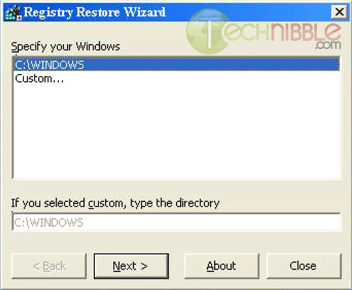
4.The program will then ask you which Windows registry you want to repair. In most cases, it’ll be C:\Windows. Choose the copy of Windows you want to repair and press Next.
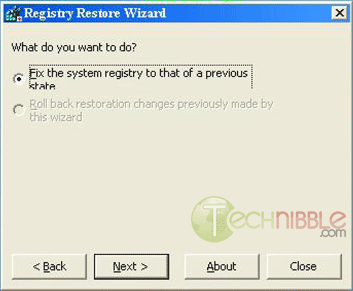
5. Choose “Fix the system registry to that of a previous state” and Press Next.
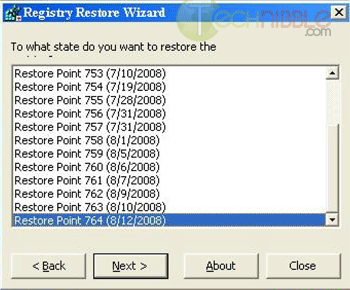
6. You should now see a list registry restore points. Choose one with a date a few days before the issue first occured.
7. Wait a few seconds for it to restore the registry. Press Finish and restart the computer. The issue should now be fixed. If not, it may be a sign of a greater issue like hard drive damage.
Session expired
Please log in again. The login page will open in a new tab. After logging in you can close it and return to this page.
I’ve used that one before (just once) and it worked like a charm! I highly recommend this to anyone who can’t get into Windows or Safe Mode.
Think I’ll rip out part of the registry and try this right now!
P.S. I love HP for that reason Koonter!!!
Cool. I’ll have to play with that one. I’ve used Super Utilities 2003 with Windows Preinstallation Environment with great success for similar things but I will definitely check that out because SuperUTL 2003 PE does not always work.
Cheers.
I found this article to be very helpful and resourceful. I had an older version of the UBcd4win and it did’nt have the registry restore feature. I just burned a 3.20 copy and I will be using this wonderful tool in the future I am sure.
BTW..
Please keep posting very helpful tips like this one. This is great stuff!
I just finished working on a case like this. I have run across it many times and have the repair down to 20 min so I totally underestimated what I was getting into. Everything was going smoothly until I boot into safe mode and get a BSOD. On a hunch I ran MHDD off of HIREN 9.5 and started getting colorful sector errors almost immediately. UNC errors = 21
IDNF = 1 with loads of lesser errors. Most of the errors popped up in the first 5 percent of the scan. The registry wasn’t corrupt, it was totally gone!! In conclusion: tech = labor and hard drive sale 350$ Client=screwed by HP. Did I mention the laptop is less then two weeks old?
1, Good tool, great for workshop, agree that the MS doc is poor advice, thanks Bryce.
2. My experience of these errors has been that most of the time it’s due to failing hard drive with multiple bad blocks – much more so than power cut/data corruption etc – anybody have other experience???
3. Onsite, I would still do repair manually so you can see how many hives are missing and get early warning of any bad blocks/CRC errors. You can then do hard drive checks in UBCD4win and warn customer/back up data if required before trying to boot to XP.
Just my personal view, but if you boot straight into XP and all seems fine then some customers would be slow to pay for further time spent checking hard drive as it is ‘all fixed now’ but would be quick to blame you if it failed a week later…
4. To do it manually within UBCD4Win you just need to back up then delete the 5 hives (or as many as are still there) and then copy and rename the 5 hives from the second to last restore point which is what I imagine this tool is doing automatically. This works ok for OEM too whereas MS doc doesn’t.
Do you think this process would work the same with a corrupted vista registry?
Thanks for the article, this is the second time I am trying to make a UBCD cd, I did it step by step but when I try to boot from the UBCD it asking for password!!!
any Idea?
Thanks
i will definitely try this method. Every time i think this site is awesome, you guys prove me wrong. This site is more than awesome. It’s the BEST!!!
Does that only work if they have restore point enabled? What if it is disabled would you be able to restore the registry? Or does that even matter?
I have a better technique which involves repairing the registry hive in only a couple of minutes.
I do like the look of this Registry Restore Wizard though, it saves the effort of hunting through the System Volume Information directory manually and renaming the files in there.
Anyway, here’s my trick way to fix a corrupt registry hive:
http://www.css-networks.com/?p=53
The problem is with most regisrty fixing software, they’re all on trial versions and they only offer to scan your system and report back but require you to register to proceed fixing the registry. So if there’s any open source registry cleaner you know of, please send us a link.
I THOUGHT MY PC WAS ON THE WAY TO DISASTER TILL I READ THIS ARTICLE. I WAS ABLE TO SUCCESSFULLY RECOVER BACK TO WINDOWS DUE TO THE HIVE ERROR. THE INSTRUCTIONS PROVIDED WAS RIGHT ON PAR. TANKS
I’ve done this in the past, but manually. It kills me to think of the time I could’ve saved if I’d known about this at the time.
GREAT!!! I like this tool…
Thanks, you helped me save my mom’s computer!!
Worked PERFECTLY !! Thanks!
In my experience it is usually indicative of a failing hard drive, or at least file system corruption for some other reason that should be repaired first…. but this method is a glorified way of replacing the hives straight from the \system volume information\rpxxx\snapshot directories which works just fine. Also, the method Carl suggests of loading the hive in regedit can also work in some circumstances, but in my experience (and I do rarely use that method because I’ve had bad luck with it) I’ve had the hives become corrupted again soon after. Again, this is usually due to a failing hard drive causing bad sectors, which is the case in the vast majority of my experiences.
Typically I will repair the drive with a factory diagnostic (if applicable,) clone the drive to a new one (if applicable,) replace all 5 registry hives with a recent backup (no matter which was corrupted,) and use a program I wrote which runs chkdsk until no errors remain. You can write this with a simple batch file as well, if chkdsk returns any errorlevel other than zero, re-run it. Naturally you will want to do the chkdsk part from your WinPE based boot CD, laptop, or tech bench system you are using to swap the registry hives.
Microsoft has officially documented the registry hive swap with a ton of unneeded steps (starting with a parallel windows installation of course,) but curiously with running system restore from safe mode AFTER swapping the hives. I’ve found this step to be unneeded if the system restore backups are recent, but it’s not a bad idea if you really want to go the extra mile. I guess it’s just in case you’ve recently installed new drivers or windows udpates… which you can always do again anyway.
getting some errors when the is finished an it tells me to fix them. HOW do I do that?? I can’t find anything that says how. New to this program and the HIVE ERROR message. am working on a windows media center edition computer an using the OEM cd. Down loaded the fix program and it gives me a runtime error. Any help would be appreciated.
Looks like a great program. I built the CD,
the troubled computer loaded it, with splashscreen , then asks for network connection.
Neither the keyboard nor mouse functions.
What do I do?
Thanks.
This worked for me:
I made a tool to automate restoring an old registry snapshots to replace a corrupted registry hive. It saves you the time of typing all the commands or dragging and dropping. It can be run from a windowsPE Disk or if you slave the offline drive to another computer. Please let me know if you find any bugs I have tested on a few computers with no issues.
http://whatsmypass.com/files/HiveRestoreXP.zip
Maybe the most important thing you need is to clean your computer, try the software “tuneup360”, it won’t let you down (*^__^*)