
How to Bypass or Remove a BIOS Password
A BIOS password is a protection measure that can be used to stop someone from powering up a computer system or making changes in some of the computer’s most sensitive areas. Many big-name computer manufacturers such as Dell and HP lock the customers out of this area because they don’t want the customer changing anything and potentially damaging the machine (which the manufacturer may have to warranty). However, when someone like a computer technician or hardware enthusiast needs to make some hardware changes to the computer, they will need to access the BIOS. Here are some methods to be a bios password cracker, removing a BIOS password.
NOTE: Do not try to guess the password on a passworded Hard Drive. 3 wrong guesses will often result in the information on the hard drive being lost forever.
Want Help Landing Your First MSP Client?
The Technibble Marketing Membership has everything you need to get that first MSP client and to continually increase your customer base. Click here to know more.
How to Bypass or Remove a BIOS Password by Removing the CMOS Battery:
The simplest way to remove a BIOS password is to simply remove the CMOS battery. A computer will remember its settings and keep the time even when it is turned off and unplugged because these parts are powered by a small battery inside the computer called a CMOS battery. If we pull out this battery, the computer will forget a lot of its hardware settings, including its BIOS password. This should not be performed on Laptops if you are not experienced working with laptop hardware.
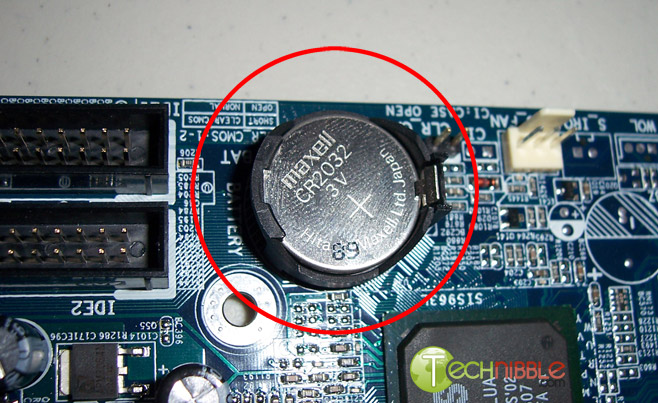 Anyway, open up the computer case using a screwdriver and locate the flat, circular and metallic CMOS battery. It should look something like the picture to the right. Some computers have this part standing upright.
Once you have located it, observe how the latches are holding it. There are many different ways to remove a CMOS battery but the most common way on newer computers can be seen in the picture below.
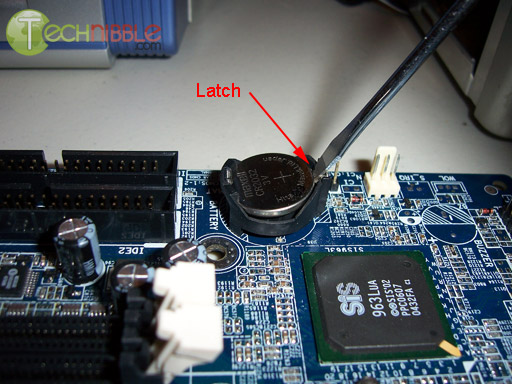
Make sure to power down the computer, unplug the power cables, and unplug any USB devices if they are powered. The computer must not be able to get power from anywhere for this to work. Take out the CMOS battery and wait 10 – 25 minutes before putting it back in. The reason for this wait is because the computer can still store power in its capacitors even though everything is unplugged. The waiting period allows enough time for them to discharge.
Plug everything back in, power up the computer, and enter the BIOS again. If everything went well there should be no more passwords. In some cases, if you get weird error messages during bootup now, you will need to go to “Load BIOS Defaults” in BIOS and save the changes to fix them.
If this method didn’t work, try one of the methods below.
How to Bypass or Remove a BIOS Password using Software:
!BIOS is a freeware utility that is designed to be a whole BIOS and security suite. It has the ability to decrypt the passwords used in some of the most common BIOS makes such as Award, Phoenix, American Megatrends, IMB, etc.
It also has the ability to brute force the password (known as “blasters”). However, this method is dangerous and can result in some unexpected and unwanted results.
Note: Because of this application’s password cracking abilities, some antivirus software may report it as a virus/trojan. This is a false positive.
To start using !BIOS, reboot your computer, and take note of the BIOS type and version you are running. For example, If your motherboard uses Award BIOS you should look for the text “Award Medallion BIOS 6.0” or something similar.
Download !BIOS and save it to your desktop. Then, open a DOS command windows by going to Start > Run and type: cmd
Once you see a black screen in front of you, type: cd desktop
You should now see something like C:\Documents and Settings\YourUserName\Desktop>
Now type the name of the file you just downloaded, if you haven’t changed the name just type in: bios320.exe
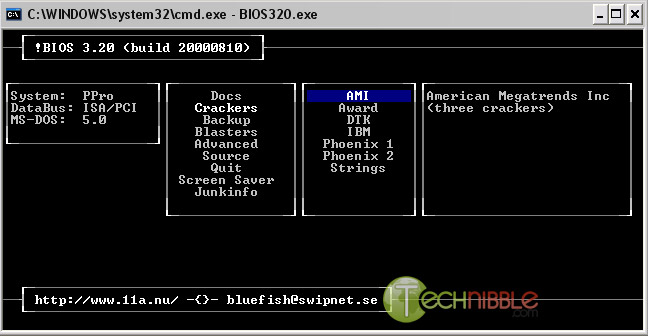
Use the down arrow and choose “Crackers” and then press the right arrow. Using the up and down arrows, select the BIOS that the motherboard is using and press Enter.
You should now see a menu asking what you want to crack, in most cases, it’s the Supervisor or System Passwords you want to crack, so press the 1 key on your keyboard. It will then show you another menu asking how you want it to be cracked. Option 1 is pretty good so try that first by pressing the 1 key on your keyboard. You should now have your BIOS password.
Reboot the computer, enter the BIOS and try it out.
How to Bypass or Remove a BIOS Password using the manufacturer backdoor password:
On many computers (especially old ones), computer manufacturers build in backdoor passwords for their own technicians to use so they can access the BIOS when the hardware is being serviced.
Here are some of the ones that have been reported. You may need to try quite a few passwords before you find one that works.
These passwords are CaSe SeNsItIve.
AMI BIOS Backdoor Passwords:
- A.M.I.
- AAAMMMII
- AMI
- AMI?SW
- AMI_SW
- BIOS
- CONDO
- HEWITT RAND
- LKWPETER
- MI
- Oder
- PASSWORD
Award BIOS Backdoor Passwords:
- (eight spaces)
- 01322222
- 589589
- 589721
- 595595
- 598598
- ALFAROME
- ALLY
- ALLy
- aLLY
- aLLy
- aPAf
- award
- AWARD PW
- AWARD SW
- AWARD?SW
- AWARD_PW
- AWARD_SW
- AWKWARD
- awkward
- IOSTAR
- CONCAT
- CONDO
- Condo
- condo
- d8on
- djonet
- HLT
- J256
- J262
- j262
- j322
- j332
- J64
- KDD
- LKWPETER
- Lkwpeter
- PINT
- pint
- SER
- SKY_FOXSYXZ
- SKY_FOX
- syxz
- SYXZ
- TTPTHA
- ZAAAADA
- ZAAADA
- ZBAAACA
- ZJAAADC
Russian Award BIOS Passwords:
- %øåñòü ïpîáåëîâ%
- %äåâÿòü ïpîáåëîâ%
Phoenix Backdoor BIOS Passwords:
- BIOS
- CMOS
- phoenix
- PHOENIX
Other Manufacturers Backdoor Passwords (manufacturer name – password):
- VOBIS and IBM – merlin
- Dell – Dell
- Biostar – Biostar
- Compaq – Compaq
- Enox – xo11nE
- Epox – central
- Freetech – Posterie
- IWill – iwill
- Jetway – spooml
- Packard Bell – bell9
- QDI – QDI
- Siemens – SKY_FOX
- SOYO – SY_MB
- TMC – BIGO
- Toshiba – Toshiba
Session expired
Please log in again. The login page will open in a new tab. After logging in you can close it and return to this page.
Thanks, I did not know about the backdoor passwords, I’ve almost always had success with resetting it, but the rest is good to know.
Again, good stuff. The manufacturer backdoor password list could also come in handy.
Excellent! pcstats gave me the link kudos to your alliance! Hardocp-er
Uhmmm, don’t take out the battery.
Just find the CMOS jumper(it’s almost always near the battery), Then move it over for about five seconds… Then move it back, and Your BIOS will be reset. This is much faster than waiting for all the power to drain. Some newer boards even have a button instead of a jumper.
Great tips, as always!
these backdoor passwords didnt work for me. i have a dell inspiron 1100 and have had a load of problems trying to reboot windows xp onto it. there isnt enuff space to do this and have been trying to get it to use the disk first on install but as it is obviously set different then i cant get it to run unless i can change the boot path. have tried taking the casinbg off to attempt the battery removal but cant do that as need a special topol. any help?
i have dell labtop model no : inspiron 6000
i have bios password . when i start my computer. he is wirte the screen . this computer system 513hl1j-595b is protected by a password authentication system. you cannot access the data on this computer without the correct password .
please type in the system or administrator password and press enter. please help me sir now what i do.
i remove the also battry inside the labtop. but he is cannot open stell. need pasword .
sir give me your mobil nubmer i called u.
dont remove the battery, JP14 has a jumper on pin 1 and 2, remove jumper and install on pin 2 and 3 for 3 seconds and then reinstall onto pin 1 and 2. The CMOS pw is now reset.
Does i need administrator rights on the computer to bruteforce a AWARD 6.0 BIOS?
Somone who knows?
That would be great to know!! thanx!!
ANd somone who know why its so many passwords that shows up when i bruteforcing? Which is the ritght of the 2000 passwords? Should i try each one or what?
I have a dell inspirion600m. I bought a new dell laptop from ebay over a yr ago, and reg it online. Now the hd has crashed, i purchased a new one, but am locked out by an admin pw the prev owner installed. Dell was willing to send me start up cds and transfer ownership, but that’s as much cooperation as they will give. I’ve not yet found a pw that works. Any suggestions?I’ve also replaced the battery, the cord, and the adapter for the motherboard. Dell is telling me I’ll have to buy a new motherboard. Ebay is of no assistance either due to the time that has passed. I never realized til the harddrive went down that there was a admin pw. Thanks.
I have a Toshiba Tablet PC (R15) I ran a program that powered down the PC then I get Password= (BIOS PASSWORD) I tried all these suggestions and even unpluge3d the battery (CMOS / RTC) but it’s still there. Any help on resetting the password?
i have a HP/COMPAQ nc8000
i cant find the battery or the jumper.
does anyone know where these are located?
– thanks
My niebor was moving and gave me a gateway GPC 400 I believe it is Phoenix– He didnot tell me the pass word when it starts up? I have no way to get hold of him. HELP
THE MOST EASIEST WAY TO BYPASS THE BIOS USER PASSWORD (not to enter the Bios but to enter computer Windows).
1.When you turn on the computer you wait until it say: “Enter Password”.
2.When the first step is done you press and hold End for about 3 seconds.
3.While holding end press Enter and you will be on your way to Windows.
i want to ask to ali.. your
problem about : -> “i have dell labtop model no : inspiron 6000
i have bios password . when i start my computer. he is wirte the screen . this computer system 513hl1j-595b is protected by a password authentication system. you cannot access the data on this computer without the correct password .” , if the problem is clear, please give me about solution, because i have same problem .
thanks in advance
I HAVE A INSPIRON 6000 WHEN BOOTING SAYS THIS COMPUTER SYSTEM, #7XG6P81-595B IS PROTECTED BY A PASSWORD AUTHENTICATION SYSTEM. YOU CANNOT ACCESS THE DATA ON THIS COMPUTER WITHOUT THE CORRECT PASSWORD. PLEASE TYPE IN THE SYSTEM OR ADMINISTATOR PASSWORD AND PRESS ENTER. IS THIS LOCKED BIOS OR HARD DRIVE ,PLEASE HELP THANK YOU
this is not a bios pw its a hard disck password just put another hard disk and you will see its not a bios pw.
good luk.
Let’s face it, go buy a new computer,,nobody is telling us how to REALLY BYPASSS THE f passwords
Seems people are getting confused with hard drive passwords and BIOS passwords. If the password is on the hard drive, these methods wont help. In fact, your options are very very few if its a hard drive password. For BIOS passwords, removing the battery fixes 90% of them.
i have a hp omnibook 4150 that is passworded can u help thanks
I shall try and help thos of you that have got a bit mixed up.
The BIOS/CMOS password can be reset most of the time by just taking out the battery from the motherboard for a few hours, sometimes only 15 mins. This can be a bit tricky on a laptop, so be careful.
Some of you have mentioned getting a meassage that goes something like this, “THIS COMPUTER SYSTEM IS PROTECTED BY A PASSWORD AUTHENTICATION SYSTEM….etc….etc”. This is a HARD DRIVE password stored in the boot sector, NOT a BIOS/CMOS password. I so far have only found one thing that works, and not every time mind.
If you have acces to another PC/Laptop, download and install the most current version of ‘Window Washer’. I find this a good program for keeping your temp files in check as you can set it to delete them every time you exit your internet browser. You’ll be amazed at how much space you’ve saved, just after a few days. Anyway, the section you want is on tab on the left hand side of the window marked ‘System Eraser’. This will show you, in 2 easy steps, how to make an Eraser boot disk/cd. This disk/cd will COMPLETELY erase the hard drive of any system that you boot it in, and hey presto, you have an almost-out-of-the-factory hard drive.
Remember, this is an erasing program, NOT a formatting program, so you will still need to format the drive after, as it will COMPLETELY erase EVERYTHING. Also, if you have sensitive data on the hard drive that you are going to erase, you might want to consider setting it to the max amount of passes, around 35!! This will almost ensure that NO Delete Retrievel program will be able to get it back. This process may take severall hours to a couple of days, depending on the size of the drive. This has worked for me around 85% of the time, hope it works for you too.
Hi
em – why go to all that trouble? Just flash the bios and it resets to default…
simple enough to do switch of and unplug computer. Open side case / locate the bios jumper on the MB/ generally theres three pins – the jumpre will cover two. Change it so it covers the one that isn’t and the center pin. Turn on computer. leave for about 5 seconds. turn off computer and unplug. reset bios jumper back to where it was.
turn on computer and access bios. simple enough no backdoors, no software and no messing with cmos batteries although the latter does work on most newer machines…
flashing the bios though is probably the oldest and easiest method to do a bios reset..
As to the other chap with the password problem? slave the drive into another computer/recover data/format the drive – password is gone as is anything on the drive/refit (as a master) and re-install….
seriously guys – this is computers first grade ffs….
Now tell me how to reset a password from a Toshiba Laptop M35-S320. I have tried all the methods on the web, I’ve tried parallet port loopback, keydisk,operate the whole laptop out into pieces and remove the cmos battery cable. There are 2 small green batteries soldered together, laptop PC is so much different than a desktop PC, the way that Andy described is so easy for a desktop PC or some laptops, but it did not work in my case where I have this Laptop M35-S320 I have tried to re-flash the BIOS, but it won’t let me because it’s not even pass the stupid BIOS password screen before it can detects any floppy drive or bootable device. I know there’s a way to short out the jumper or EPROM jumper, but I could not find this on the laptop motherboard, maybe it is somewhere that I couldn’t see it yet. If anyone has a solution to this, please help.
PASSWORD RECOVERY i have toshibe tecra laptop ……. i forgot the bios password …
can u help me in this regert
thankz
andy gets the golden jumper award.
it is simple and fast (1st grade)
Got a HP laptop wheni start it up it goes straight into a screen that asks for a power up password how do i get by that
nemmmmuuukodik
Hey Bryce,
Just wanted to thank you for helping me restore the BIOS system using your recommendation to take the battery out and replace it later.
I have zero technical experience and your most excellent article has now enabled me to bypass the password which I didn’t have.
Thanks Again, and to Technibble, which I shall now refer to as my prefered tech support site!
pls i have a new a new hp dv6000 askin my for password.pls how can i removed the password? and there is one dell 1501 dat has a password how can i removed it
When I powered my computer on, then show the message that “Press F2 to enter setup”. When I pressed F2, the system ask bios password, I cannot know it . Before that event, the system can be choosed two options ,they are-
(1) Press F2 to enter setup
(2) Press F12 to chose boot device
Now, F12 option is disable and i can not boot on.
Please reply me .
Summary
Product Level 1: Notebook
Product Level 2: Extensa
Product Level 3: Extensa 4620Z
Operating System: Windows XP
Serial Number: LXEA00C008749028492000
yours
Mr Myintmo Naing
Hy i have sony vaio laptop and its dosnt even let me in to the bios setup. its asking me password all the way so what can i do to remove password . i even strip out that battery also but its same
I have some of questions about the bios pass.More than that i have to know how to remove the Bios password in the all computer.
A part from that I want to know how to remove the password in the IBM computer.
Thanks.
I HAVE A INSPIRON 6000 WHEN BOOTING SAYS THIS COMPUTER SYSTEM, #7XG6P81-595B IS PROTECTED BY A PASSWORD AUTHENTICATION SYSTEM. YOU CANNOT ACCESS THE DATA ON THIS COMPUTER WITHOUT THE CORRECT PASSWORD. PLEASE TYPE IN THE SYSTEM OR ADMINISTATOR PASSWORD AND PRESS ENTER. IS THIS LOCKED BIOS OR HARD DRIVE ,PLEASE HELP THANK YOU
abdul says:
April 5th, 2008 at 3:43 pm
this is not a bios pw its a hard disck password just put another hard disk and you will see its not a bios pw.
good luk.
Abdul, it is the BIOS Admin Passwd. I even call and ask Dell technical support. They want me to pay them 49.99 for 1 year support before they give out the passwd. I just hate them for doing that, so I didn’t pay. If you can help me access my computer I will pay you $50 buck.
Thanks.
hi it me tai, i need some help about my labtop problem, i fogot my password so, i need to open my labtop. please so what I can do to open my PC.
dude, i have been lookin all ova tha web for a muthafu**in bios password removal tecniq for like a week, tha fuckin jumper tecniq DOES NOT work on a newer laptop. i have a dell d820 and its got tha grey screen askin for a sys/admin password. tha only person thats actually been a help chargers 60 bux for his service, i hear good things about him but theres got to be a free way to get tha code. does anyone kno of a software that u can enter the service tag number and it will generate a code, cus this guy who is sellin his service has it, so its got to be somewhere on tha net.shit like that does not just have one place, its got to be hidden in a million otha places. please someone, quit tellin me to jump tha cmos cus all that does is fry ur motherboard and require u to get a new one. please everyone, just one fuckin website to help me, please
Same problem almost…Fujitsu A3040 notebook. I didn’t put a password, but it asks for one. Tried all the backdoor passwords listed I could find for all just incase. I took out the battery for about 6 hours, but that didn’t work. Not sure who made the motherboard so I can’t find the jumpers on it.
Chipset = ATI Radeon® Xpress 200M (RS482M and SB450)
processor = AMD Turion™ 64 Mobile Technology MT-37 (2 GHz, 1 MB L2 cache) with high-speed Hyper-Transport™ Technology system bus operating at 1600 MT/s
Thanks!!
Andy fails, that used to work a LONG time ago. I have 3 notebooks that that didnt work on. I had to find a service center to reset the bios. (and I’m a IT)(MSDST,MCP,a+,MSCSE)and the wouldnt tell me how to do it, imagine what regular people get stuck with
that info on disable the jumper on the motherboard works great by the cmos battery !!!
again it a winner!!!!!!!!!!!
hello
i got phoenix ver 1.18 bios. bios320 is giving me ciphers which i am unable to crack. wat to do
THANK YOU, IT VERY HELPFUL.
to all who still can’t understand it try this :
press right “Alt” then “enter”
hey, it worked for me….
that was only to get through w/o typing a pass. but the rest….still haven’t tried yet…
I have a Dell Inspiron that when
i power up. It comes up with a password screen. Nothing else boots up. Not even the screen that you can press F12. Just the password. How do I bypass this or get rid of it? I am no expert on this. Not even first grade. So I need the help
update put in some wrong info. when i turn on the laptop. It does go to the setup screen then password pops up
The first post, and the post from FriendlyGeek explains in plain text how to do this. The Administrator also noted that in some cases it could be a HDD password, which you more than likely will not get pass. The site is Great!
Help
please
Somebody
my laptop is asking for a system or administrator password.
its a dell d610 latitude.
i cant seem to find aney help on the net.
Too all those asking for help .. put your freakin’ computers back in the box and ship them to someone that has a clue ..
Damn guys/girls .. read the article !
morons
Hello out There!
Here is my problem.
I have a dream machine desktop Dell System Precision Workstations 690
Series. My wife and I are in
process of divorce. She’s more fluent in IT computer field than I. We
now separated and before she
left she did some strange thinks in the system. I can no longer
access the system. This is the screen
I get when I try to log on:
Phoenix Rom Bios Plus Version 1.10 A03
Copyright 1985 – 1988 Phoenix Technologies Ltd
Copyright 1990 – 2006 Dell Inc.
All Rights Reserved
Dell System Precision Workstation 690 Series
BIOS Version A03
Performing automatic IDE Configuration…
Type The System Password and press
Enter Password:- (Blinking cursor)
1. **Incorrect password.**
2. **Incorrect password.**
3. **Incorrect password.**
Number of unsuccessful password attempts: 3
System Halted ! Must power down.-
I have an HP pavilion dv6000 with fingerprint logon manager. It has locked me out and I would like to reset it so that I can try again. Any help would be great. Thatks in advance.
Hi,
I have an old omnibook 4150. I’ve tried to disable BIOS password, but the damn thing still wants a password. The old password doesn’t work, nor does hitting enter or right alt + enter or del + enter.
I’ve also tried all backdoor bios password I could find online.
Clearing the cmos doesn’t do any good either, it just erased date and time settings, but not the password request.
Calling HP customer support was total waste of time and money, too.
HP omnibook 4150
Phoenix BIOS 4.0 release 6.0
Hash code 06713
Help will be much appreciated.
i need to remove bios setup password from toshiba laptop a215
Hi,Everyone.
I have a dell inspiron 6000,which gives me this msg #HH1N42J-595B.then to enter admin password.
Although I’ve already removed the CMOS battery.and NO JUMPERS to reset, in fact no jumpers at all.so who is calling everyone morons.
whats your problem?not everyone’s solution is same.If anyone has a solution to my problem please do email me:- dr_olaving@yahoo.com ,and help everyone please.
THANX on behalf of myself and everyone.
THANKS AGAIN
I HAVE A HP PAVILION ZT SERIES LAPTOP CANNOT LOCAE CMOS BATTERY.NEED BIOS PASSWORD O BOOT SYSTEM. HARDDRIVE HAS CRASHED. WANT TO REPLACE HD.HELP!
“Download !BIOS from here and save it to your desktop.”
How does one get into the computer to download !BIOS when one is locked out from entering due to someone messing around with the password?
This is on a Dell Inspiron 8000 laptop.
KK
i need to remove bios setup password from toshiba laptop a215
I bought a bulk package of 40 gig. harddrives and they are all passworded, i can’t use them untill i format them, or remove the pass word, how can i do this?
I’m using HP Compaq Who can tell me the back door pass or by pass skill’s.
Thank you.
I wan To ask BackDoor Password should type Example : – pass or -pass
Dude takeing off the battery is simple….
OMG… taking out the battrey is easy but nid to format comp my msn cannot work… ><
Can any one help me in removing the bios password for xps m1210.
i am getting the same screen as above i don’t want to pay that much money for this so if some one please help me in erasing it.
thank you
Have a sony vaio PCG GRZ 610 with Bios password.
Tried removal battery, no help. Tried Password Genius from Spotmau, wasted $20….asked Sony, they said no way they would give me back door password…ANYONE …CAN YOU HELP? ED
I bought a used hp pavilion ze4800 computer from a person, and I had to install a new hard drive, and I do not know the drive lock password, is there a way to retrive the password?
removing the battery worked like a champ,, now i get to work on other problems,,, yippie!
OK! I’ve read all the comments on this page etc. i have a “DELL”(stands for aggravating piece of s#!*). Any way its a dell inspiron 5100, Now i have good mech. skills and tools but how exactly do i access the small memory battery (without breaking something.instructions or reference to a website with a diagram would help. THANKS IN ADVANCE!
i got a compaq armada pIII and i cant locate the cmoss or any jumber to remove power-on password ASSIST
ahm.. help me im 16yrs. old and i have laptop ….. oldschool laptop but i cant reboot it i need help because idk the password (PhoenixBios NoteBios 4.0 Setup)
non of the backboor password worked for me either i forgot my user password hope someone can help me get it bck plz
sir,
i have tosibha laptop ,when i power on password asking.we dont know passord.we r forget.pls give solestion
I LIKE ALL THE INFO YOU HAVE PROVIDED ON BYPASSING THE BIOS. I HAVE THE SAME PROBLEM WITH A SONY VALO LAPTOP. NOTHING HAS HELPED. I AM AFRAID TO DO THE BATTERY AS I AM LEGALLY BLIND. IT WAS MY DAUGHTERS LAPTOP AND SHE PASSED AWAY AND I DONT HAVE THE RECEIPT FOR SONY. I JUST WANT TO SAVE THE INFORMATION ON THE PC. SHE HAS THE LAST PHOTOS OF HER ON THE LAPTOP BUT CANT GET PAST THE BIOS PASSWORD. I WOULD LIKE TO DO THE SLAVE DRIVE TO SAVE ALL THE FILES AND FOLDERS, THEN REINSTALL WINDOWS. WOULD THIS WORK AND IS IT DIFFICULT TO DO. I LIKE THIS SITE BECAUSE IT IS EASY TO READ ALL THE COMMENTS WITHOUT THOSE THREAD THINGS. IT IS MUCH EASIER FOR ME AS I CANT SEE VERY WELL AT ALL. THANK YOU FOR ANY HELP OR ADVICE ABOUT A SLAVE DRIVE.
MAUREEN
PS
IS THIS WHERE YOU ASK A QUESTION??
Maureen…I would get a laptop hard drive case with usb connection on Ebay for about $20 total, and pull your laptop hard drive,put it in the case and connect to another computer with cdrw. Find the files you want, and copy them to the cd. Maybe you could use a friends computer. My sony vaio laptop hard drive is on the right side with one screw and a slide latch, then pull it out. Take it out of the case and put it in the usb case, and follow insts they send. Photos are very important.
Hope is answers your problem..God Bless, Ed goeking
I have a Dell Inspiron 1526 laptop and my friends have set the bios password and aplied the require on sartup. they also dont know the password. any advice.
Hello everyone, im working in a authorized laptop repair/service center portable and have access to all information on how to remove the BIOS password of the models: IBM / Lenovo, Acer, Dell, Compaq / HP, Sony, Toshiba, Fujitsu-Siemens . If you have more questions you can write to conradodav at hotmail dot com
I´m on MSN or visit my website laptoprebirth dot com
i have dell inspiron 4150 and its bios has been locked and i have tried it all but all use less is there any other thing i can do to remove or change that password??
if you are looking to reset your administrator password all you have to do is press Ctrl Alt Delete and it will pop up a screen, you should be able to type in an account and pass. type administrator in the account and press inter and bingo your on to windows
i have a micostar model no MID2020 notebook pc (8640SC) bios is passworded.tried the cmos battery out but did not work.has anyone any ideas to get past the bloody password .any help greatly appreciated .
i need dell dell vostro 1400 password its about making me loose the new system.thanks
I use a utility called KillCmos on a bootcd. This utitlity will reset the bios to default settings and avoid having to open the case to remove the battery or jumper.
I’ve just watched an interesting video of a presentation from Defcon about how to read the unencrypted bios password. I tried it on this laptop, it didn’t work but it does apparently work on others. You have to be able to boot into windows or linux so it might not be so useful. You will also have to compile it using nasm.
http://www.defcon.org/images/defcon-16/dc16-presentations/defcon-16-brossard.pdf
I work for HP, and if you have a system power up password on a laptop. It is customer damage when you don’t know the password. System board needs to be replaced but not under warranty.
Had these problems before with company’s who had their employees fired but not knowing the system passwords of the laptops. And the ex-employee did not want to tell it. So they had to replace all the system boards under no warranty $$$.
Some laptops were only 2 months old.
Removing the CMOS battery works for the BIOS password but not for System Power up password.
I have a HP desk top that had only one password and the password was entered too many time incorrectly and now it won’t let us log into it at all. Is there any way to bypass the password as an administrator.
I have a Dell Inspiron 1525 How to a Reset the Bios Password without using any programs? Can anyone help me please
Kenny,
There is more than one way ;). Haven’t met a system I couldn’t get into, except for HDD passwords which I’m currently integrating into my services :)
#36 for d820 remove bios battery (under the ram in the back of laptop) turn it on. I will check the site again monday to see if you need further assistance.
#49 unplug the machine, open the case on the motherboard look for a nickel sized battery. turn on. password will be cleared.
#81 bios password or windows password?
#49 opps REMOVE the battery and then turn on :)
I HAVE A HP MINI 1035NR, I HAVE REMOVED THE CMOS BATTERY, IT HAS NO JUMBERS, AND SHORT OUT BATTERY TERMINALS. STILL,, PASSWORD REMAINS. THE MB IS AMERICAN MEGATREND. SOMEONE PLEASE HELP. SEAN G I WILL PAY YOU FOR UR SEVICE, IF YOU CAN HELP.
THANK YOU VERY MUCH
I have been trying to get this working for 3 hours and this information really helped!
Thank you again!
ok im a novice user but i found the best solution for toshiba laptops with bios password set (and lost obiosly) what i did was remove the cmos battery and let it reset until it ask for the date and time again but very important step when the promp ask you reset defaults or or enter setup do alt ctrl delete and boot using a usb floppy drive with a windows 98 floppy and bingo good to go
hope this information helps anyone out there with the same problem mssage me for any questions crazy thing is i tried everything hex floppy and parralel key all failed ..
Hello,
I’m using a Fujitsu Tablet, T4010, Windows XP, Phoenix 1.04.
I’ve tried the !BIOS you’re talking about and it doesn’t see to work because it gave me a like -1C1 when I press enter on Phoenix 1.
And for the backdoor password, it didn’t work too.
So, Can anybody help me out?
Your help would be greatly appreciated. :D
Thanks,
Xavier
Hey i have a Latitude D620 and I cant remember the athentication system password #9BC7DC1-595B how do i get by it
my cousing has a dell latitude laptop that says:
this computer #vq15n**-d35b is protected a password authentication system you cannot access the data on this computer without the correct password
can anyone help to unlock this please?
i have a compaq presario v4000, that was given to me by the school i go to,the problem is they dont know the poweron password,nor do i,what can i do to bypass this setting without pulling out the internal battery,any backdoor passwords that will help me.thanks
Hey guys,
If anyone could please help with this little problem i would be very gratefull
I have a Toshiba Satellite L40-18Y,
When I start the computer, after the beginning screen it turns black and says “PASSWORD:” I assume this to be a bios lock?
PLEASE HELP!!
….uhhh bios320 wont support a 64-bit system
got a second hand dell inspiron 1501 has a pass
word as soon as you turn it on. don,t know the password can you help me thanks
I have been reading all of the Q and A’s and I have to say this guy Kyle is a real first grade tech. First off he forgot that not everyone is as adept at computers as others. And if he would have continued to read he would have noticed everyone is speaking mostly on LAPTOP computers not a HOME pc. As fas as this being elementary level, by far also not true. I have an associate degree in Computer Science and many cert. and also I am emplyed by a firm that deals with things of this nature, and this is by far not elementary. How-ever another common fix that he forgot to mention is that you can short out the admin pass stored on the EEPROM setting, which is what HP is notoriuos for, simply by unplugging the EEPROM board and the CMOS (not bios by the way KYLE) and depressing the power button for a few seconds. If it doesnt work that way then you can also try shorting out the cmos password by touching the CMOS battery tips on the board that the battery plugs into to a seperate grounded peice of metal. Not aluminum or brass, it has to be metal. You can usually find a piece real close to the CMOS battery plug-in. Hope the info was helpful. Thanks
Sorry about last post Kyle, Those comments were aimed at ANDY. He seems to be a really fine expert on the topic, instead of trying to help people, he is bashing and I find that somewhat disturbing simply because he is probably not a computer Savant so to say. Again I appologize.
I need key to bypass bios password
hello i have one acer laptop model no Extensa4120 phoenix bios how can i remove my bios password pls help me
laptop HP pavilion zt 1175 necesito saber como resetear el cmos, thanks
Instead of going through the entire default list you can go online and lookup the password for the motherboards make and model.
thank you sir
real hard time with Vaio PCG-R505AFE. i have searched for its jumper on the motherboard, but i guess the password will remain there forever, i also unpluged the battery, but nothing seems to relief the pain.. LOL
What should i DO?
hey i cant reset my password.there is no jumper, tried resetting the battery as always, dint work any help..
i have a microbytes (manufacturer what do i do??? :( i dont know weres the backdoor password plz reply
I see this kind of response to cmos password recovery all the time and would like to add my two pennith.
Firstly Battery removal will work if the cmos password was set up by a user after it has left the factory.
Second, you can flash, restore to original, trip the jumpers as many times as you want and it will have absolutely no effect if the password was set up in the original bios by the manufacturer. Simply because it is protected as the rest of the base setup software is.
The best you could do is to retrieve the password that has been created. This method will work for most secured passwords.
Firstly what you need is a floppy drive and 2 blank disks.
You will need to create a Win98 boot disk.
You will need to download (AWARDBFD.exe)
Search google for it, the one on Drivers Guide is a good copy.
http://members.driverguide.com/driver/detail.php?driverid=134029&action=filfo&t=1
Extract that zip onto the other blank 3.5″ floppy disk.
My guess is your BIOS is set to start Hard drive before CD rom so, disconnect the hard drive and the BIOS will naturally look for the next bootable device.
Boot your system with the Win98 Startup Disk.
When you have the prompt (Make sure its the A:/) or drive letter of your floppy, insert the AWARD disk and then type AWARDBPF.exe
Hey Presto, you will see both user and administrator passwords. Write them down and then enter Setup and type the Administrator Password
Hope this helps :)
This information is intended for experienced users. It is not intended for basic users, hackers, or computer thieves. Please do not try any of following procedures if you are not familiar with computer hardware. I’ll not be responsible for the use or misuse of this information, including personal injury, loss of data or hardware damage. So use it at your own risk.
A. By Using the Motherboard Jumper:
In most motherboards CMOS battery is soldered, which makes it difficult to remove the battery. In this case we use another method.
Almost all motherboards contain a jumper that can clear all CMOS settings along with the BIOS password. The location of this jumper varies depending upon the motherboard brand. You should read your motherboard manual to check its location. If you don’t have the manual then look for the jumpers near the CMOS battery. Most of the manufacturer label the jumper as CLR, CLEAR, CLEAR CMOS, etc.
When you find the jumper, look carefully. There will be 3 pins and the jumper will be joining the center pin to either left or right pin. What you need to do, is remove the jumper and join the center pin to the opposite pin. e.g. if the jumper joins center pin to left pin, then remove it and join center pin to right pin. Now wait for a few seconds and then again remove the jumper and join the center pin to left pin.
Make sure to turn the PC off before opening the cabinet and resetting the jumper.
B. By Using Software:
I have found that BIOS/CMOS Password Recovery Tool is the most effective.:
BIOS/CMOS Password Recovery Tool is a program that works instantly to remove any lost or forgotten BIOS/CMOS password. Simply boot your PC to DOS and execute the program, and get access to forgotten BIOS/CMOS passwords in just seconds
BIOS/CMOS Password Recovery Tool Service: http://www.biospasswordrecovery.com/
Hi!Very helpful information,thanx for the tips!
i have a VGN- CR353, cant get pasted the BIOS code, any tips.
i want the dotts that i can remove my windows /vista passwords please
thank you
A. By Using the Motherboard Jumper:
In most motherboards CMOS battery is soldered, which makes it difficult to remove the battery. In this case we use another method.
Almost all motherboards contain a jumper that can clear all CMOS settings along with the BIOS password. The location of this jumper varies depending upon the motherboard brand. You should read your motherboard manual to check its location. If you don’t have the manual then look for the jumpers near the CMOS battery. Most of the manufacturer label the jumper as CLR, CLEAR, CLEAR CMOS, etc.
When you find the jumper, look carefully. There will be 3 pins and the jumper will be joining the center pin to either left or right pin. What you need to do, is remove the jumper and join the center pin to the opposite pin. e.g. if the jumper joins center pin to left pin, then remove it and join center pin to right pin. Now wait for a few seconds and then again remove the jumper and join the center pin to left pin.
Make sure to turn the PC off before opening the cabinet and resetting the jumper.
B. By Using Software:
I have found that BIOS/CMOS Password Recovery Tool is the most effective.:
BIOS/CMOS Password Recovery Tool is a program that works instantly to remove any lost or forgotten BIOS/CMOS password. Simply boot your PC to DOS and execute the program, and get access to forgotten BIOS/CMOS passwords in just seconds
BIOS/CMOS Password Recovery Tool Service: http://www.biospasswordrecovery.com/
i forgot my asus x80l model bios password.i tried removing the cmos battery.but i didn’t get.please help me………
I have a ASUS z9000 Notebook,
when i start it i need a password wich I dont know. Do you guys know how to bypass it and remove it, i tryed the battery thing but i just cant find it =S Mail me at f-famous-f@hotmail.com if you have any idea about how taking it off !!
i have tried everything to reset my bios password i have a dell inspiron 1501 and i cant find the cmos battery near the motherboard..if someone is kind enough to email me anything that can help me i would really appreciate it…thank you
Hi guys I have been trying different methods to access the Bios password , but couldn’t enter , at the end I tried four ziros , as a password , and it worked perfectly , Just 00000000 , I have an ACER Aspire 3680.
I wish this tip will help . thnx .
sorry I made a mistake , it was eight ziros and not four ziros as I mentioned before .
” 00000000″ . try this password with ACER aspire 3680.
Mines basicly the same thing as what everyone is saying.. here are the facts.
*Product: Pavilion dv6
*Model #: dv6- 1030us
*Laptop.
*says “Enter Administrator Password or Power On Password” on sreen, in a blue icon.
*HP Pavilioin Entertainment PC.
*HP Pavilion dv6-1030us Entertainment Notebook PC.
*System Disable [ 99597946 ]
*(C)2005 Microsoft Corporation
So far, I havn’t cracked it yet. I’m waiting on the battery to die out.
Longest I’ve waiting so far was about 40 min. Didn’t work.
Hopefully some one with the same laptop could help me, thx.
great post!!!
http://blog.resetwindowspassword.com/?p=43 also can help you out!!all the methods are for free and easy.
I have a dell inspiron 1501 and i cannot get pass the HDD password if anybody can help that would be great
I have a fujitsu 3110 how to i bypass or remove bios password.I tried all the backdoor passwords listed I could find for all just incase. I took out the battery for about 6 hours, but that didn’t work.
you can erase all HDD data passwords by shorting out two point on the bottom of the drive, did it often at a job i had b4. Also a good brute force attack.
A. By Using the Motherboard Jumper:
In most motherboards CMOS battery is soldered, which makes it difficult to remove the battery. In this case we use another method.
Almost all motherboards contain a jumper that can clear all CMOS settings along with the BIOS password. The location of this jumper varies depending upon the motherboard brand. You should read your motherboard manual to check its location. If you don’t have the manual then look for the jumpers near the CMOS battery. Most of the manufacturer label the jumper as CLR, CLEAR, CLEAR CMOS, etc.
When you find the jumper, look carefully. There will be 3 pins and the jumper will be joining the center pin to either left or right pin. What you need to do, is remove the jumper and join the center pin to the opposite pin. e.g. if the jumper joins center pin to left pin, then remove it and join center pin to right pin. Now wait for a few seconds and then again remove the jumper and join the center pin to left pin.
Make sure to turn the PC off before opening the cabinet and resetting the jumper.
B. By Using Software:
I have found that BIOS/CMOS Password Recovery Tool is the most effective.:
BIOS/CMOS Password Recovery Tool is a program that works instantly to remove any lost or forgotten BIOS/CMOS password. Simply boot your PC to DOS and execute the program, and get access to forgotten BIOS/CMOS passwords in just seconds
BIOS/CMOS Password Recovery Tool Service: http://www.biospasswordrecovery.com/
hi, i have an acer aspire 3690-2900 notebook. when i turn it on it asks for a setup password. i set it s my mom couldnt see what i been doin. lol. but i lost the charger and found it six months later while moving please help me bypass or remove this password. its really making me mad. please help. thank you.
I have HP labtop model no : pavilion zt1175 motherboard APL000 LA-1301 REV2.0 MADE IN TAIWAN
I have bios password . when i start my computer. he is wirte the screen .
please type in the system or password and press enter. please help me, clear cmos (KILL CMOS)
You can try Password Genius. It works for me. Check this out:
http://www.password-genius.com/how-to/how-to-recover-my-windows-login-password.html It works for me.
Hey, I also got locked out of my computer several days ago. I tried several free software. It took me two days and got quite messy. Unfortunately none of them work for me. Finally I made it work with password genius. The good news is that it works. The bad news is it is not free.
the battery trick worked for me, thanks
i dont know how to remove bios password if help me i will be happy
I love that cats! She knows where her bread is buttered. That is a very sweet photo. Your boy is a very handsome young man.
ok i have seen dell inspiron 1501 laptops on here a few times. i am helping a friend. and noticed that no one has answered the call. there is no disket drive. this model comes with a rightable dvd drive put i notice he does not have it. so no cd or disk drive will work. witch leaves usb. i did remove the nickel size battery on the mother board it is under the keyboard easy, carefully popped the cover over the power button/hinges and unscrewed the keyboard and poped it out of place. pushed battery carefully to the heavy side of the plastic and lift and it fell out of place. anyway i called dell and they charge. i have been reading googled. and found out they give you a maser password from the information that comes written on your laptop. i would use a software to crack it except the few i found are questionable at best or charge. there are no jumbers to reset and leave very few options to recover from any of the bois password lock outs. i am not paying the fellow if i mess this up so shorting out anything is out of the question. i get that idiots out there steal and such. so i guess if i am to get the answer i have to pay and pass the buck or let go of this one. my puplic email is snowcatman@yahoo.com
sorry i dont have the questions answered but someone out there does. i have like 2 of these in my closet and would love to fix them. but i want to get passed the password thing first. thank you
American Megatrend
All,can anyone help.
American Megatrend has hijacked my starting up system.Haven’t a clue how it got there.
As soon as i turn on machine hard drive is making a loud noise and the screen won’t let me do anything.
The AM screen just says about downloading,i’m afraid to do anything incase i lose everthing.
Does anyone have an idea how i can get rid of it.
Thanks
Hi,
I was suffering from this problem.I tried several free software. It took me two days and got quite messy. unfortunately none of them work for me.
finally I made it work with Password Genius. the good news is it works. the bad one is it is not free.
Check this out: http://www.password-genius.com/how-to/how-to-recover-my-windows-login-password.html
Hope this can help you!
Best wishes!
Sallysung.
i have my password since my so called friend put it on my computer without my knowledge. my issue is how do i take it off? i have a dell inspiron 6000 and tried dell support (warranty expired so no help) i really just want to take the password thingy off so i can just turn on my laptop and go to work. help if you can thanks plgblondy@yahoo.com
can u help me restore my factory setting
This is for Desktop Computers only.
Laptops have an eeprom chip and it retains it’s memory for a long time.
EEPROMS are also found in tv’s etc.
you can unplug your tv from the wall and leave it sit for a long time but the eeprom chip keeps it’s memory.
Another site (I forget where) said they sell the dell software that’s used by the dell service centers to unlock the password.
Ok – I’ve read a lot of post and tried a lot ‘solutions’ most work for desktops, few work for laptops…
However – I’ve got a good one here, a Panasonic CF-T5 (typically called a ToughBook), it’s bios and HardDrive locked. The laptop was originally owned by a hospital, passed via auction to an employee, which then was passed to her daughter. Neither of them can remember either of the passwords. I’ve yet to get the cover off to force the reset of the Bios (as the screws in this thing have damaged two of my screwdrivers) and are very small.
I plan to format the hard drive with Linux once I can get past the bios (as it won’t boot to an external drive/flash drive/usb drive).
I’ll post an update here on how this went. (may also link some images of this case and it’s cmos battery location and such)
Randy
hello,
sir
i have a hcl me laptop . but i don’t know my bios name which is being use by my motherboard .so how can i know my bios name .
I have the Answer for all who need a password or CMOS password or hard drive passwords. (For windows only!) Desktop are as follows. If the BIOS is password protected, Like in previous posts, All you have to do is remove the CMOS battery and reset the jumper. Laptops on the other hand my be a little more difficult. Most can be recovered my just removing the CMOS battery for 30min others need a little to a lot more work. Some as above have master passwords that can reset to OEM. Some like most dells require you to call dell for them to try and generate a password for you if the password fails you will be required to send to dell for them to replace the motherboard because of the BIOS backup chip located on the motherboard right below the CPU (or if you are truly gifted replacing this chip yourself). If your under warranty then your fine, If the CPU was given to you just transfer the ownership on dells support website and your fine, dell will be happy to replace the board and you are only out 15 days. But if you don’t have a warranty it will cost you about $50 to acquire a temp warranty so you can get the same service. Those who don’t want to pay or have gotten there laptop by ill gotten gains are S,O,L, unless you find a way to replace the motherboard or chip. As for all hard drive passwords on desktops and laptops, you have two option, a program that creates its own BIOS to format the hard drive like SecurErase 8 or the ever famous password recovery tools that people like to use ( keep in mind that those programs need the windows BIOS to create there own so if the BIOS is locked your S.O.L. As for the second way just use a legit OS and reformat the hard drive and you will be back to square one. but remember that some ways you will loose all data and others you just will recover your lost password. I hope this was somewhat helpful to those don’t know or would like some light shed on this subject!
I have dell latitude d820 how do i reset bios password. removing battery does not work built in security feature anybody have any other i just but 10 of this in auction please help
Removing a Bios password is simple on a laptop just short out the small motherboard battery via the two connections for a few seconds with a strand of wire , but remember to remove the battery pack and remove main power . Reboot with out the battery pack press F2 or what ever key you need to press as laptop boots up key to access Bios , bingo your in . you don’t need all these fancy programs , cracks etc . one word do this at your own peril , but its always worked for me .
can u please tell me how to remove the setup password for hp 6710 compaq laptop.
can u please tell me how to remove the setup password for hp 6710 compaq laptop
reply can be at guntur.krishna @gmail.com
hi need some help please i have a hp laptop and it is asking for power-on password and am not sure wat to do please help
Hi, i have a Dell XPS M1210, and it says it has wondows XP..( got this comp from a friend BTW)….when i turn it on it sAYS….
THIS COMPUTER SYSTEM IS PROTECTED BY A PASSWORD AUTHENTICATION SYSTEM. YOU CANNOT ACCESS THE DATA ON THIS COMPUTER WITHOUT THE CORRECT PASSWORD.
PLEASEE TYPE IN THE SYSTEM OR ADMINISTRATOR PASSWORD AND PRESSS ENTER.
so is this a bios or hard drive password problem?? any ideas on what i can do?
So if anyone can help…my email is chantal_tim@hotmail.com
i have dell labtop model no : latitude 6500. when i start my computer the screnn apperas as “this computer system is protected by a password authentication system. you cannot access the data on this computer without the correct password .
please type in the system or administrator password and press enter. i dont remember putting a password. i need an urgent hel
if anyone can assist me please contact me on: Samuel.Owusu-Sekyere@Newmont.com
i haven`t try it, but i think i found something great……welldone
these backdoor passwords didn’t work for me. i have a dell inspiron 1525. service tag 2NNCR3j
if you are trying to cut the time down on draining the battery then after removing the battery push the POWER button and u should c the lights flicker continue to hold for 6 minutes and then reconnect the battery.
I set a hdd password so i dont remember it any more i’ve been guessing any words that can be matched with that password. please can you help me to reset it. Is a dell laptop inspiron 1525.
i have a lenovo r61 thinkpad notebook. Someone has put in a bios password on it (i am sure of that as when i went to get it removed they said that they will have to replace the motherboard). Kindly tell me what the backdoor password is? i tried ‘merlin’ but i don’t think it works completely. my email address is “piyushahuja1991@gmail.com”
Let me just get this one straight for you all people ,first of all if you dealing with a computer laptop Don`t remove the Battery please that don`t work only thing that really works is replacing the bios chip which cost $29.99 That is for anyone having a administrator password setup in the bios system.,other option which do work with some models but not all of them is downloading the bios from HP,Dell,etc then create a boot disk written in dos system and restart your computer off the floppy disk.
Now for those that have other message that says this computer system is protected by a password authentication system. you cannot access the data on this computer without the correct password .
That password has been setup in the bios system but that one will work just fine if you replace your current Hard Drive with a new one,Just make sure you press keys >F2 or F12,F10.for the boot menu then chose DVD Rom.
Althought flashing your bios that Can be very dangerously sometimes.,if you don`t have a password on your bios plz don`t flash your bios you just really mess up.
I am a PC Technician and deal with those problems in a daily basics. ok
Good Luck…………..
For desktop computers those are really easy to clear your bios,just remove the jumper near the batter for about 3 or 5 seconds bingo you`re done……….okie ,dokei
Wow, Sony Vaio PCG-R505GL, got at yardsale. BIOS is password protected. ONLY Sony customer service can help. Called them last night. They want $49.99 AND a faxed copy of a Proof of Purchase. I told them that I purchased this unit at yardsale and don’t have a true “purchase receipt”. They told me that it would be impossible, due to security reasons, to help me without receipt. On this laptop (and many other newer laptops), removing CMOS battery has NO effect on removing passwords AT ALL! You can NOT FLASH the BIOS to remove the password either. The system will NOT boot to CD or floppy or USB. What I have read is that Sony IS capable of generating a MASTER PASSWORD (after you pay) that is associated with your laptop’s serial number. So this is more of a complaint than anything….SONY, in it’s great wisdom, has completely forgotten that MANY, MANY laptops are discarded at second-hand stores, flea markets, and donated as “old and useless” all the time. But these laptops are still useful to many of us who can’t afford a brand new unit. So although it’s great for Sony to capture $49.99 to recover a lost password and make a computer USEFUL, they have NO WAY (that I know) of initiating some kind of TRANSFER of laptops program when we, the general public, comes across a second-hand laptop. FORGET the THIEVES, they are a very small part and WE shouldn’t have to live our lives based on criminals. How about a little REAL HELP for the decent people? ~just my thoughts~
i need u bios passwrad beacause i forget my laptop passwrad.my laptop is ibm n prosesar p3…so plz give me some gudie…
Very helpful info, I know my bios password. It is the Windows xp user log on that appears. I have no recollection of every setting up such password as I am the only user.
I cannot get into my windows OS to disable log on screen. I don’t know my user name. I tried leaving password blank, then tried ‘administrator’ as user name and it says ‘disabled contact administrator’. I AM THE ADMINISTRATOR for goodness sake. So I contacted me now what, HA!
i have dell labtop model no : inspiron 6000.
when i start my computer. he is write the screen . this computer system #48bkj1j-595b is protected by a password authentication system. you cannot access the data on this computer without the correct password .”
, if the problem is clear, please give me about solution, because i have same problem .
thanks in advance
.pls i have a new a new hp dv6000 askin my for password straight away I can not access the Bios settings, nothing! All it wants is the password. I’m not sure if opening it up is a good idea!
hi i need a way to bypass the password on my laptop hdd i forgot it and i relly need to get on there asap can anyone tell me if there is anything i can download to do it or if i can format it and how?
me too dell inspiron 6000:: bios or harddisk password screen shows cant get anything else,grrrrr piece of !@#$%@#$%%$^&*(!@#$%^&~!!!!!!!!!!! #byh8l81-595b pls type system or administrator press enter …its been 3-4 days help,please if not anyone want to buy this piece of !@#$(*&^!@#$%^&(*&^!!!!!! seriously, let me know at stirrinwebin@gmail.com thanx xooxxxoxox
Hello.My laptop model name is lenovo Y410. I have forget my bios password. How we can bypass my bios password ? Please help me.
Helpful Tips. Removing the battery on the motherboard has saved me a number of times.
the CMOS battery and wait 24 hours before putting it back in.but it can’t solve the problem istle ask the password for more information Toshiba satellite pro L300-EZ1004X model NO PSLB1U-01D011
plase to help how to solve this problm
For post:
TNX…
hello everybody i have a very bad problem named notebook packard bell model mx37-u-032 whit asus mainboard model t12c. my bios password security doesn`t work any more. i have an acer notebook whit same password and i use it everyday. what can i do beucase i tried to use the method whit the cmos battery ( it was removed from the motherboard and the password do not resets only the bios resetes but it`s still telling me “Enter password:” it`s making me sick of it :( please if someone knows how can ii repair it please post me some advice`s !) tHANKS ALL
This is for mth420’s dilemma. I don’t know of any programs for generating a admin passord from the service codes, but if you can find the chip on the mother board where the passwords are stored you can either replace it with a blank cmos chip for about $20 on eBay. Or you can try to find someone that actually knows what the Hell they are doing and have them show you what pins to jump to that would erase the passwords of the bios.
i have the same prob. with the password on a dell b130 and after reading these post, i think they need to shut down this thread because nobody can get a real answer
just throw our laptops in the f!@#$ dump
I have always used this website whenever i get a Dell bios password to remove, http://biosremoval.com/
cheers
i need the password for a IBM Lenovo ThinkCentre with phoenix bios 2.0
thanks
Sir, i want to know how to remove bios password.i need ur help,plz plz plz help me
my system is HP540.
Kindly do some thing.plz
Thanks! It worked! I removed the battery for about 15 minutes, and then put it back!
Hi German!
I have a HP dv 2940se notebook.
I’m using it to work so, I needed to put a bios administrator password.
After that, I updated the bios. Downloaded it from HP website and installed.
Since that, I cannot access my bios, because the password I set up is incorrect…
I read that you know how to fix it by downloading the bios from HP and, using DOS commands, boot it from a floppy disc.
Could you please send me the commands and if you could, The right bios for me to install? I’m with a phoenix one. May use a CD instead of a floppy disc?
If you want, contact me by e-mail:
yuriko_sakura@live.jp
Thank you very much!
hi im trying to boot my dell DXP051 BIOA A03, and im keep getting a NO SUPPORT mesage, I have tried all combinations in the BIOS but nothing works, anyone know how to fix this and whats the message meaning.
This information is intended for experienced users. It is not intended for basic users, hackers, or computer thieves. Please do not try any of following procedures if you are not familiar with computer hardware. I’ll not be responsible for the use or misuse of this information, including personal injury, loss of data or hardware damage. So use it at your own risk.
A. By Using the Motherboard Jumper:
In most motherboards CMOS battery is soldered, which makes it difficult to remove the battery. In this case we use another method.
Almost all motherboards contain a jumper that can clear all CMOS settings along with the BIOS password. The location of this jumper varies depending upon the motherboard brand. You should read your motherboard manual to check its location. If you don’t have the manual then look for the jumpers near the CMOS battery. Most of the manufacturer label the jumper as CLR, CLEAR, CLEAR CMOS, etc.
When you find the jumper, look carefully. There will be 3 pins and the jumper will be joining the center pin to either left or right pin. What you need to do, is remove the jumper and join the center pin to the opposite pin. e.g. if the jumper joins center pin to left pin, then remove it and join center pin to right pin. Now wait for a few seconds and then again remove the jumper and join the center pin to left pin.
Make sure to turn the PC off before opening the cabinet and resetting the jumper.
B. By Using Software:
I have found that BIOS/CMOS Password Recovery Tool is the most effective.:
BIOS/CMOS Password Recovery Tool is a program that works instantly to remove any lost or forgotten BIOS/CMOS password. Simply boot your PC to DOS and execute the program, and get access to forgotten BIOS/CMOS passwords in just seconds
BIOS/CMOS Password Recovery Tool Service: http://www.biospasswordrecovery.com/
First off, the post title doesn’t specify desktop or laptop so some of you need to be a little more cautios before insulting others. Secondly, not everyone is PC tech saavy, that is why these post exists because people don’t want to pay business’s high fees for something they can do themselves. Third, there have been a few posts stating that the Dell message ‘this computer system is protected by a password authentication system. you cannot access the data on this computer without the correct password . please type in the system or administrator password and press enter’ is a Hard Drive passwaord then they had the nerve to call the people asking for help idiots. Well it is NOT a hard drive password, it is not even a bios password but a ‘System Boot’ password. The easiest way to find out if it is a hard drive password is to REMOVE the drive and turn it on, with NO DRIVE in the laptop you will still get the massage.
Those of u who r using laptops the cmos battery r of several types and some r with wires u remove the wires and the board is lifeless gound it so it losses all the power and once lost all power it will be reset i dont trust the bios password recovery tool so i used this method to recover the password also jumpers dont exist in laptops they do exist in desktops so dont waste ur tie searching for the jumpers in laptops its a dead end :-( also be very careful replacing or reseting the bios don damage any other components its not too complicated if u have already done it on desktops
Have a nice day :-)
i hope i was helpful
hi i have a notebook olidata tehom 4903 model L51II0 , with a bios psswrd.
i’ve clear the cmos …… battery …..no jumper
i need a defoult password
i thought my misses put the password on till i found all you guys lol
my brothers from anuther muther..
mine wont boot,tried to turn it on 1 day n it wanted a bois password..its out of warrenty n .. toshiba said they`l do a free estimate b4 any works done to it, and if the estimate to high, they`ll send your lappy back for seventy quid.. haha the fuckin robbin twats.. they can suck my mother fookin dickkkk.. never gonna have another toshiba.. gonna try shortin the jopen thing after readin this :) cheers for the info.
Hi, I have a Dell Inspiron 1564 laptop. Recently I was just doing some R&D about the BIOS settings.
I set a password successfully for Supervisor , User.Then I wanted to delete it.i didnt find any option for it, so I just selected the user password, typed in the current password, entered blank(i.e. jst pressed Enter) for new password, and did the same again for confrm new password. After that it shows Supervisor password and User password “Locked”. Is there any way I can unlock it? And every time I turn on my laptop it asks for my HDD pwd. Is there a way to bring it back to normal like how it was before?Please help.
Acer laptop bios locked no o.s on HD Will not boot from cd
The fix. Easy and it always works. Cd rom and HD in laptop remove the HD and using a external HD case 20 bucks put the HD in that connect it to USB and boot pc Now you can boot from cd cuz hard drive is not present (we moved it to USB HD ) now when you install the os to your external HD you might get a error during second part of install this is suppost to happen b.s.0.d
simply put your HD back in laptop and reboot now you can finish the second half of xp installation and the bios dose not need to be unlocked cuz your os boots fine. I just did this with a travelmate 5520 and it worked like a dream
you CANT erase this password just by removing rtc battery, you have to get a master password based on the hash code .
The hash code appears after entering 3 wrong passwords it has a 5 digit format “xxxxx”, you can get your laptop unlocked at Laptop Rebirth
laptoprebirth(DOT)com
THANKS A TON.
For the last 1 month i have been searching for this.
The backdoor password worked
I am using Alienware m5550 Laptop.
And i have Pheonix BIOS.
Hi, i am using dell inspiron 1300, whenever i power on the system an error message come which says that there is no boot device. I try to format the system but i am not able to do that since the default boot order menu is internal hard disk, i try to set it to cd drive but it says that it is password protected. I need to remove the password, i follow your instruction to remove the cmos battery, i unplugged the battery from the system board for about an hour, when i start the system again the date and time section load to default but the password protection is still there.
Please help me!
hi i have few suggestions on all of these matters first of all bios password removing is almost impossible in most cases because we are not all expert programmer when i had a problem with one of the laptops i used a program called bios password remover had to be used on boot up which i think is the best way to crack a bios password but in one of the laptops it crashed it i took it to a repair shop they told me it is not fixable anymore then i took it home taken it a part i took out the processor chip and turn on the laptop it made few noises i turned it off and put back the processor chip back and turned it on again guess what no bios password and laptop is still working still i wont advice anyone to do all that unless you are willing to lose your laptop for good lets get back to the windows password there is few ways i know how to bypass that it is all tryed and tested on lots of laptops so i am talking from experience
1.if you are worried about loosing your stuff on the hard disk take it of then plug it in external reader which costs around £8 pounds transfer all your files at another computer then put your hard drive back and install new windows on it here you go
2. you can install windows vista if your system is capable vista keeps your files on place called an old windows get your files out re-format with any windows you want format all old windows so they dont keep extra space on your hard drive this works with windows 7 is well
i hope this helps
for dell desktops,I with the power on(RISKY)i switched the jumper. then switched it back to original position. And that way worked fine.Got into my boot sequence and changed it…
is there is any shortcut key to remove a bios password for laptops
to reset a bios password you willl need to shut down you computer then start it up the press f2 while you are on the computer if you have loss you pass word well then if you have warrnty then u r good but if your freind gave you a laptop and its out or sumthin like that well you are scrude ok well if you do go to your for father notice contact your customer servicee thx!
hi i have a dell inspiron 1721 it has a bios password on it ” this system is protected by a password auntentication system ” ive tried everything i can find on the net any ideas would be appreicated thanks
how can i reset bios password in acer laptop aspire 5735.i tried to back door and remove cmos battry and battry its not reset it is same problem. when i go to f2 requried password
pls help me. from doha qatar
tnx for helping guys,..
Hi, I feel like a total retard, but I’m not sure what kind of password is on my computer. It worked fine til one day I went to boot it up, and as soon as i hit the power button, it went to a black screen with a blue box that says “Enter Password.” Nothing else… I dont know if it is a bios password, or a hard drive password, or what. If someone can help, it would be greatly appreciated. By the way, i tried taking out the cmos battery, and that didn’t reset it.
Hi all!!!
I just reset the bios password of my HP Mini 110, i tried to remove the cmos battery but it didnt worked it just reset the clock and the system date.
I search over a week in youtube / google and founf this link
http://www.youtube.com/watch?v=RwIqdUF2K2U
I unlock my netbook using the hash code generated after 3 wrong password attempts.
I think this may be interesting for everybody……
hi sir
i have dell latitude D610 i need someone to help me how to remove bios password,
like most people i too have a dell inspiron 6000 that requires a password . please i am desperate !! can you hepl? i will pay ,just need hepl!Q
other hint… run from ‘cmd’ these commands
debug
o 70 2E
o 71 FF
quit
restart win.
I have a compaq presario 4800 I got from a friend. And when I turned it on it says, “Power-on Password” what do I do here to reset it or something? Do I need like a system restore disc?
great job!
worked on inspiron 1501 with bios cracker
thanks!
Nice introduce! I just have new choice to purchase new laptop battery stuff.I have new laptop and I needed laptop battery .
Thanks a lot , It helps
i have a hp 520 laptop..i couldn’t remove the bios paasword….i also dont know which bios is there in my laptop..but it has been shown by ‘dxdiag command that it is a kbc version 82.14..can u tell me which bios is this??and plz tell me how can i remove the bios password…
People please note that much of the above information is not going to work if you have a Dell Laptop and the screen is reading DATA PROTECTION password, the only sure way is to go via Dell and follow thier advice. This system is designed to help stop thieft, the pass word is in fact a secondary bios password but is in fact not written to the bios chip but rather is stored on a special chip and not as some have claimed stored on the boot sector of the HDD.
Take care in what advice you follow as there aqre a great many fools who think because they know the difference between a laptop and a desktop, think they are a tech, if you are not carefull you can stuff your comp totaly
Not understanding this, its a good post, but how are you suppose to get to the windows and run !BIOS if you can not get passed the HDD password?
Bios.exe is great. The setup password was removed after the first few attacks on my nec versa p440 notebook. Thanks!
#181 Dr@gon, THX
“jumpers dont exist in laptops”, I looked for a while where those bl**dy things were on my Dell Latitude D620 laptop… so, I took the CMOS battery out… now wait for a while and see if I can getfurther than the BIOS screen…
If anybody knows any “master passwords”, or specifics for Dell Latitude machines, please post :-)
Cheers,
I waited overnight, but the BIOS start up screen is still there.
Dell as a BIOS password does not work.
Buying a laptop over E-Bay is perhaps not such great idea…
Any comments/hints for a Dell Latitude D620 laptop welcome, cheers
I took the CMOS battery out… now wait for a while and see if I can getfurther than the BIOS screen
All Dell Passwords, All Compaq/HP Phoenix Bios based old notebooks, some Acer Aspire with phoenix some Fujitsu or Samsungs I can provide passwords Ill need full service tag 7 digits + -595B or whatever, all HP/COMPAQ/ACER ASPIRE NEED THE 5 CODE HASH ERROR if not found press F2 or F12 to get the Hash Code.
Regards,
hackz2you
Hi,
thanks for your help.
I have a Dell Inspiron 1520 with bios locked!
My service Tag is:
#7NJVLD1-595D
Thanks again
Victor
Hi,
thanks for your help.
I have a Dell Inspiron 1520 with bios locked!
My service Tag is:
#7NJVLD1-595B (Sorry i type wrong the last post)
Thanks again
Victor
try to use ultimatebootcd clear cmos…….goodluck
hi…
i have dell insprion 530s
I m having phoenix-AWARDBIOS…
i get to password menu when i enter setup…
how to remove this …
which backdoor password suits it?
hi i have a D865Glc board, i forget the Bios password plz tell me how to remove or break the bios password plz reply soon. thanks
Hi bios setup password problems
i have a dell inspirion 4150 at start uppassword authentication system.type in primary oradmin password.please help
I love your web site! did you produce this your self or did you outsource it? Im trying to find a blog style thats comparable so thats the only reason I’m asking. Either way maintain up the good work I was impressed with your content seriously..
I have hp omnibook xe3
the password bios
serial number TW12107388
SERVIS ID 11183
Hi. I wanted to thank you for the fantastic info you have posted on your internet site. I will definitelycome back to check it out again and have subscribedto your RSS feed. Have a great day.
My ultimate repair tool is the Hiren’s boot cd. It has so many tools to to assist you it is unbelievable that it is free. The latest version is version 11. Just google it and enjoy.
thanks for the tips i’ll be using them.
For all of you that ” DO NOT” own a personal laptops. Please …..I meant Pls…go buy a new one don’t just tried to ask for any informations about how to reset pw it’s not going to help you alls, its because it’s not your..get it! tried to steal some one laptops and make it your? pls…get real peoples.
hey! I have a Toshiba, i did the removing thing of thr CMOS Battery but i didn’t work for me, it says to remove it for 15 or 20 minutes, some people tell me i have to leave without the battery for 2 or 3 days in order for this to work, anyways i did remove the battery but for only like an our and i didn’t work and i turned the PC back on :S The freaking BIOS PASS was there still….
I have a Toshibia Satalite Pro L40 requires a HDD password trouble is i never set any passwords can any one help
I’ve published password generators FOR FREE which work on most laptops:
Table of Reverse-Engineered BIOS Hashing Codes
need power on password cracker or device or softwear for notebook/laptop
HAVE A ADVENT 8117 LAPTOP.IT WAS WORKING FINE .WHEN I TURN IT ON. ALL I GET IS SCREEN AT BOTOM SAYING PRESS F2 OR F12.IF I LEVE IT IT ASKES FOR ENTER PASSWARD .AT NO TIME DID I SET IT WITH A PASS WARD .SO TURED IT OFF THEN ON PRESSING F2 GOT IN TO BIOS STILL AKING FOR PASSWARED PRESSED ESC IT IS SAYING THAT MY SYSTEMS BIOS SHADOWEN THEN GOWES TO PASS WARED HELP .ALSO I CAN HER MY HARD DRIVE BUT NO FAIN DONT NO IF THIS WILL HELP YOU.ANS WEAN I TALK OUT MY COMS BATTERS THER IS NO DIFRENCE IN OR OUT .IS MY BATTERA GONE
i was told that i would need the start up pass word and that my bios was fine help
need help on how to bypass a fujitsu amilo li 3710 system password without removing the c. mos battery.
ma e-mail address is killerinnocent2004@yahoo.com
thanx
LOL.
What a statement:
“NOTE: Do not try to guess the password on a passworded Hard Drive. 3 wrong guesses will often result in the information on the hard drive being lost forever.”
As if, lol, imagine the lawsuits, you have entered your password incorrectly three times, now securely erasing your data… LOL
Obviously the original author doesn’t doesnt really know his/her subject…
After three times, the hard disk freezes until the next power cycle…
Dear All,
i have solution for all your problems releated to BIOS password for further details contact me on my mail address hafizismail2000@gmail.com
e-mail me for the disk to remove all of the bios passwords on any dell laptop.this is the only thing you can do to remove the password on a dell laptop because the bios password is on a separate chip set and is not controlled by the CMOS battery.this is the disk that is used by dell to remove all passwords.sproctor4@comcast.net
sorry the e-mail is
sproctor4@comcast.net
I’ve a Lenove G550, when I opened it today, is asking for Supervisor Password, any one have any idea how what is password. I never setup a password.
Easily, the article is really the sweetest on this precious topic. I concur with your conclusions and will thirstily look forward to your next updates. Saying thanks will not just be adequate, for the extraordinary lucidity in your writing. I will immediately grab your rss feed to stay abreast of any updates. Solid work and much success in your business enterprize!
If anyone need BIOS Password Unlock for any Laptop including DELL HP COMPAQ IBM we will provide you the Unlock password or Master Password for reset for details contact
sk@live.com.pk
I have a toshiba satellite L455D-S5967 laptop and I’m locked out because of the bios password someone help plz
Email me at dave outten at yahoo
HI there, can someone tell me how long are you spose to leave the bios battery out for and where abouts is the jumper located fo dell pp29L i think its 5256.. do all the laptops have a master password.. i get the same error as everyone else can someone help???
I have found that BIOS/CMOS Password Recovery Tool is the most effective.:
BIOS/CMOS Password Recovery Tool is a program that works instantly to remove any lost or forgotten BIOS/CMOS password. Simply boot your PC to DOS and execute the program, and get access to forgotten BIOS/CMOS passwords in just seconds
BIOS/CMOS Password Recovery Tool Service: www[doc]biospasswordrecovery[doc]com
forgat my bios password and can’t login to my hard disk and i can’t select other boot device just the hard disk and it’s laptop sata. any one know wht to do
THANK YOU SO MUCH I JUST REMOVED THE BATTERY AND NOW IM NOT GOING TO THROUGH MY COMPUTER OUT THE WINDOWS….SUCH A LITTLE THING BUT A BIG PROBLEM
All HP users with Bios password problem and who had tried to login and have faced screen disabled with few numbers may contact this e-mail for help. thebugz@gmail.com
bios locked,servis tag:#fbl622j-595b
hi, please help me i’m tryin 2 remove a bios password from a laptop but no luck so please help, if u got a software i can use please send me the name of that software to boot from the CD,thx
i have aproblem in my dell labtop ,when i startup it give this message (this computer system #ju5s9**-559513 is protected by a password authentication system u can not acsess the dataon this computer without the correct password please type in the primery or adminstrator password and press enter)
Hi I have Toshiba Satelite SA50-110 please help to remove a bios password. Thanks
That gotta be the most useless advice i’ve ever seen in my life. How the hell do you want me to use that !BIOS program on my computer, when i can’t even get into windows?
for all dell bios pass
i remove them in seconds
dzdecode@gmail.com
hi,
some one help me !!
I got problem <> notebook BIOS pass word problem .
how i’ll remove this ?????
please can i get one laptop bios password cracker boot-able software ????
plz help me !!
ssamwillbabor@gmail.com
hi,
some one help me !!
I got problem Toshiba satellite A100-233 notebook BIOS pass word problem .
how i’ll remove this ?????
please can i get one laptop bios password cracker boot-able software ????
plz help me !!
samwillbabor@gmail.com
please can anyone help me i have a 2006 dell computer and i need to bypass the password so that i can get on to the computer if you have anything please send it to my email corkey11978@yahoo.com
http://www.whatsmypass.com/bios-password-recovery-service only $10 to recover most BIOS passwords
hey just to let you all know i was able to get the password from dell. i had make them understand i knew what was going on and that they had the info and i wanted it. he got on the phone with senoir tech and got it for me and my system is out of warrenty. and it is not dell as the passord it is dymr0y9x it is per my system.
Who wrote this article, has he really worked on a laptop before?
Thanks Sooooooooooo much for this info.. by removing the battery I was able to reset the bios an now my usb ports work again! Merry Christmas to Mom .. because the kids we’re driving me nuts!!
o meu notebook pede o password hdd, ele é um dell inspiron 1564.
alguem pode me ajudar ? não consigo nem formatar .
urgente..
my laptop asks for HDD password, it is a dell inspiron 1564.
Can someone help me? I can not even format.
urgent ..
Unfortunately these don’t seem to work on my Dell laptop, after googling for a bit I found loads of companies offering password recovery services but ended up using someone called “The Password Doctor” – http://www.thepassworddoctor.com... the passwords displayed on screen after paying $20, the cheapest and quickest I could find as all of the other sites said they would take 1-24 hours to send the password.
I have a DIGITAINER DG4008,with “Phoenix-Award Bios v6.00
I put d battery off & even reset the jumper for 12hrs, still ask for “password”
I’ve try the “BIOS320” it onlywork for V4.6 or lower. pls help.
I have a Dell Inspiron 5100 while messing around in the bios i set a password not really knowing what i was doing so now i get the screen saying this computer #8JTYD41-A95B protected by a password authentication system. now when i put in the password i thought i set for it i get invalid password after the 3rd attempt i did not get a hashcode it just shuts off can anybody tell me how to reset this.