
Delete those Undeletable Viruses with our Killbox Tutorial
As most computer users already know, you need a good antivirus to help keep your computer safe. Anti-virus programs such as Norton and AVG usually do a good job at getting rid of them. However, sometimes the antivirus cant completely delete the virus. In this tutorial we show you how to delete those undeleable viruses, trojans and malware.
In this example, Norton Antivirus came across a trojan called “Backdoor.Trojan” but is unable to fix it producing the message “Unable to repair this file”.
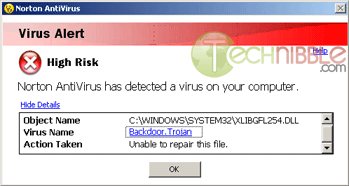
The reason why this trojan couldn’t be deleted is because the file is in use (meaning the trojan is active) and you cannot delete a file that is currently in use by Windows.
This is where Killbox shines, it can delete a file while your computer is rebooting so that it gets deleted outside of Windows.
To Begin, first download a copy of Killbox from our Killbox Download page here and run it.
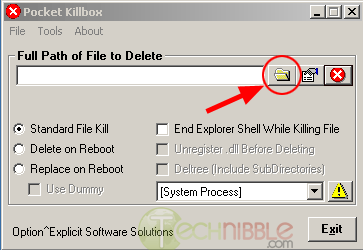
Once Killbox is open, click the folder button in the upper right.
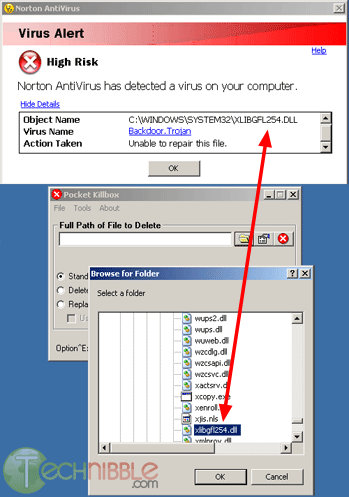
Find the file that your Antivirus said it couldnt delete and click OK. In our example Norton says that the nasty file is located at “C:\Windows\System32\xlibgfl.dll”.
Session expired
Please log in again. The login page will open in a new tab. After logging in you can close it and return to this page.
Norton is a terrible anti-virus.
Norton has above average rates, but is a system performance hog, and is often disabled or hijacked by popular viruses. Finally, Norton digs deep into the operating system at the kernel level and can often lead to OS corruption. (Most of this doesn’t apply to Symantec corporate edition)
AVG is good with system resources but it only has average detection rates. (there is a free version, though!)
I suggest NOD32. It is always an industry leader (#1 or #2) in detection rates, fighting only with Kaspersky. It uses far less resources than Kaspersky, however.
Yeah, I’m not overly fond of Norton either. AVG is my weapon of choice.
Ive used Kaspersky a bit and I like it but dont know enough about it to recommend it one way or the other. Ive heard rave reviews about NOD32.
I realize this article relates to the “KillBox” application. However I wanted to offer a more detailed explanation of how this program works and why it’s needed.
As stated, when an infected file can’t be deleted it is usually because the file itself is still in use on the system. This is because one of the most popular ways to get a virus to stay on ones machine is to place the file, or a link to the file, in a start-up location; allowing the file to run every time the machine goes through the start up process.
The alternate, more technical method if this nifty tool fails (as it sometimes may):
1. Write down the location of the infected file.
2. Power cycle the machine. (reboot)
3. Bypass the Windows start-up files by pressing F8 during boot sequence and entering “Safe Mode”
4. Locate the infected file on the hard drive and delete it.
For more information, search: “registry start up files” “msconfig” “start up group” or visit http://www.Doylestown-IT.com
In April of this year Microsoft wouldn’t allow me to use System Restore and when I tried to get onto the Web I received the Error message that they had encountered a problem and would have to close. At the same time on going to Internet options a Restrictions notice appeared telling me that’this operation has been cancelled due to restrictions in effect on this computer’ A PC technician cant find the problem and his response was to put my computer on wireless which makes it possible to get on the Web Microsoft say there is a problem but they cant find it. My question is this, before I download anything – Is there a possibility that Killbox can help to sort out this problem?
If you really can’t get rid of a virus, it’s usually a good idea to write the path down and boot to a live cd. From there it’s usually easy to delete the file.
This application looks more than handy though, and I’ll show it to some of the guys I work with tomorrow. We can probably put it to excellent use. (I work at a mom and pop computer store)